DynamoDB TTL: How Expiring Items Get Deleted
Time to Live (TTL) lets DynamoDB delete items automatically once a timestamp you store on them passes. You name one attribute holding a Unix-epoch expiry, and DynamoDB deletes expired items in the background, without a delete job of yours and without consuming write capacity.
Take an append-only audit log for a multi-tenant SaaS: one item per event under
the tenant's partition key (PK = TENANT#acme). Each tenant has a retention
policy: keep events for 90 days, 1 year, or 7 years for the compliance-heavy
ones. TTL enforces that without a delete sweep of your own.
How does DynamoDB TTL work?
You enable TTL on the table and name one attribute; DynamoDB deletes each item some time after the timestamp in that attribute passes.
- TTL is one attribute holding a Unix-epoch (seconds) timestamp. When that time passes, the item becomes eligible for deletion.
- Deletion is background and best-effort: typically within a few days of expiry, not the exact second.
- TTL deletes are free. They don't consume write capacity, though on a global table the replicated delete costs a write in every other replica Region.
- Expired-but-not-yet-deleted items still appear in reads, so filter on the expiry attribute if you need to hide them immediately.
The problem: expiring old data yourself is expensive
Without TTL, enforcing "drop events older than 90 days" means running your own
reaper: scan (or query) for old items on a schedule and DeleteItem each one.
That scan burns read capacity, the deletes burn write capacity, and you own the
schedule, the failures, and the retries.
For a high-volume audit log, that cost grows with every event you keep. TTL moves the job into DynamoDB, and the deletes are free.
How TTL works
You enable TTL on a table and tell it which attribute holds the expiry:
aws dynamodb update-time-to-live --table-name audit-log \
--time-to-live-specification "Enabled=true, AttributeName=expiresAt"The value must be a Number holding Unix epoch time in seconds. TTL ignores an item whose attribute isn't a Number, and one whose value is more than five years in the past (computing TTL).
DynamoDB "automatically deletes expired items within a few days of their expiration time, without consuming write throughput" (TTL docs). Until then an expired item is still readable, and still updatable: set its TTL attribute to a future time, or remove it, and it won't be deleted.
Put a condition such as attribute_exists(PK) on that update. Without one, an
update that lands after TTL has deleted the item creates it again, with only the
attributes the update sets.
A worked example: per-tenant retention
Each audit event carries an expiresAt attribute set when the event is written:
now + the tenant's retention window, in epoch seconds.
| PK | SK | action | expiresAt | note |
|---|---|---|---|---|
| TENANT#acme | EVENT#2026-03-26T…#a0 | login.success | 1782259200 | 90-day tenant: eligible now |
| TENANT#acme | EVENT#2026-06-24T…#a1 | invoice.export | 1790035200 | still inside window |
| TENANT#globex EVENT#2026-06-24T…#b9 | role.granted | 2003184000 | 7-year compliance tenant |
With TTL enabled on expiresAt, acme's 90-day event becomes eligible when the
clock passes 1782259200, and DynamoDB deletes it on its own, typically within a
few days.
The compliance tenant's events carry a far-future expiresAt, so they
survive: same table, same mechanism, different retention per item.
The write side is just adding one number when you create the event. You can
compose the SET expiresAt = :ttl clause and verify the typed :ttl value in the
DynamoDB Expression Builder.
To hide an expired-but-undeleted event from a read immediately, add
expiresAt > :now to the query's FilterExpression. A filter doesn't reduce read
cost (query vs scan).
Every audit event carries expiresAt. On a table where some items have none, use
attribute_not_exists(expiresAt) OR expiresAt > :now.
Archive expired items
To keep a copy of each event TTL deletes, read the deletes from a
stream. Enable it with OLD_IMAGE (or
NEW_AND_OLD_IMAGES) so the delete record carries the item, then attach a Lambda
whose filter matches only TTL deletes
(TTL and Streams):
aws lambda create-event-source-mapping --function-name archive-expired \
  --event-source-arn "$STREAM_ARN" --starting-position TRIM_HORIZON \
--filter-criteria '{"Filters":[{"Pattern":"{\"userIdentity\":{\"type\":[\"Service\"],\"principalId\":[\"dynamodb.amazonaws.com\"]}}"}]}'That filter is the one AWS's TTL and Streams page publishes, so keep it. But Lambda's DynamoDB filtering page says event source mappings "only support filtering on the dynamodb key".
The two pages disagree, so the filter can't be your only gate. The function must
check the marker itself, null-safe: a user write or delete has no userIdentity.
export const handler = async (event) => {
  for (const record of event.Records) {
    const id = record.userIdentity;
    if (id?.type !== 'Service' || id?.principalId !== 'dynamodb.amazonaws.com') {
      continue; // a user write or delete: not a TTL expiry
    }
    await archive(record.dynamodb.OldImage); // your S3 PutObject or Firehose PutRecord
  }
};You can't test this path on DynamoDB Local: its TTL delete records carry no
userIdentity, so the check skips them.
The record arrives after the item is gone, and the stream keeps it for 24 hours. A consumer that is down longer loses those items; the Streams guide covers the failure settings and the longer-retention path. On a global table, only the Region that ran the delete marks the record.
Do it in DynoTable
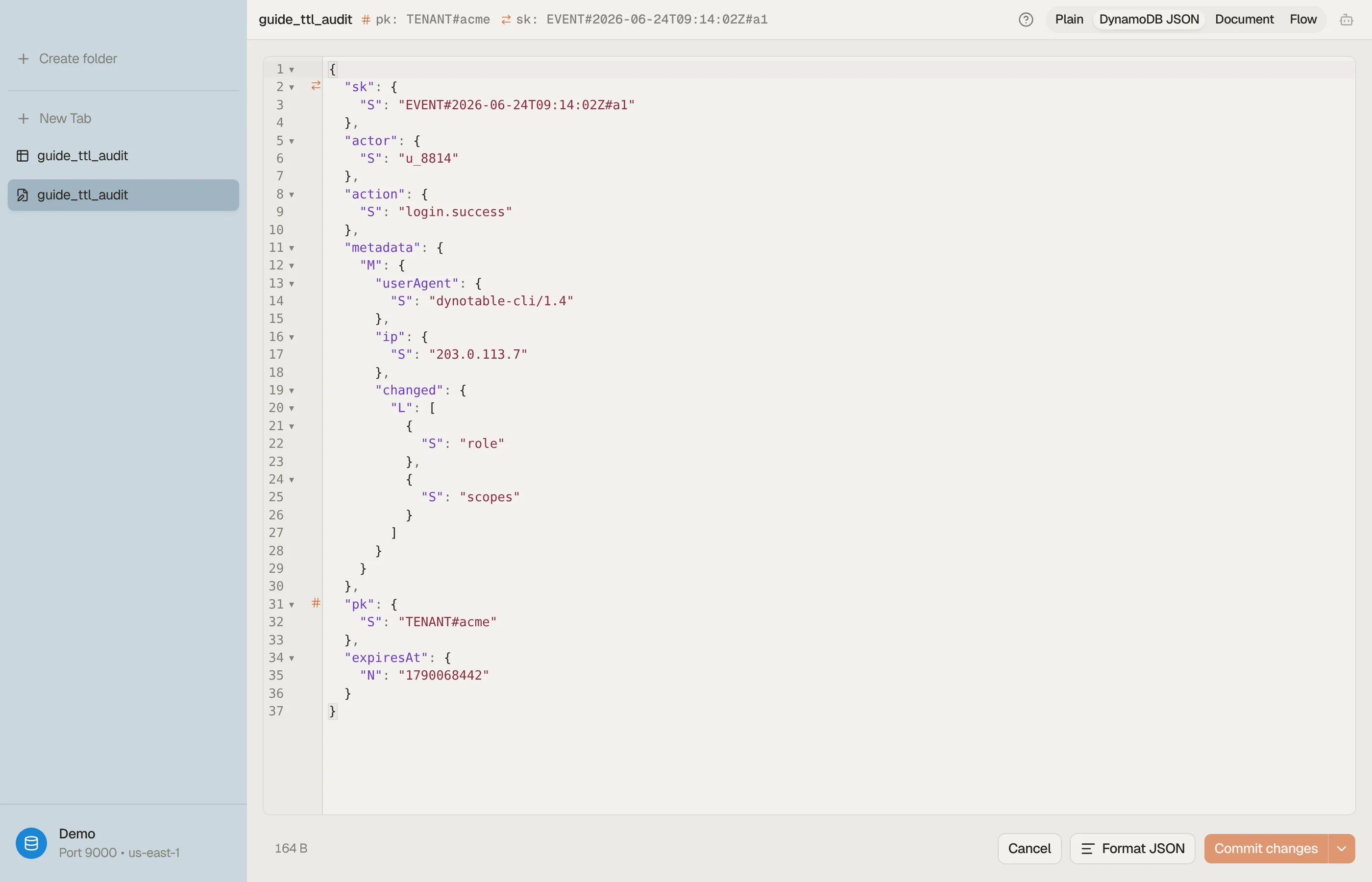
The classic TTL bug is a wrong expiresAt: stored in milliseconds instead of
seconds, or as an ISO string. Either way the item never expires. A millisecond
value reads as a date about 56,000 years out, and TTL ignores a String.
DynoTable shows each item's attributes with their DynamoDB types, so you can
confirm expiresAt is a Number in epoch seconds (not a String, not
milliseconds) before you trust TTL with real retention.


Pitfalls and next steps
- Epoch seconds, as a Number. A millisecond value pushes expiry ~56,000 years out; an ISO string is ignored entirely. Paste the value into the TTL converter: it detects seconds vs milliseconds and flags exactly this mistake.
- Repair items already written wrong. Fixing the writer doesn't touch stored
items.
ScanwithexpiresAt > :ms(:ms=100000000000, year 5138 as seconds) orattribute_type(expiresAt, :s)(:s="S") to find them, thenSET expiresAtto the right value in seconds on each. - Backfills can land too far back. A backfill that stamps old events with
createdAt + retentioncan produce values more than five years in the past, which TTL ignores. Delete those events directly instead. - Don't rely on the deletion timing. A few days can pass between expiry
and deletion. To hide expired items, filter on the attribute in reads. When a
deletion must happen on time and be provable, delete the items yourself with
DeleteItem(orBatchWriteItem) at the deadline, from a scheduled job that queries the expired range, and log it, with TTL as the backstop. Your stream handler skips these deletes as user writes, so if you also archive, the job writes each item it queried to the archive before deleting it. If TTL reaps an item between the job's read and its delete, both paths archive it, so key each archived object by the item's primary key (an S3 object per key overwrites the duplicate; a Firehose stream needs dedupe downstream). - TTL deletes still hit GSIs. Removing an item also removes it from
any secondary index it was in. If a count must track live items, keep it from
the stream (decrement on each
REMOVErecord, TTL deletes included) instead of counting the index.
TTL handles the end of an event's life cheaply. The next question is what you pay for the writes in the first place: On-Demand vs Provisioned capacity.
Download DynoTable to inspect your items' attribute types and confirm your TTL attribute is a Unix-epoch Number before you flip TTL on.