Sorting DynamoDB on a Changing Attribute
You model a sort key around an attribute so you can query items in its order — then the attribute changes. A ticket's status, an order's state, a task's priority. DynamoDB's rule: you cannot update a key attribute in place. A primary key is immutable for the life of the item. Change a value that's part of the key and you're not editing an item — you're moving it, which DynamoDB makes you do explicitly.
Can you change a DynamoDB sort key?
No. A sort key is part of the primary key, and DynamoDB key attributes are immutable — UpdateItem cannot edit a partition or sort key value, and there is no "move item" operation. To change it, delete the old item and put a new one, or keep the volatile value on a GSI sort key instead.
- Key attributes are immutable. You can't
UpdateItema partition or sort key value — DynamoDB has no "move item" operation. - To change a key value you delete the old item and put a new one — ideally in a transaction so it's atomic.
- Better: keep the volatile value off the base-table key and put it on a GSI sort key instead — GSI keys can change, because updating the base item just re-propagates the index entry.
- Choose sort keys that don't change (timestamps, immutable ids) whenever the access pattern allows.
The problem: a status you want to sort by, that keeps changing
Say you run a support desk and want to list a team's tickets ordered by status, so you put status in the sort key:
PK: TEAM#7 SK: STATUS#open#TICKET#8842Now the ticket moves to pending. You'd like to just UpdateItem the sort key to
STATUS#pending#TICKET#8842 — but DynamoDB rejects any write that changes a key
attribute. The key is the item's address; you can't edit the address in place. The
status you chose to sort by is exactly the thing that won't sit still.
Option 1: delete and recreate (atomically)
If the value must live in the base-table key, changing it means removing the old item and writing the new one:
1. DeleteItem  PK=TEAM#7  SK=STATUS#open#TICKET#8842
2. PutItem PK=TEAM#7 SK=STATUS#pending#TICKET#8842 (same attributes)Do it inside a TransactWriteItems so the delete and
the put either both succeed or both fail — otherwise a crash between them loses the
ticket or duplicates it. This works, but every status change is now two writes plus a
transaction; fine for occasional changes, costly for hot ones.
Option 2: keep the mutable value off the base key (preferred)
Make the base-table key something immutable (the ticket id) and put the volatile, sortable value on a GSI sort key.
Base:  PK: TICKET#8842   status: "open"   teamId: TEAM#7
GSI: GSI1PK: TEAM#7 GSI1SK: STATUS#open#TICKET#8842Now changing status is a plain UpdateItem on the base item's status attribute —
which DynamoDB allows, because status isn't a base-table key. DynamoDB then
re-propagates the GSI entry automatically to its new sorted position. One API call,
with atomicity handled for you — no transaction, no delete dance (under the hood DynamoDB
still deletes the old index entry and writes the new one, so an indexed change costs ~3
write units against the ~4 of a transactional delete-and-put).
The GSI is eventually consistent and costs extra storage/writes — but for a value that changes often, that's somewhat cheaper (~3 vs 4 write units) and much simpler than delete-and-recreate on every change.
Designing the keys in DynoTable
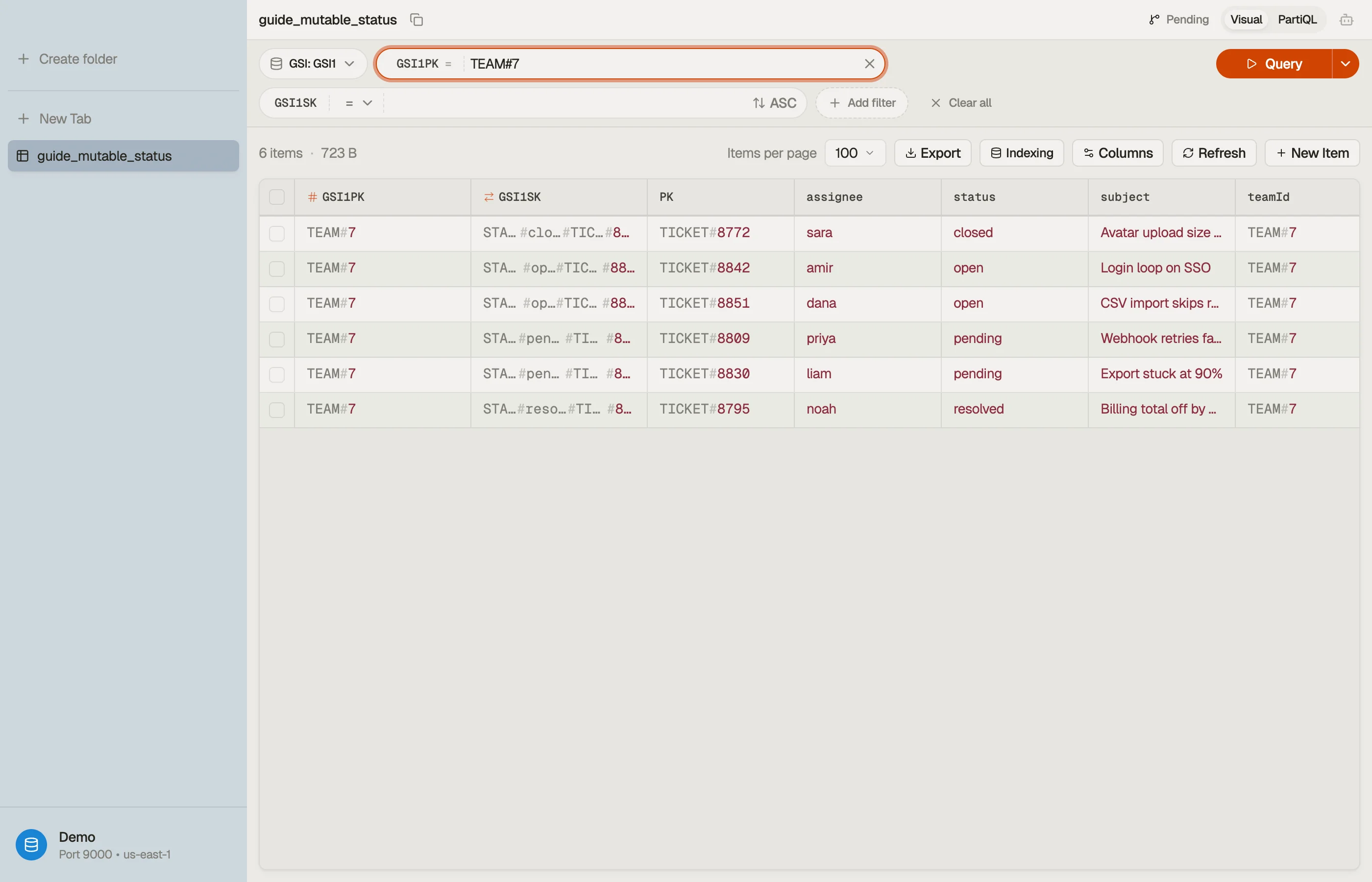
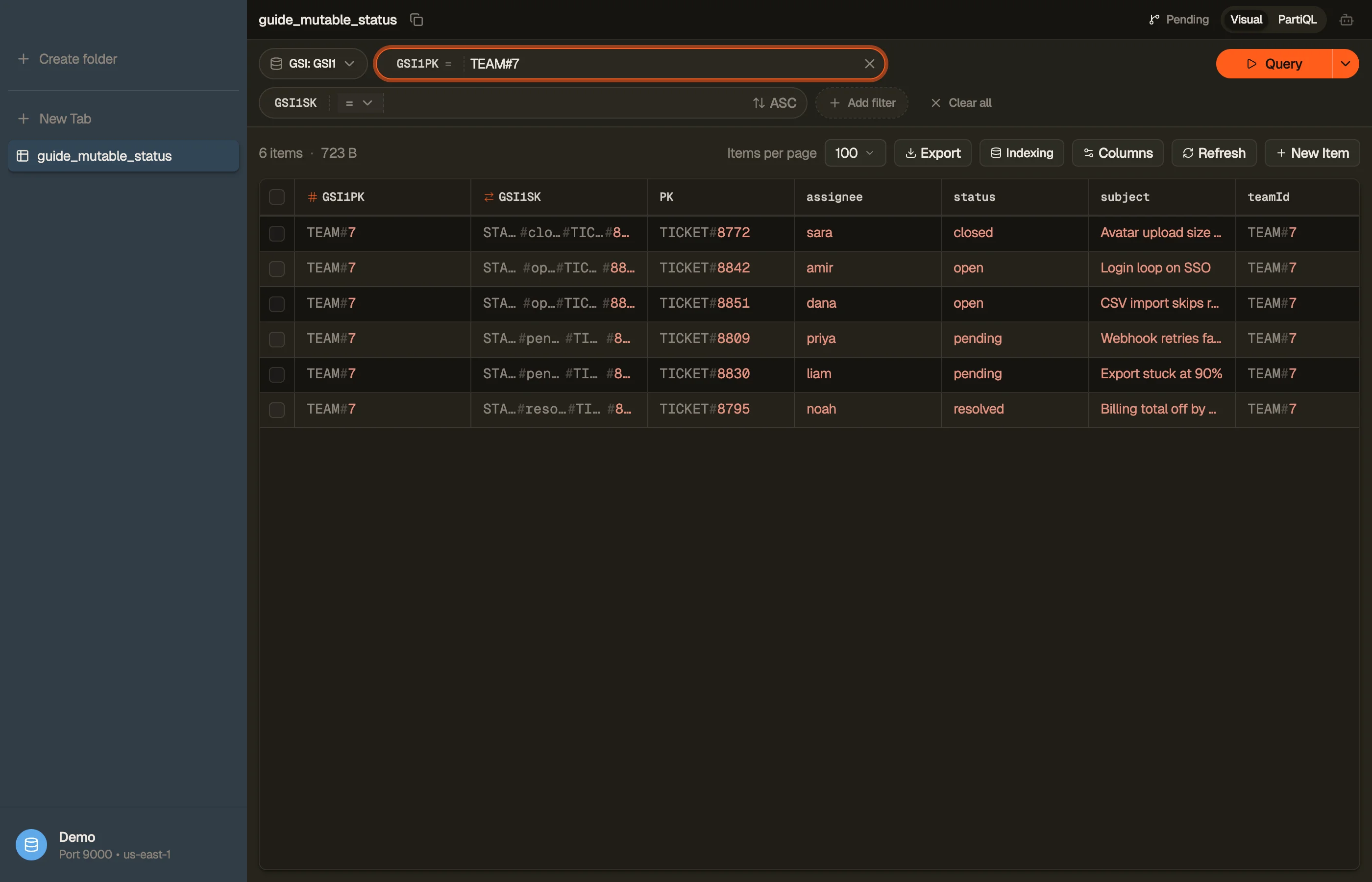
Build and preview the key conditions for both the base read and the GSI read in the DynamoDB expression builder.
In DynoTable, you then pick which index a query runs through and watch the volatile value sort on the GSI while the base item keeps its immutable key — both reads side by side on real data.


Pitfalls + next steps
- Never try to
UpdateItema key attribute — it's rejected; key values are fixed for the item's life. - If you must move it, do delete+put in a transaction — never as two unguarded writes.
- Prefer immutable base keys + a GSI for any attribute you sort by and mutate.
- Don't forget GSI eventual consistency — the re-sorted entry appears after a brief propagation delay.
- Related: sort-key strategies, GSI vs LSI, transactions.
Want to see how a mutable attribute sorts on a GSI versus the base table? Download DynoTable and explore your indexes directly.
Write cost: delete-and-put vs GSI update
Rough WCU comparison for a 1 KB ticket item in us-east-1 on-demand (actual
billing follows AWS rounding rules):
| Pattern | API calls | Typical WCU impact |
|---|---|---|
| Transactional delete + put on base key | TransactWriteItems (2 ops) | ~2× item size per op in transaction pricing |
Update status attribute; GSI re-propagates | One UpdateItem | Base write + GSI write (~2 WCU for 1 KB item + projected attrs) |
The GSI path avoids application-level orchestration and eliminates the window where a crash between delete and put loses the row. You trade eventual consistency on the index read for simpler writes.
Model your item size and update rate in the pricing calculator when status changes fire many times per minute.
Sparse GSI for status-sorted lists
If only open tickets need a status-sorted queue, use a
sparse index: write GSI1PK = TEAM#7 and
GSI1SK = STATUS#open#... only while status = open. When the ticket closes,
remove or omit the GSI key attributes on update — the item drops out of the
index without a delete-and-put on the base sort key.
That keeps the index small and avoids indexing closed tickets you never list.
Immutable base keys to prefer
| Volatile field | Base-table SK | Better base SK | Volatile field lives on |
|---|---|---|---|
| Order status | STATUS#shipped#ORD#99 | ORD#99 | GSI sort or attribute |
| Task priority | P#1#TASK#12 | TASK#12 | GSI sort |
| User display name | NAME#alice#USER#5 | USER#5 | Non-key attribute |
Timestamps and immutable ids (CREATED#2026-06-27T10:00:00Z, TICKET#8842)
make stable base sort keys when you need chronological order on the base table
itself.
Design the GSI before coding
Map access patterns in the
single-table design tool — enter "list
open tickets by team, priority order" and inspect the suggested GSI1PK /
GSI1SK templates. Then build the key condition in the
expression builder and emit a paginated
query with the query builder for integration
tests.
Read-your-writes after status change
After UpdateItem, a strongly consistent read on the base table shows the
new status immediately. A query on the GSI may lag briefly. UI flows that
redirect to a GSI-sorted queue should tolerate stale rows or re-fetch from the
base table by id when precision matters.