Global Secondary Indexes in DynamoDB (GSI)
You add a GSI for every access pattern that lacks a key, wake up to tripled write cost, and still read stale rows from the index because you assumed strong consistency. A global secondary index is a second table AWS maintains for you: same billing rules, eventual reads only, and an extra write on every base-table write that touches it.
At 100 writes per second of 1 KB items, at us-east-1 on-demand list price, writes
cost $164.25 a month with no indexes, $328.50 with one GSI, and $492.75 with two.
Each ALL-projection GSI you add re-buys your write throughput.
What this section teaches you to do
- Price GSI write amplification before you commit to a second or third index.
- Choose GSI vs LSI vs filter expression for a specific access pattern.
- Read from a GSI knowing results are eventually consistent at half the RCU rate.
- Design sparse and overloaded keys without breaching projection and quota limits.
Reading order
- GSI vs LSI: repartitioned reads vs same-hash alternate sort; creation-time rules and the 10 GB LSI collection cap.
- Index projections:
ALL,KEYS_ONLY,INCLUDE; storage, read and write trade-offs. - Sparse indexes: omit the index key on cold rows so only the hot subset is copied.
- Key overloading: generic
pk/sknames with typed values, sliced bybegins_with, on the table and on one GSI. - GSI eventually consistent: read-your-writes failures and UI patterns that need base-table reads.
- GSI throttles base table: under-provisioned or hot GSI partitions throttling base-table writes.
- Vector search: vector indexes,
SearchVectors, per-byte billing, and when S3 Vectors is cheaper.
What is a global secondary index?
A GSI is an index with its own partition key and optional sort key, chosen from
top-level String, Number, or Binary attributes. Since November 2025 each can
combine up to four attributes. The index key does not need to include the table's key.
DynamoDB maintains the copy for you. Put, update, or delete an item and every
affected GSI is updated asynchronously; you never write to an index directly.
You read it with Query or Scan against the index name.
| field | value | note |
|---|---|---|
| PK | "ACCOUNT#9313" | table partition key |
| SK | "TICKET#2026-08-01#K4" | table sort key |
| status | "CLOSED" | GSI partition key |
| opened | "2026-08-01" | GSI sort key |
Query the status-opened GSI for status = "OPEN" and you get every
open ticket across all accounts, sorted by date. The base table cannot
answer that without a Scan.
An item that lacks the index key attributes is absent from the index. That gap is what sparse indexes exploit to turn a small hot subset of a huge table into its own pre-filtered collection.
What does a GSI cost?
The write side dominates. A 1 KB item costs one write
capacity unit (writes round up per 1 KB), and with an ALL
projection every base-table write repeats into every GSI. Computed at list price
for three sustained write rates:
| Sustained writes | 0 GSIs | 1 GSI | 2 GSIs |
|---|---|---|---|
| 10 writes/s | $16.43/mo | $32.85/mo | $49.28/mo |
| 100 writes/s | $164.25/mo | $328.50/mo | $492.75/mo |
| 1,000 writes/s | $1,642.50/mo | $3,285.00/mo | $4,927.50/mo |
Items up to 1 KB, on-demand, us-east-1, at AWS's published $0.625 per million write request units (pricing synced 2026-07-29). 10 writes/s is 26.28 million WRUs over a 730-hour billing month.
Read the GSI columns as a floor, not an exact multiple. An index item carries the base table's keys, the index's own keys and about 100 bytes of overhead, so a base item close to the 1 KB line writes 2 WRUs into each index rather than 1, and the ×2 and ×3 grow from there.
An update that changes a GSI key value bills two index writes (delete the old entry, put the new one), so a volatile index key costs more than a steady one. An update that touches no attribute the index stores costs it nothing.
Storage repeats too. An ALL projection re-stores the table at $0.25/GB-month
in us-east-1 (same sync), plus 100 bytes of overhead per index item; 10 GB of
table is $2.50/month extra per GSI.
Shrinking the projection to KEYS_ONLY or INCLUDE shrinks
both bills; see index projections.
In provisioned mode the same amplification shows up as capacity, and an under-provisioned GSI throttles your base table's writes. Why a GSI throttles base-table writes walks through that failure.
To price your own workload, the pricing calculator runs on the same price table as the numbers above.
How a GSI bills reads
GSI reads are always eventually consistent, and eventual reads bill at half rate: 0.5 RCU per 4 KB.
A Query returning twenty 1 KB items sums to 20 KB, rounds to five 4 KB
units, and bills 2.5 RCUs. The same twenty items read strongly consistent from
the base table bill 5 RCUs.
The half price buys a lag. Changes propagate to a GSI "within a fraction of a
second, under normal conditions" (AWS's wording), and there is no
ConsistentRead option to wait it out.
If your code reads its own writes back through a GSI, read why a GSI is eventually consistent before that bites in production.
GSI vs LSI vs filter expression
| Your access pattern | Reach for | Why |
|---|---|---|
| Query by an attribute that isn't the table key | GSI | The only index that repartitions; can be added to a live table anytime |
| Second sort order in the same partition, strong reads | LSI | Shares table capacity and supports ConsistentRead; creation-time only, 10 GB collection cap |
| Query a small hot subset of a huge table | Sparse GSI | Only items carrying the index key are copied, so the index stays tiny and cheap |
Narrow a result set that is already one cheap Query | Filter expression | No copy to maintain, but you still pay to read every discarded item |
| A one-off question you will never ask again | No index | A Scan or an export costs once; an index costs every month |
The LSI cap is stricter than it sounds: 10 GB per partition-key value counts the base-table items plus every LSI entry with that key. At the cap DynamoDB can reject writes that would grow the collection; writes that shrink it still work.
Pass ReturnItemCollectionMetrics: "SIZE" on writes and alert well below 10 GB
(AWS suggests 8 GB), then trim or archive that collection. That cap, plus the
creation-time-only rule, is why a GSI is the default.
GSI vs LSI makes the full case.
Limits that shape index design
These apply to GSIs and LSIs; vector indexes have their own limits and are read
with SearchVectors (see vector search).
- 20 GSIs per table: a default quota, which you can ask AWS Support to raise.
- 5 LSIs per table: fixed, and only at
CreateTable; you can't add one later. - 100 projected attributes: the combined
INCLUDEattributes across all of a table's indexes;KEYS_ONLYandALLprojections don't count against it. QueryandScanonly:GetItemandBatchGetItemdon't work on a GSI or LSI.- No base-table fetch from a GSI: a GSI query returns projected attributes
only, and asking for any other attribute is an error. Project it, or take the
base keys every GSI entry carries and
BatchGetItemthe items (up to 100 per call). An LSI query can fetch unprojected attributes, at extra read cost. - Index keys are top-level scalars:
String,Number, orBinary; no sets, lists, maps, or nested attributes. To index a nested value such asaddress.city, write a top-level copy (address_city) in the same write. - Multi-attribute GSI keys: a GSI partition key and sort key can each combine up to four attributes; an LSI's sort key is exactly one attribute.
Adding a GSI to a live table
Unlike an LSI, a GSI can be added to a table that is already serving traffic.
UpdateTable accepts one index creation or deletion per call, and the table keeps
serving reads and writes throughout (its status passes through UPDATING).
DynamoDB builds the new index in two phases: it allocates the index's resources, then backfills every existing item that carries the index key attributes.
The backfill has three consequences:
- You can't query the index until it finishes. The index reports
CREATING(with aBackfillingflag once the copy starts) and aQueryagainst it is rejected until the status reachesACTIVE. - Backfill reads are free, and extra index capacity doesn't speed it up. DynamoDB reads the existing items with internal capacity, so the scan doesn't bill against the table. AWS says raising the index's write capacity doesn't shorten the build.
- Duration depends on the table. Table size, the number of items that
qualify, the projected attributes and write activity during the build set it:
minutes for small tables, hours for hundreds of gigabytes. Watch the
OnlineIndexPercentageProgressCloudWatch metric for progress.
The risk AWS names is a skewed new index key throttling your live writes during
the build. Add the index at low traffic and watch the table's WriteThrottleEvents;
you can delete an index that is still backfilling.
FAQ
Can you add a GSI to an existing DynamoDB table?
Yes. A GSI can be added to a live table at any time with UpdateTable, one
index per call, and the table keeps serving reads and writes while DynamoDB
backfills the index. Only LSIs are locked to table creation.
How long does a GSI take to backfill?
It depends on table size, the number of items that qualify for the index, the
projected attributes and write activity during the build, not on the index's
write capacity: minutes for small tables, hours for large ones. Watch
OnlineIndexPercentageProgress for progress; queries against the index are
rejected until its status is ACTIVE.
Can you change a GSI after it is created?
No. DynamoDB has no way to change an existing GSI's keys or projection: you
create a replacement index with the shape you want, wait for it to reach
ACTIVE, move readers over, and delete the old one. Throughput settings
(provisioned capacity, on-demand maximum, warm throughput) are the exception:
they can be updated in place.
Can you add an LSI to an existing table?
No. LSIs exist only if declared at CreateTable, and no tool can add one
later. For a second sort order on an existing table, add a GSI with the same
partition key. If you need strongly consistent reads on it, create a new table
with the LSI and copy the items across; Import from S3 can't create LSIs.
Open DynoTable
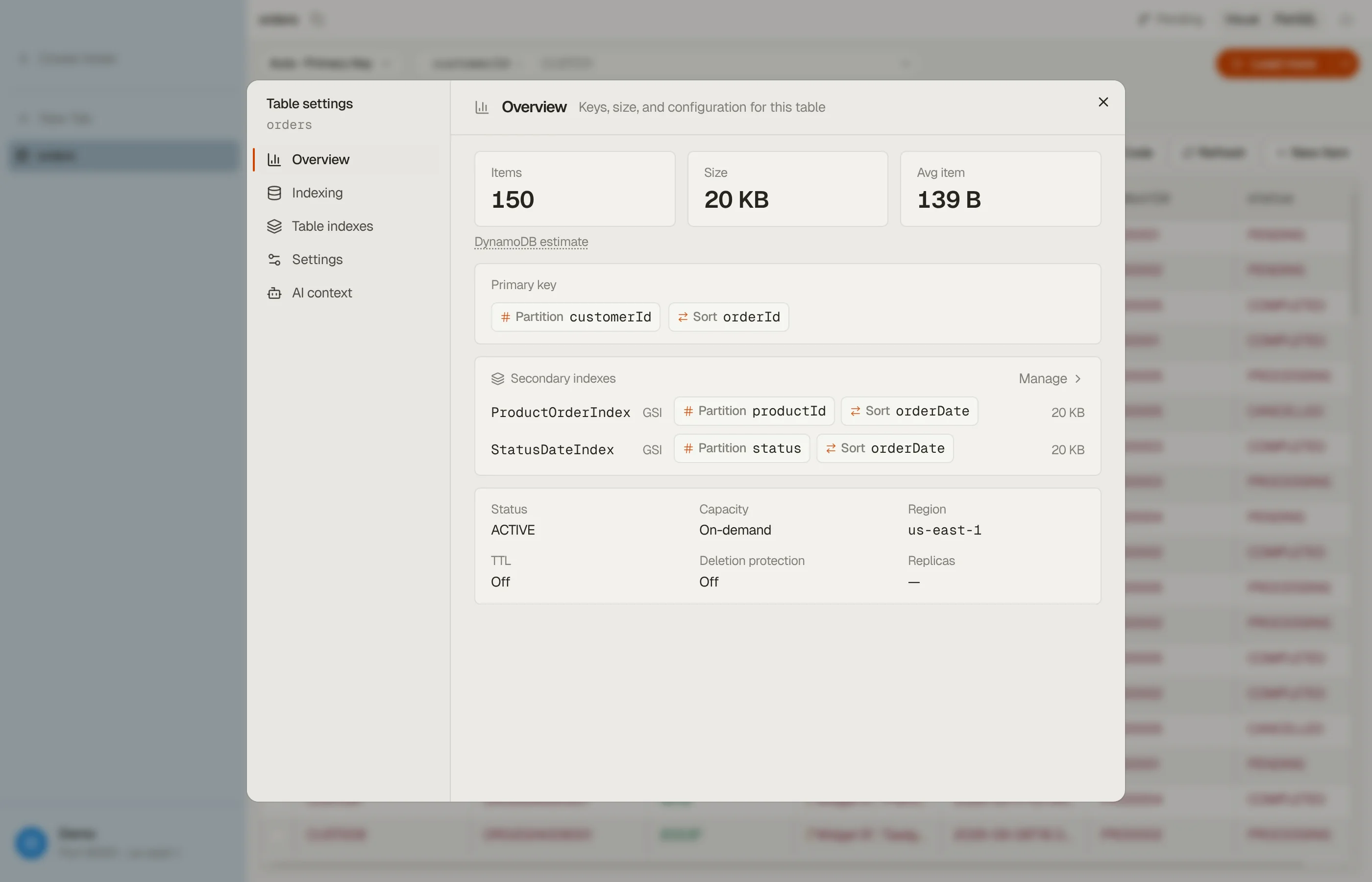
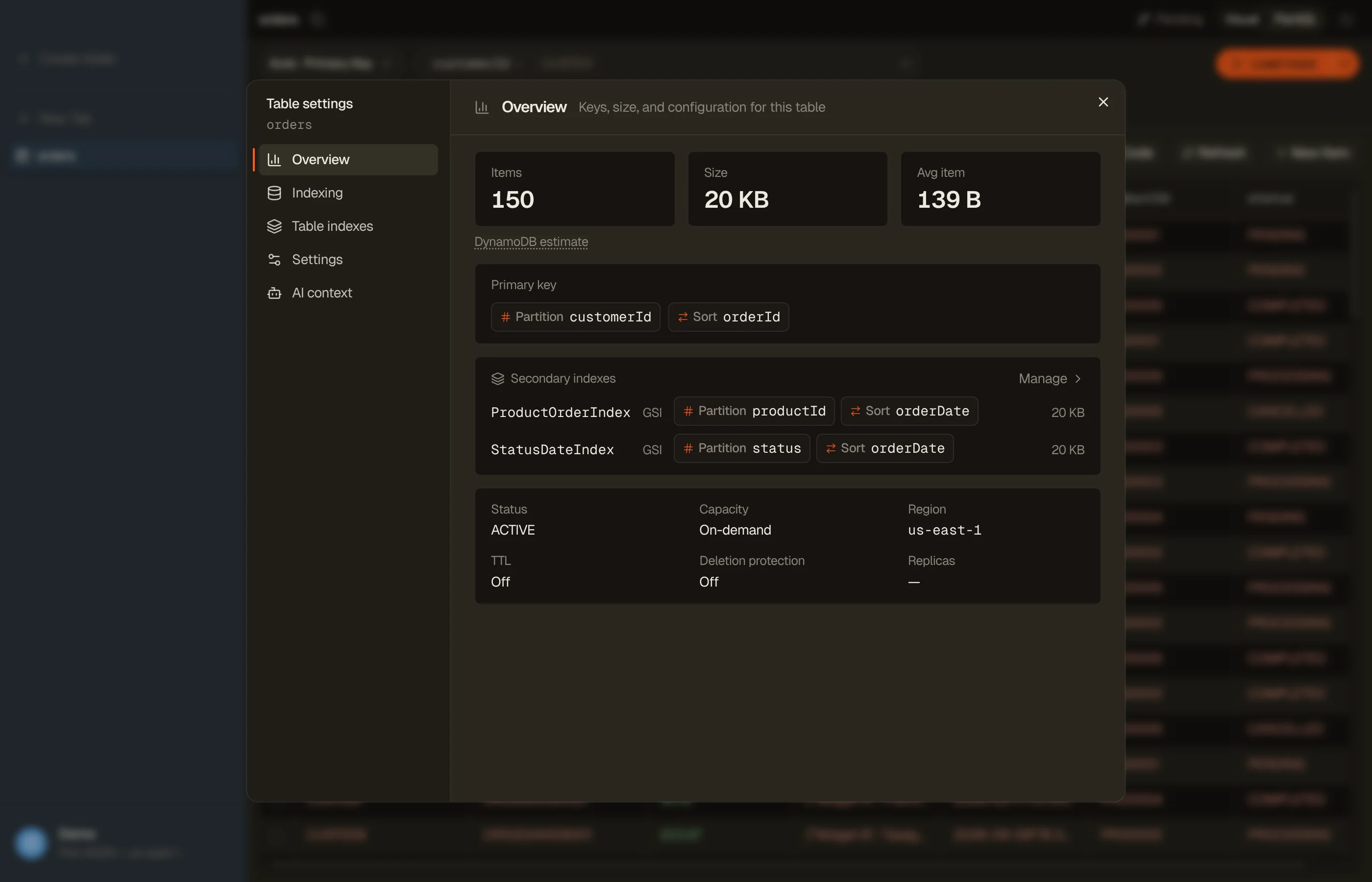
The Table settings dialog in DynoTable lists the table's key structure and every GSI and LSI
with its keys, so you can see which access patterns a table already serves
without running DescribeTable yourself.


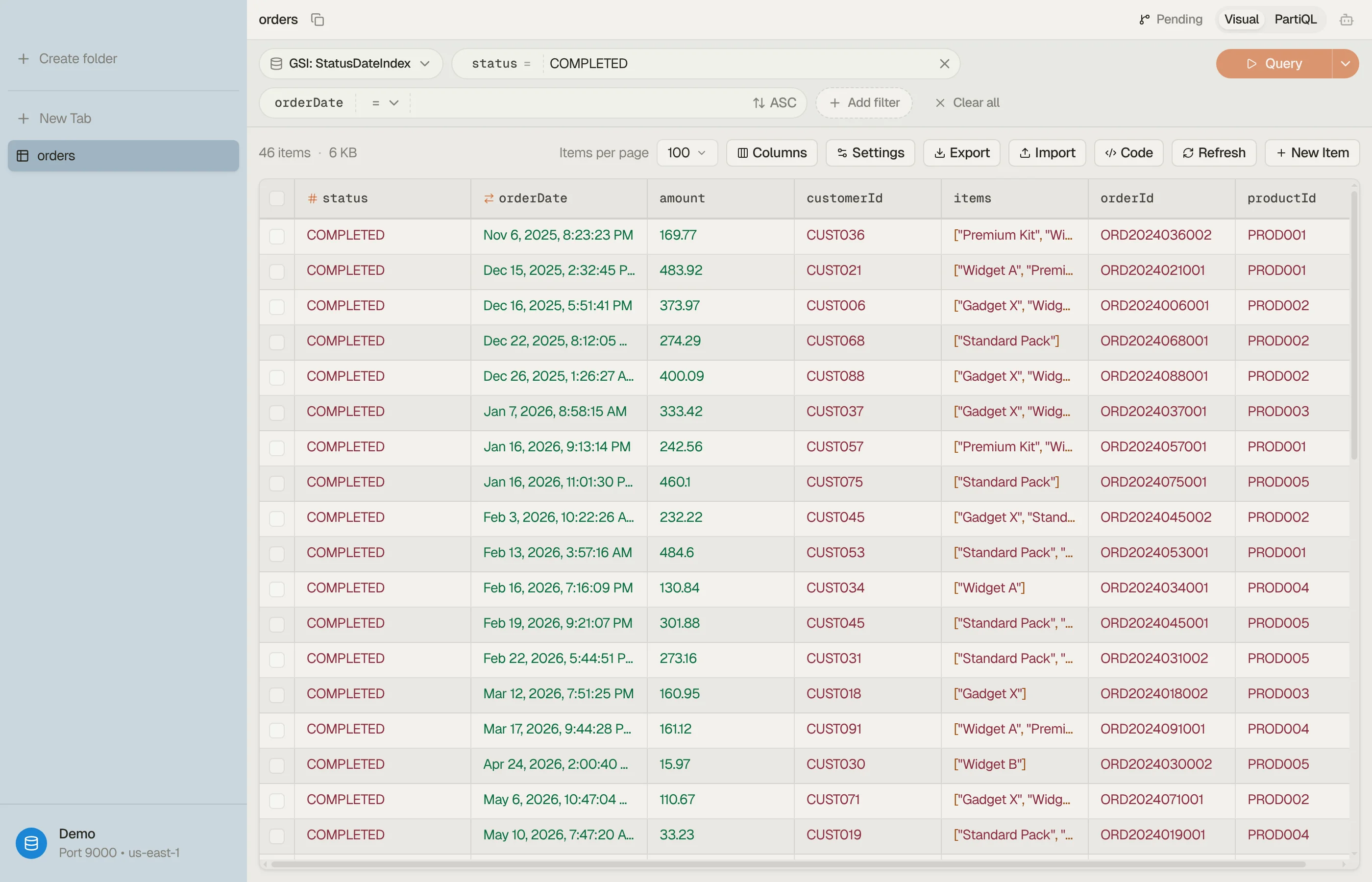
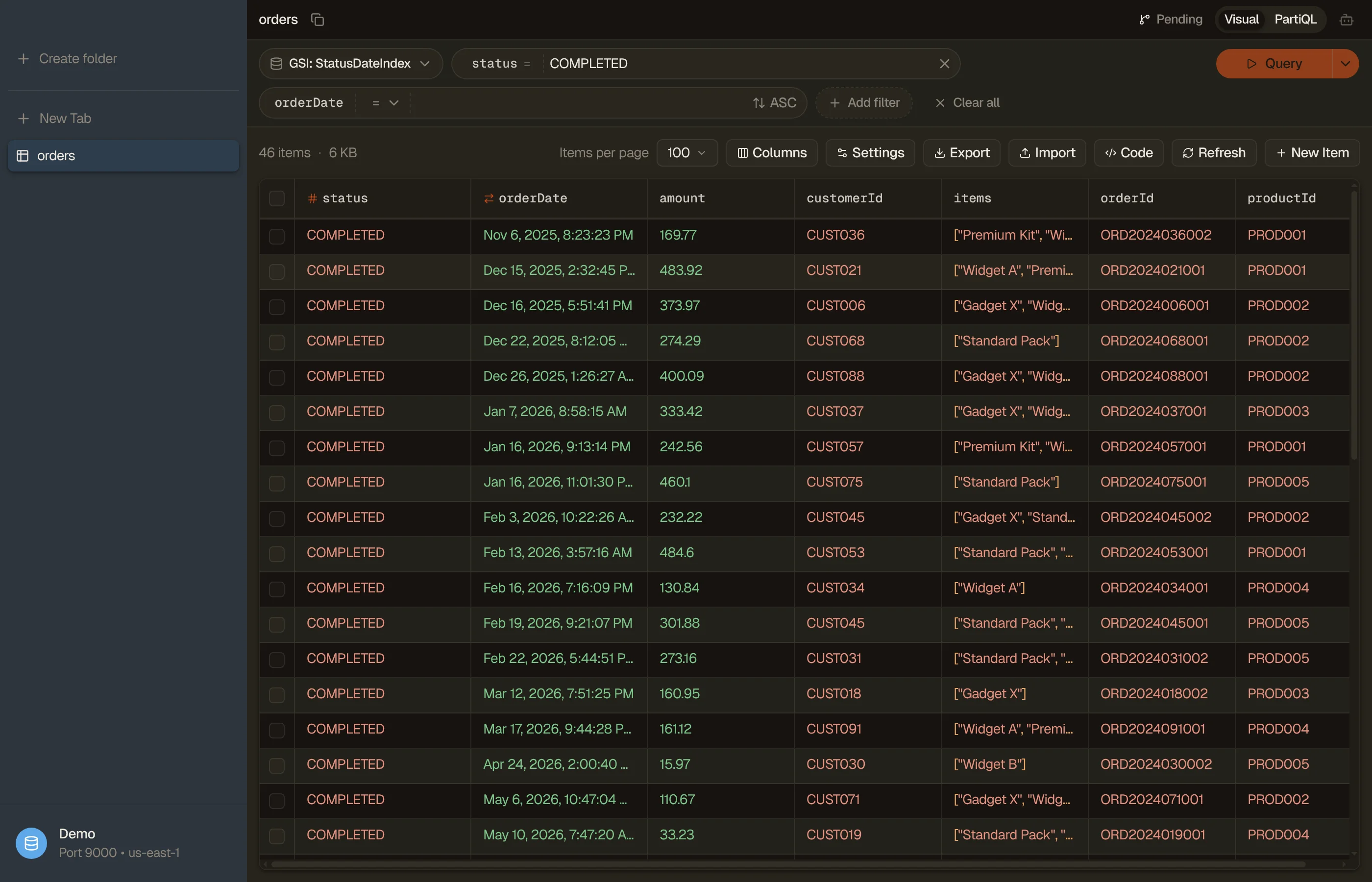
The visual filter builder has an index picker and derives Query vs Scan
for you as you add conditions, so an expensive fallback to a full Scan is
visible before you run anything.


The same dialog also creates and deletes GSIs: name the key schema, pick an
ALL / KEYS_ONLY / INCLUDE projection, set per-index throughput on
provisioned tables, and follow the CREATING/Backfilling status, which the
dialog re-polls until DynamoDB finishes building the index.
LSIs are listed read-only, because DynamoDB fixes them at table creation, and an existing GSI can be replaced but not edited. Table management is part of the paid plan, trial included.
Download DynoTable to inspect and query your indexes directly, and try the single-table design planner to turn a list of access patterns into a PK/SK/GSI layout before you commit to one.