DynamoDB Data Types: Every Type, with Examples
Every DynamoDB attribute is tagged with a short type code (S, N, BOOL, SS, …) in
the wire format. Knowing the set matters because the type drives both how a value is stored
and how it counts toward an item's size.
What data types does DynamoDB support?
DynamoDB supports ten data types in three categories. Scalars are String (S),
Number (N), Binary (B), Boolean (BOOL) and Null (NULL). Documents are
Map (M) and List (L), which nest other types.
Sets are String Set (SS), Number Set (NS) and Binary Set (BS): unordered,
homogeneous and non-empty. Only S, N and B can be a key.
| Code | Type | Category | JSON / JS equivalent | Example (DynamoDB-JSON) |
|---|---|---|---|---|
S | String | Scalar | string | {"S": "Ada"} |
N | Number | Scalar | number | {"N": "37"} |
B | Binary | Scalar | Uint8Array / base64 | {"B": "ZGF0YQ=="} |
BOOL | Boolean | Scalar | boolean | {"BOOL": true} |
NULL | Null | Scalar | null | {"NULL": true} |
M | Map | Document | object | {"M": {"k": {"S": "v"}}} |
L | List | Document | array | {"L": [{"N": "1"}]} |
SS | String set | Set | none in JSON; JS Set | {"SS": ["a", "b"]} |
NS | Number set | Set | none in JSON; JS Set | {"NS": ["1", "2"]} |
BS | Binary set | Set | none in JSON; JS Set | {"BS": ["ZA=="]} |
DynoTable's item editor toggles any item between plain JSON and DynamoDB JSON, so you can see each type tag described below on your own data (how).
Scalars hold one value each
S: string (UTF-8; sized by its byte length, not character count).N: number, sent as a string for precision; up to 38 digits.B: binary, sent base64-encoded.BOOL:true/false.NULL: an explicit null marker.
Maps and lists nest other types
M: map (object). Nested attributes each keep their own type tag.L: list. Elements may be mixed types.
{"profile": {"M": {"name": {"S": "Ada"}, "age": {"N": "37"}}}}Sets are typed, unique and never empty
SS(string set),NS(number set) andBS(binary set).
Sets are unordered, homogeneous, and can't be empty. Plain JSON has no set type,
so an array round-trips as a list (L), never an SS/NS; the
DynamoDB-JSON converter shows the difference.
In application code, ask for a set explicitly. The JS SDK v3 (marshall, or the
document client) turns a JavaScript Set into a DynamoDB set and an array into a
list; boto3 does the same with a Python set:
import {marshall} from '@aws-sdk/util-dynamodb';

marshall({tags: new Set(['a', 'b']), scores: new Set([1, 2]), history: ['a', 'b']});
// {tags: {SS: ['a', 'b']}, scores: {NS: ['1', '2']}, history: {L: [{S: 'a'}, {S: 'b'}]}}An array where you meant a set is a quiet bug: duplicates pile up, and an
ADD tags :newTags update fails with a ValidationException because the stored
attribute is an L.
Model "no tags" as a missing attribute, since {"SS": []} is rejected. An UpdateItem
with DELETE tags :t that removes the last element removes the attribute itself, so
treat a missing attribute as an empty set when you read.
Sets aren't keys. To look items up by set membership at scale, write one item per member (an adjacency item) and query those; otherwise filter on the set after the key condition.
Which types can be a key?
Partition and sort keys, on the table and on any index,
must be a scalar: S, N or B. You can't key on a boolean, set, map or list.
To key on several values, concatenate them into one S, a synthetic key such as
TENANT#acme#PROJECT#42 (composite sort keys).
On a GSI you can instead declare a multi-attribute key: up to four attributes each for the partition and sort key, with no concatenation (AWS docs).
Limits worth knowing
- An item maxes out at 400 KB, counting every attribute name plus value, including nested ones.
- Numbers carry up to 38 digits of precision (positive or negative).
- Maps and lists nest up to 32 levels deep.
- Sets are non-empty and homogeneous: no empty set, no mixing
SandN.
Why the type affects cost
Item size is the sum of attribute-name bytes plus value bytes, and each type sizes differently: numbers are compacted, booleans and nulls are 1 byte, maps and lists add per-element overhead.
Reads bill that size in 4 KB steps and writes in 1 KB steps (capacity modes). Measure a real item with the item-size calculator.
Size example with real units
Take a minimal user profile:
{
  "pk": {"S": "USER#42"},
  "email": {"S": "a@example.com"},
  "plan": {"S": "pro"},
  "score": {"N": "1280"}
}Paste the item into the
item-size calculator and it reports
42 bytes. That's well under one 4 KB read block, so a GetItem costs 0.5 RCU
eventually consistent or 1 RCU strongly consistent, and a write costs 1 WCU.
Add a 2 KB bio string and the item grows to 2,093 bytes. The read still fits one
4 KB block, but the write now rounds up to 3 KB: 3 WCU.
Nested maps charge per element: each child attribute name plus typed value adds
bytes. A deeply nested M inside M tree can push an item toward the
400 KB cap faster than flat attributes with
the same information.
Picking a type on purpose
The type you pick constrains keys, size and queries:
| You need… | Prefer | Avoid | Why |
|---|---|---|---|
| A primary or index key | S, N, or B | BOOL, M, L, sets | Keys must be scalar S/N/B |
| Exact decimal money | N as string | JSON number in app code | 38-digit precision on the wire |
| Unique tags on an item | SS | L of strings | Sets dedupe; lists allow duplicates |
| Ordered history | L or a sort key | SS | Sets are unordered |
| Nested profile blob | M | Flattened S JSON | Maps keep typed children |
| Binary thumbnail | B | Base64 in S | B is the native binary type |
Numbers ride as strings for a reason
DynamoDB stores N values with up to 38 digits and sends them as strings. A
JavaScript number is an IEEE-754 double, exact only up to Number.MAX_SAFE_INTEGER
(9,007,199,254,740,991).
Plain JSON is where digits get lost: JSON.parse turns 9007199254740993 into
9007199254740992 without a word. The JS SDK v3 is stricter on the way in: marshall
throws on a JS number past that limit.
On the way out it's mixed. Plain unmarshall returns a large integer as a BigInt
(9007199254740993n), throws on a large decimal such as 12345678901234567890.5, and
silently rounds a long decimal: 3.14159265358979323846 comes back as
3.141592653589793.
To keep every digit, read with unmarshall(item, {wrapNumbers: true}) (the document
client's unmarshallOptions.wrapNumbers). It returns every number, even 1, as a
NumberValue whose .value is the exact string, so convert before you do arithmetic or
compare with ===. Write large values as a BigInt or a NumberValue from
@aws-sdk/lib-dynamodb.
Expression placeholders carry numbers as tagged strings too:
{":n":{"N":"42"}} in ExpressionAttributeValues. The
expression builder emits those maps, so no
untagged literal ends up in a ConditionExpression.
Do it in DynoTable
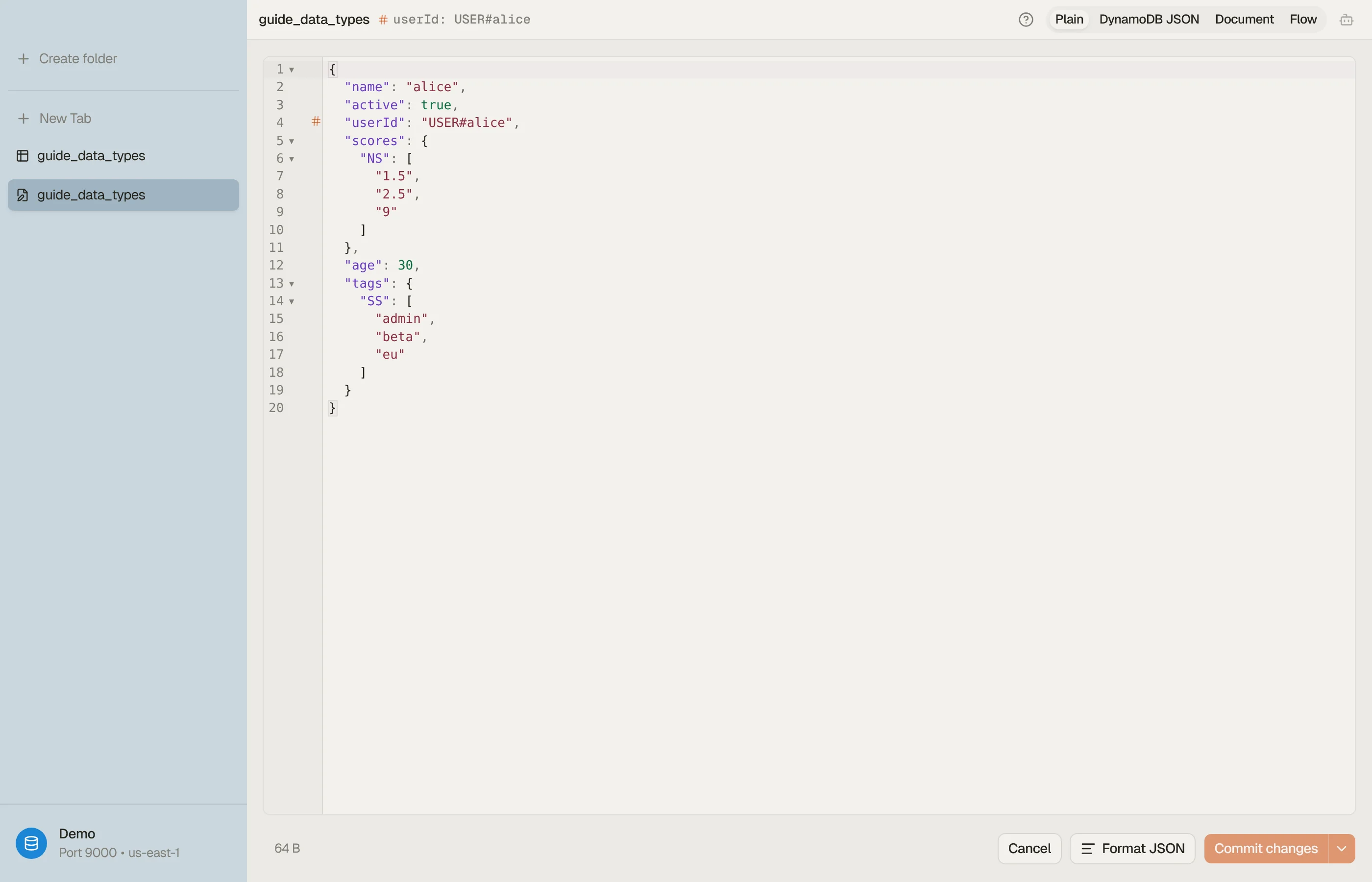
DynoTable's item editor makes the set-vs-list distinction explicit with a format toggle:
- Plain JSON: primitives stay plain (
"age": 30), but sets keep their type wrapper so they survive the round-trip:"tags": { "SS": ["a", "b"] },"scores": { "NS": ["1.5", "2.5"] }. Type a new set the same way. - DynamoDB JSON: the canonical AWS marshalled form, where every value
carries its type tag:
"age": { "N": "30" },"name": { "S": "alice" }.
Switching between them shows how each scalar, document and set type looks on the
wire. A list you meant as a set shows up as L in DynamoDB JSON: rewrite it as SS.
The footer shows the estimated item size as you edit.


To convert a marshalled blob without the app, the DynamoDB-JSON converter does the same round-trip in the browser.
Download DynoTable to edit items with typed controls instead of hand-writing attribute descriptors in the CLI.