The Best DynamoDB GUI Clients in 2026
Most teams pair AWS's free NoSQL Workbench, for designing tables, with one data-ops client for live tables, chosen by the job they do most. I build DynoTable, one of the ten clients compared here, and its section lists what it does not do.
What is the best DynamoDB GUI client?
Pick by the job you do most. For designing tables and GSIs before you write code, NoSQL Workbench is free and comes from AWS. For the widest paid feature set, with a visual query builder, code generation, CSV/JSON import and export, backups and stream tailing, Dynobase. For saved requests shared through Git and run in CI, Dynomate. For one free client across DynamoDB, Elasticsearch and MongoDB, DocKit; its AI agent and SSO sign-in need the paid Ultimate edition. For DynamoDB Local, dynamodb-admin. For JOINs, GROUP BY and aggregates over live tables, which PartiQL can't run, DynoTable, the client I build.
Every DynamoDB GUI compared
| Tool | Price | Platforms | Visual query builder | Live data ops | Modeling | JOIN / GROUP BY / aggregates |
|---|---|---|---|---|---|---|
| NoSQL Workbench | Free | macOS / Win / Linux | Operation builder | Limited | Strong | No |
| Dynobase | $9/mo billed annually, or $199 once | macOS / Win / Linux | Yes | Strong | Single-table designer | No (PartiQL only) |
| Dynomate | Free tier; $10–$29/mo billed annually | macOS / Win / Linux | Yes (filter builder) | Strong | No | Partial: DuckDB SQL over a local snapshot, Athena |
| DbVisualizer | Free (limited); Pro $199 first yr, $89 renewal | macOS / Win / Linux | Pro only (generates SQL) | Solid (Pro only) | No | No (PartiQL only) |
| DocKit | Free Community (Apache-2.0); Ultimate $99/yr or $9.9/mo | macOS / Win / Linux | Yes (13+ operators) | Strong | No | No (PartiQL only) |
| dynamodb-admin | Free (MIT) | Any (Node) | Scan/Query form | Basic (built for local) | No | No |
| DynamoIt | Free (GPL-3.0) | Any (JVM) | Auto Query/Scan | Basic | No | No |
| TablePlus | $99–$129 once (1 yr of updates) | macOS / Win / Linux | Filter only | Basic (beta, view/filter) | No | No |
| DataGrip | Paid; free for non-commercial use | macOS / Win / Linux | No | Basic (editor + PartiQL) | No | No (PartiQL only) |
| DynoTable (mine) | Free read-only; from $9/mo billed annually | macOS* / Win / Linux | Yes (index picker) | Strong | No | Yes (SQL Workbench) |
* DynoTable's macOS build is Apple Silicon only. Its free plan requires an account and is read-only; see pricing.
Live data ops ratings, highest first: Strong is a full daily client for live tables (browse, filter, query, edit, import or export), Solid browses, queries and edits with less around it, Limited works one operation at a time, and Basic browses, with simple edits at most.
Every value arrives type-tagged
A GetItem against a DynamoDB endpoint returns this:
{
  "Item": {
    "meta": {"M": {"tz": {"S": "CET"}}},
    "sk": {"S": "PROFILE"},
    "active": {"BOOL": true},
    "pk": {"S": "USER#42"},
    "plan": {"S": "pro"},
    "seats": {"N": "3"},
    "tags": {"SS": ["beta", "eu"]}
  }
}seats is {"N": "3"}, the digit three transported as a string and tagged as
a number. tags is SS, a string set, which is not a list and will not accept
duplicates. Translating that into a grid is the easy direction. Translating an
edited cell back is where clients differ: write "3" as S and you have
silently changed the type of an attribute your application filters on. The free
DynamoDB JSON converter does the same
conversion in both directions if you want to see the shape of it.
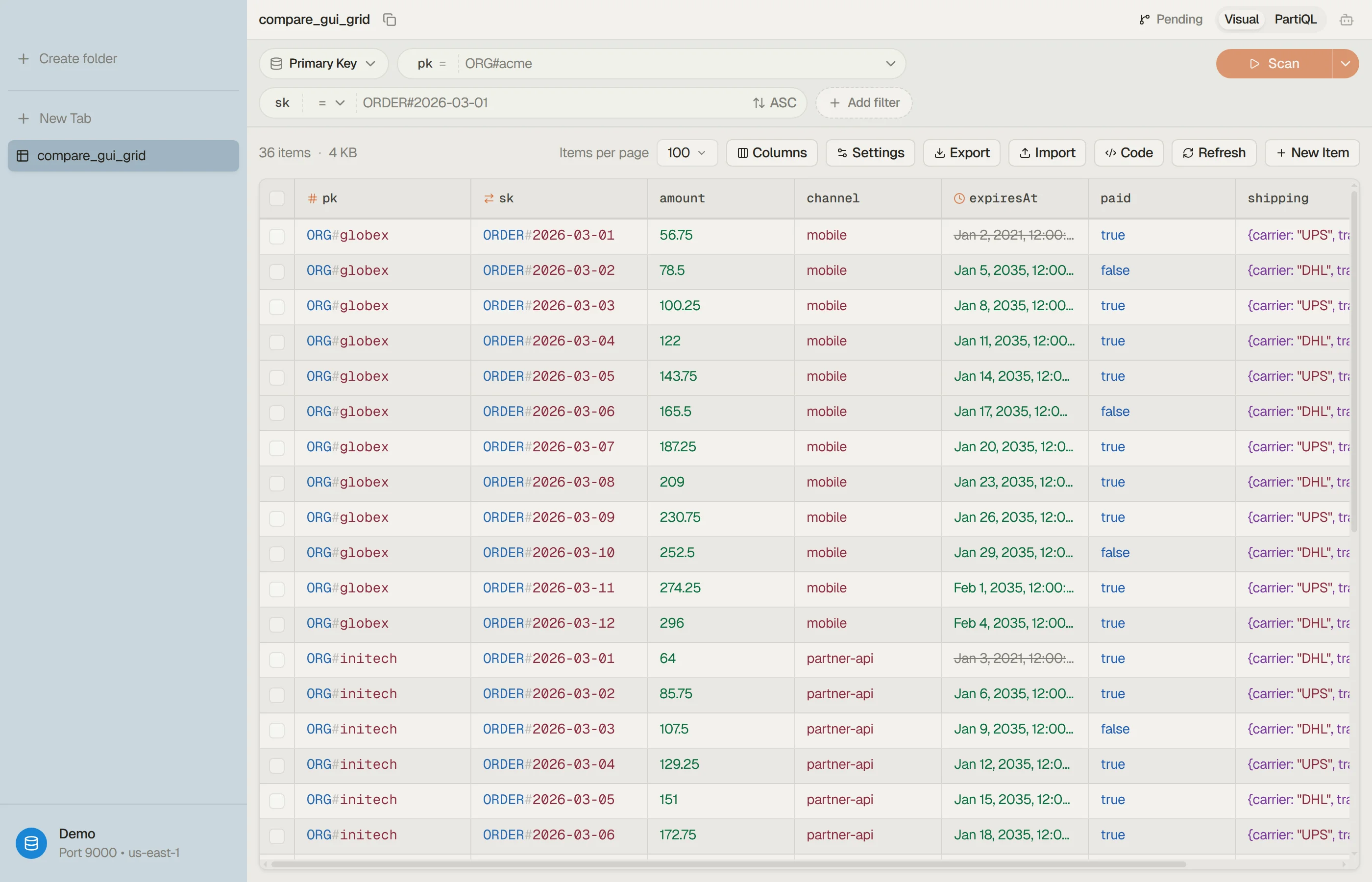
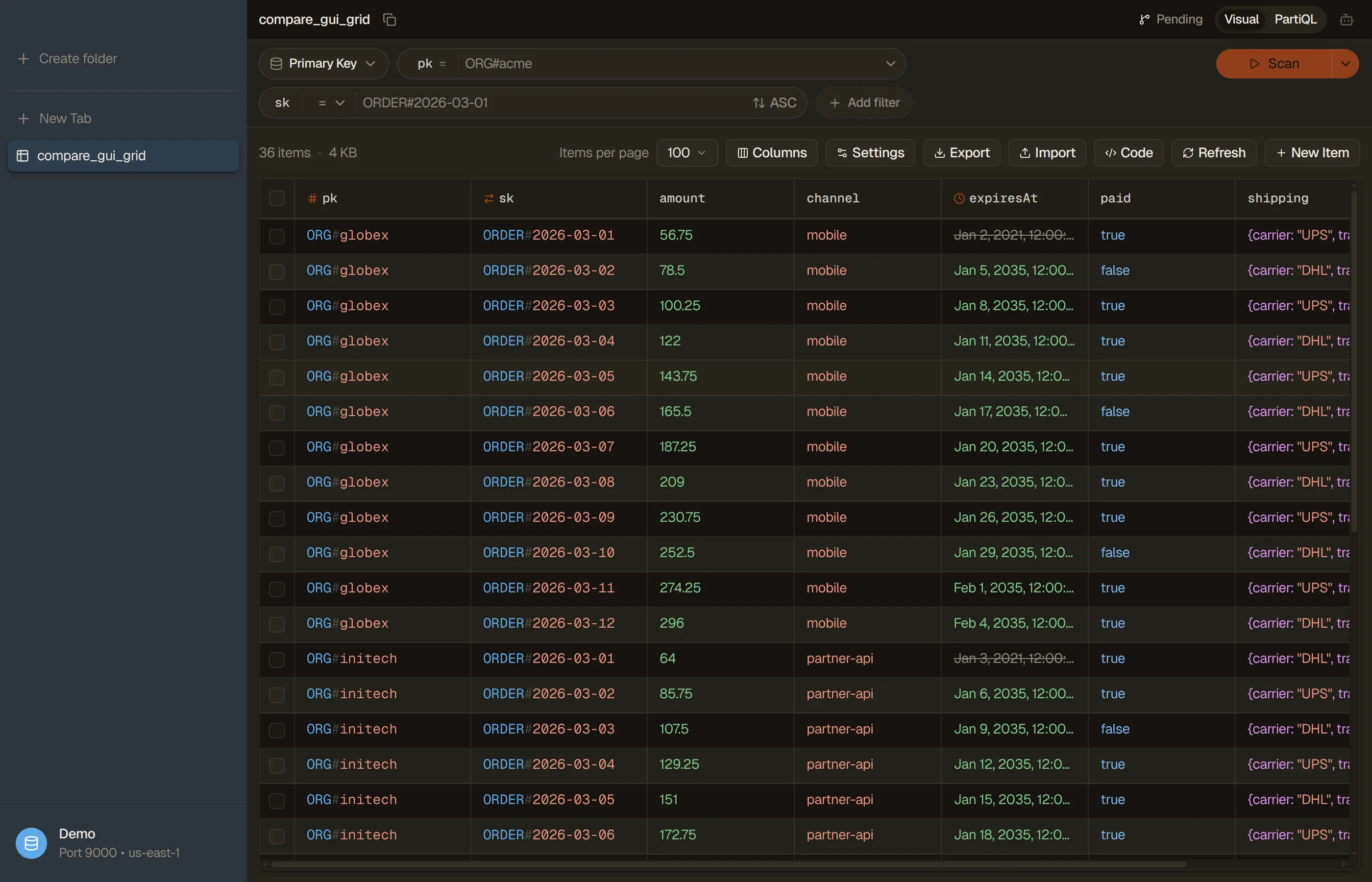
Note also that the attributes came back in an order nobody chose. The API returns an item as an unordered map, so a stable column order is something the client invents.


Keys are the only schema
Two items from that same table:
{"pk": {"S": "USER#42"}, "sk": {"S": "PROFILE"}, "plan": {"S": "pro"}, "seats": {"N": "3"}}
{"pk": {"S": "USER#43"}, "sk": {"S": "PROFILE"}, "legacyFlag": {"S": "yes"}}DescribeTable declares pk and sk and nothing else, because keys and index
keys are the only attributes DynamoDB tracks. Every other column a GUI shows
you was inferred from the items it happened to fetch. Scroll into an older
stretch of the table and columns you have never seen appear, which is normal
for DynamoDB and alarming the first time a grid does it to you.
Browsing is a pagination loop
"Show me the table" is not an API call. Scan returns at most 1 MB per request
plus a LastEvaluatedKey when there is more, and per the
Scan reference
the absence of that key is the only signal that you have reached the end.
Filters are applied after the 1 MB is read, so a filtered page can arrive empty
and still not be the last one. Every "load more" in every DynamoDB GUI is that
loop, and a client that stops at the first empty page will tell you a table is
empty when it isn't.
How to judge a DynamoDB GUI client in 2026
Every client inherits the three API facts above. Five questions separate the field.
Is it maintained? The signal that counts is a dated release, and seven of the nine other clients here published one in 2026. AWS's NoSQL Workbench shipped 3.20.2 in April and a 3.20.3 build in July. Dynomate shipped 2.1.0 on October 6, DocKit v1.4.5 on September 6, and dynamodb-admin v5.3.4 on June 10 (npm's latest is 5.3.3). The generalists are current too: DbVisualizer 26.2.4 (October 8), DataGrip 2026.2.6 (September 29) and TablePlus 27.0.2 (October 8). DynamoIt was tagged 2.0.0 in January 2026; I could not confirm a published release, and its last published one is 1.2.1 from October 2024. Dynobase publishes no dated release history, but its current 3.0 searches DynamoDB vector indexes, which AWS launched on August 5, 2026, so it shipped after that date. Ask about release plans before a lifetime purchase. DynoTable's releases are dated on its changelog; the latest is v1.16.2, from October 7, 2026.
What does the money buy? Four clients cost nothing: DocKit's Community edition, dynamodb-admin and DynamoIt are open source, and NoSQL Workbench is AWS's free official tool. Dynomate has a free Community tier, DbVisualizer a Free edition without its query builder or data viewer and editor, and DataGrip is free for non-commercial use. Paid plans start at $9/month billed annually for Dynobase (or $199 once), $99/year (or $9.9/month) for DocKit Ultimate, $10/month billed annually for Dynomate and $9/month billed annually for DynoTable, whose subscription adds the SQL Workbench, Smart Tables, writes and the AI agent to its free read-only plan.
Does it fit production AWS workflow? For daily work against live AWS accounts the rubric is AWS SSO, named profiles, multiple tabs, and query history. Dynomate (from its $18 Professional tier) and DynoTable sign in through AWS IAM Identity Center inside the app. DocKit Community connects with static access keys and puts AWS profiles and SSO in Ultimate. DynamoIt reads your AWS CLI profiles, while dynamodb-admin runs one credential set and one region per process. Dynomate keeps profiles, regions and tables in tabs; each DynoTable profile pins its region, and ⌘P switches profiles. DocKit Community keeps query history and saved queries, and Dynomate saves requests into collections.
Does it respect the API facts? Three checks, one per section above: an
edited cell must keep its type tag (N stays N, SS stays a set); the
client must tell you whether a filter became a Query or a full Scan, which
cost very different amounts; and "load more" must follow LastEvaluatedKey to
the end instead of stopping at the first empty page. On the second, DynamoIt
and Dynobase pick Query or Scan for you, Dynomate offers Query and Scan
modes with an index picker, and DynoTable's filter builder shows which one a
filter became as you type. Test the first and third yourself in a trial: edit
a number and a string set, re-read the item, then page a filtered Scan to its
end.
Where do your data and credentials go? DocKit, dynamodb-admin and DynamoIt are open source, so you can read the answer in their code. NoSQL Workbench, Dynobase, Dynomate, DbVisualizer, TablePlus, DataGrip and DynoTable are closed-source, and with them you take the vendor's documentation on trust. For AI, the sharper question is where inference runs. DocKit's assistant (Ultimate) is bring-your-own-key, so inference stays on your machine only with a local model. DynoTable reads and writes straight from the app to your AWS account, keeps your credentials on your machine, and runs AI inference on Amazon Bedrock in your own AWS account; no DynoTable server sees your prompts or rows.
One stack note: DocKit is built on Tauri, DynamoIt on JavaFX, and DynoTable on Electron. The framework tells you little on its own. What you can check in a trial is whether the grid stays responsive while it streams a large table, and whether the app drives fully from the keyboard.
AWS NoSQL Workbench
Free · macOS / Windows / Linux · modeling-first
NoSQL Workbench is AWS's own "cross-platform, client-side GUI application" and it costs nothing. Its data modeler designs tables and GSIs from scratch or from an imported model, lets you "visualize your access patterns as real DynamoDB operations" against sample data, then commits the model to DynamoDB Local or an AWS account.
The operation builder is the live half: "view, explore, and query live datasets", with projection and condition expression support, sample-code generation in multiple languages, and table cloning between accounts, regions, and DynamoDB Local. The download includes DynamoDB Local, so offline modeling works out of the box.
It's the best free way to design a table. Treat it as a development and modeling tool; browsing or editing live data all day in it is slow going. Reach for it when you're modeling your single-table design, not when you're debugging a row at 2am. The NoSQL Workbench alternative page covers the day-to-day gap.
Verdict: the free modeling tool every DynamoDB team should have installed; pair it with a data-ops client.
Dynobase
$9/mo billed annually ($108) or $199 one-time · 7-day trial · macOS / Windows / Linux
Dynobase is the established paid desktop client and the broadest commercial one. Its pricing page lists a Solo plan at $9/month billed annually ($108), a one-time $199 lifetime license (struck from $249), and a Team plan at $79/month billed annually, all behind a 7-day trial with no credit card.
It covers fast exploration, inline editing, a visual query builder (its headline feature, and the axis every rival gets measured on), import/export in CSV or JSON, code generation for JS/TS, Rust, Go, and Python, and local DynamoDB including Docker distributions. It switches between named profiles and regions, signs in with AWS SSO identities, and keeps bookmarks and query history. 3.0 updated its single-table designer, which imports and exports NoSQL Workbench models, and added table operations: on-demand backups, CloudWatch metrics, stream tailing, replica management, bulk edit with item history, copying items between tables, and CDK, CloudFormation or Terraform for a table. It also added an MCP server so an outside tool such as Claude Code can read your tables, with item writes off until you allow them.
It is also the only tool in this field besides mine with a DynamoDB vector-search surface. Dynobase 3.0 can "Search an existing DynamoDB vector index with text, a pasted embedding, or an item in your table", by text through Bedrock Titan or by Find similar. Its own page sets the limit: "Dynobase does not create vector indexes or backfill embeddings." Something else has to build the index and keep the vectors current.
Two things to weigh. It's closed-source, and its SQL surface is AWS PartiQL pass-through, so it inherits PartiQL's limits, as Dynobase says itself: "Dynobase does not turn DynamoDB into a relational database or add joins". And it has no AI agent of its own; its AI feature generates code snippets.
Verdict: the safe, broad commercial pick if the license cost is fine. The Dynobase alternative page covers where DynoTable differs, chiefly the SQL Workbench and EUR/EU-tax billing.
Dynomate
Free tier + $10–$29/mo billed annually · 14-day trial · macOS / Windows / Linux
Dynomate grew popular as a Dynobase alternative, and its distinctive feature is a request-collection workflow: save queries, chain one request's results into the next with environment variables, organize them in folders, and share the collections through Git. Version 2.0 (September 24, 2026) turned each request into a DNML file, a TOML format that a command-line tool (0.1.0 since 2.1) runs as well, so the same request works in CI. Requests can now use 23 DynamoDB and Athena operation types, including table create, delete, truncate and TTL, and 2.1 (October 6, 2026) added Amazon Aurora DSQL. Request collections sit in the $18 Professional tier and are still marked Beta. It also does AWS SSO and MFA sign-in inside the app, multi-profile and multi-region tabs, DynamoDB Local, and CSV/JSON export.
Its pricing changed in 2026. In June it sold a $199 one-time license; the pricing page now lists a free Community tier and subscriptions at $10, $18, and $29 per month billed annually, with a 14-day trial and a 30-day money-back guarantee.
Its DynamoDB SQL runs DuckDB over a local Parquet snapshot that a full-table Scan builds, so results reflect the table at export time; it can also query Amazon Athena. It ships no AI assistant, agent or MCP server. For Git-friendly, reviewable query collections it's a strong pick; the Dynomate alternative page covers where DynoTable differs.
Verdict: the pick if a shared, versioned library of saved requests that also runs in CI is the feature you're shopping for.
DbVisualizer
Free edition (limited) · Pro $199/user first year, $89 renewal · 21-day trial · macOS / Windows / Linux
DbVisualizer is the veteran multi-database SQL client. For DynamoDB it browses tables, partition and sort keys, and local and global indexes, and runs PartiQL through its SQL Commander. In Pro it also edits items, including maps and sets with mixed content, and adds a visual query builder that generates the statements for you.
Pricing splits into a Free edition, whose feature table leaves the query builder and the table data viewer/editor to Pro, and Pro at $199 per user for the first year ($89 renewal), with a 21-day trial and no credit card. If your week spans Postgres, MySQL, and DynamoDB, one tool for all of them is a fair trade.
The trade-off is the same one every generalist makes: DynamoDB is one of dozens of supported databases, the querying is single-table PartiQL, and there's no DynamoDB-native modeling or cost awareness.
Verdict: worth a look if DynamoDB is a side database in a relational-heavy week, not your main store.
DocKit
Free Community edition (Apache-2.0) · Ultimate $99/yr or $9.9/mo · multi-datastore · macOS / Windows / Linux
DocKit is a free, open-source desktop client built on Tauri (Rust), and it spans five datastores: Elasticsearch, OpenSearch, DynamoDB, MongoDB, and EasySearch. For DynamoDB it has a query builder with primary-key filtering and 13+ operators, plus a PartiQL editor with autocomplete and inline item CRUD.
DocKit is open-core. The free Community edition (Apache-2.0) connects to AWS with static access keys; Ultimate, at $99/yr or $9.9/month, adds the AI agent, an MCP server and AWS profile/SSO sign-in. The "Agentic Data Studio" agent is bring-your-own-key across OpenAI, Anthropic, DeepSeek, Requesty, Ollama and LM Studio. With Ollama or LM Studio inference stays on your machine; with a cloud provider your prompts and results go to that provider.
Its breadth is also its trade-off. DocKit is a generalist across five stores rather than a DynamoDB-native client, and its DynamoDB querying is single-table PartiQL, with no modeling.
GEEKFUN's "Best DynamoDB GUI Clients in 2026" is published by DocKit's own maker, and it picks DocKit. It is a vendor page, as this one is.
Verdict: the best free option if your stack is broader than DynamoDB and price matters.
dynamodb-admin and DynamoIt
Free / open-source · lightweight
dynamodb-admin is a small MIT-licensed web GUI for DynamoDB Local, dynalite, and LocalStack. Install it globally and point it at your local endpoint:
pnpm add -g dynamodb-admin dynamodb-admin --dynamo-endpoint=http://localhost:8000By default it sets dummy credentials (
key/secret, regionus-east-1) so it connects straight to a local endpoint, which makes it the standard answer for "I just need to see what's in my local table." For a deeper walkthrough of endpoints and dummy creds, see connecting to DynamoDB Local; for how it stacks up as a daily tool, see the dynamodb-admin alternative page.DynamoIt is a free, GPL-3.0 JavaFX desktop viewer that reads your AWS CLI profiles, so it works against live AWS accounts, for quick browse/edit work with no login step. It auto-picks scan vs query, paginates, and supports local DynamoDB; its README asks for at least Java 17 and Maven to build and run it, though the current source targets Java 21.
Verdict: both are great for local and light use and cost nothing; neither aims to be a production workbench.
TablePlus and DataGrip
Generalist SQL clients with partial DynamoDB support
These are excellent relational clients whose DynamoDB support is bolted on rather than native.
- TablePlus added a DynamoDB driver in September 2025 (changelog, 6.7.0) that its docs don't yet cover. You can view tables and filter items with its visual filter builder; it documents no PartiQL/SQL query editor for DynamoDB, and DynamoDB has no page in TablePlus's official docs. It is a perpetual license ($99 for one device, $129 for two, each with a year of updates) and ships for macOS, Windows and Linux.
- DataGrip added DynamoDB in version 2023.3: "tables with keys and indexes are now introspected", PartiQL runs in the code editor, and items open in the Data editor and viewer, where grid edits still have open bugs. It is free for non-commercial use and paid otherwise. Useful if you already live in a JetBrains IDE, though its DynamoDB surface stops at a data editor plus PartiQL.
Both now ship an MCP server and bring-your-own-key AI agents (DataGrip 2026.1; TablePlus 7.1.8, June 2026), and neither documents what they do on a DynamoDB connection.
Verdict: fine as an occasional client if you already pay for them; a purpose-built client fits the data model better when DynamoDB is a primary database. See the DataGrip comparison and the TablePlus comparison.
DynoTable
Free read-only plan · $9/mo billed annually ($108/yr) or $12 month-to-month · 30-day trial, no card · macOS (Apple Silicon) / Windows / Linux
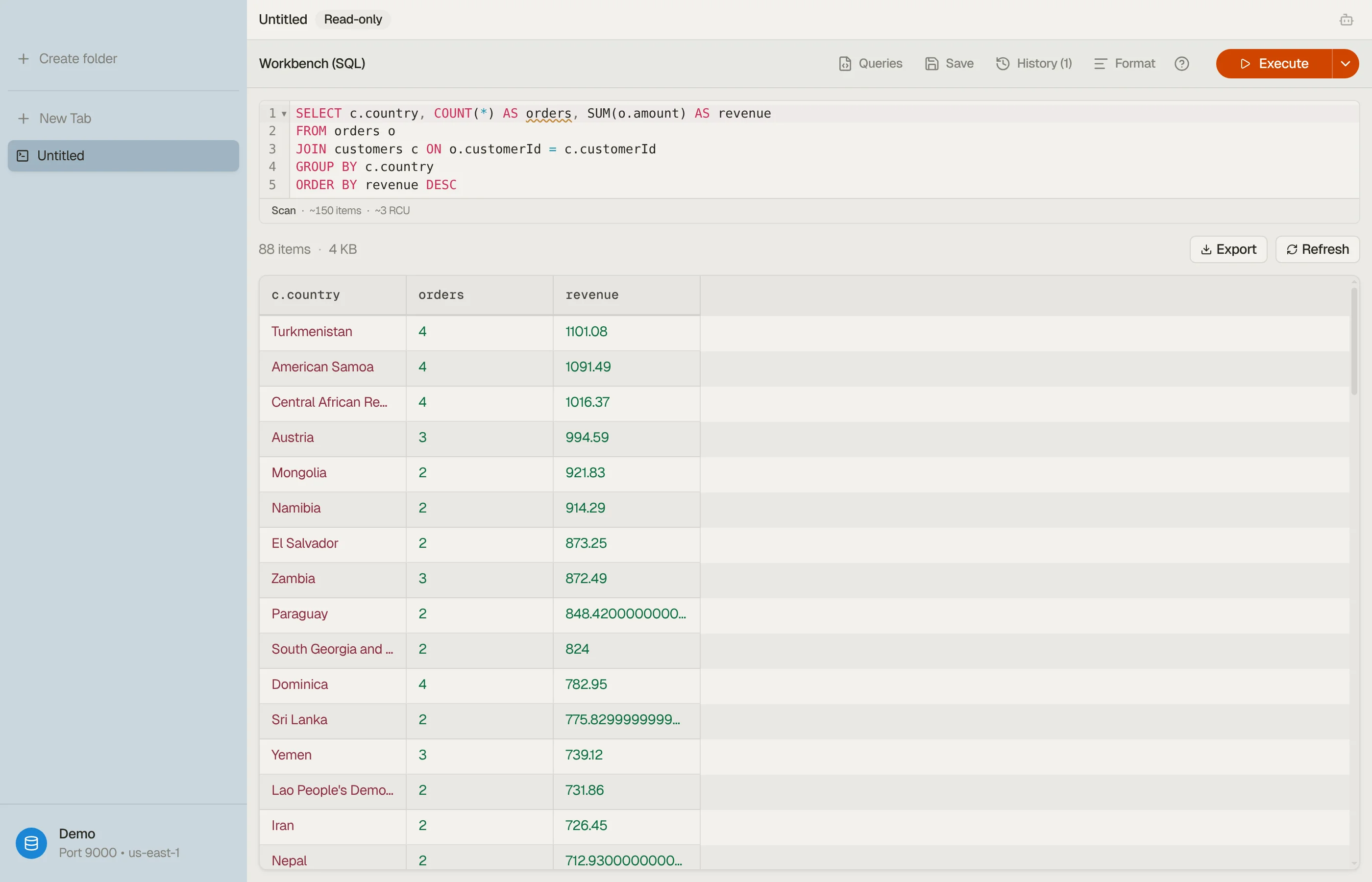
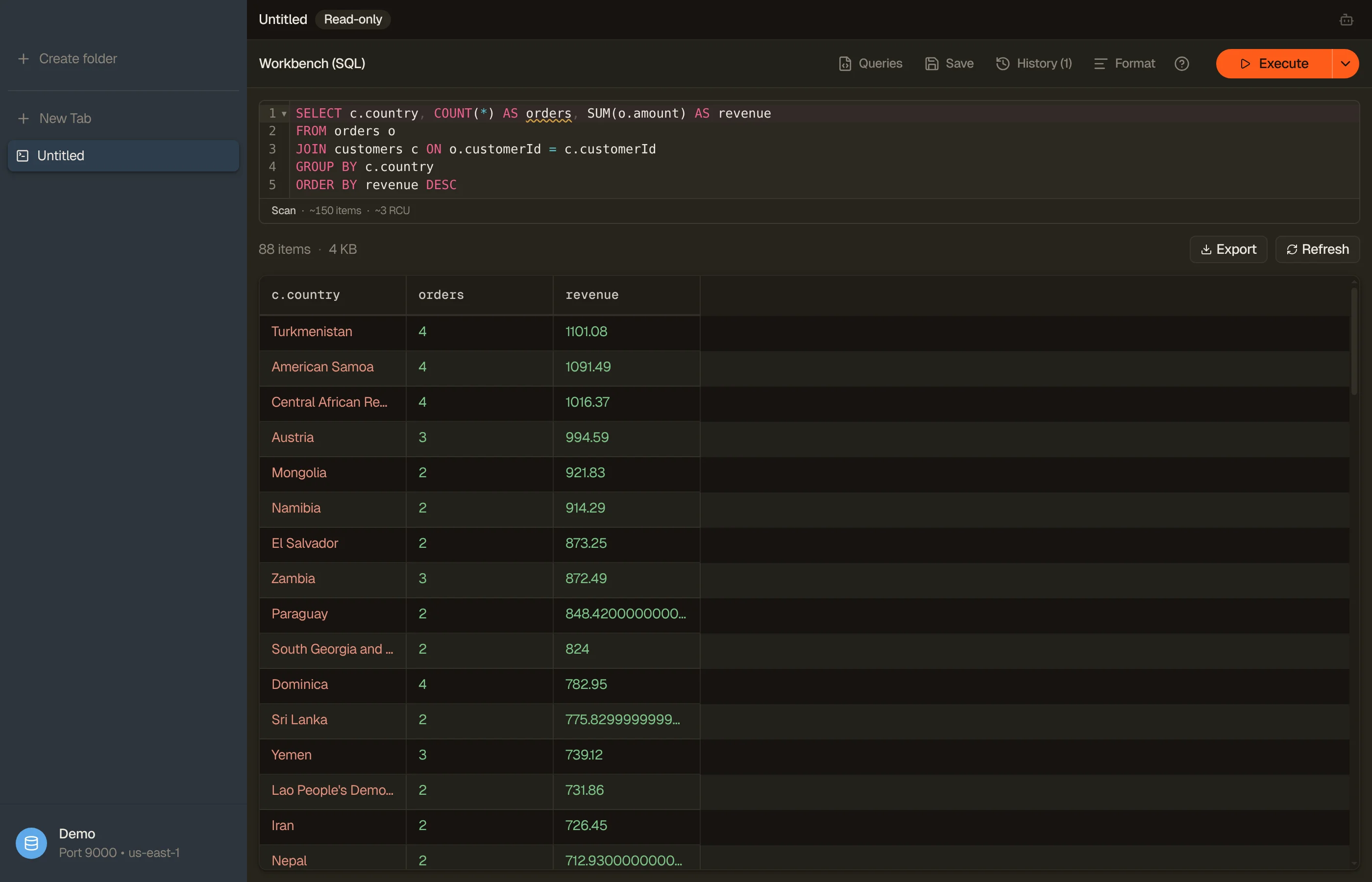
DynoTable is the desktop DynamoDB client I build. Its differentiator is a SQL Workbench that compiles SQL (INNER/LEFT JOIN, GROUP BY, and aggregates like COUNT, SUM, and AVG) down to DynamoDB's Query/Scan operations.
That matters because DynamoDB's own SQL surface can't. Per the PartiQL SELECT reference, the grammar is SELECT … FROM … WHERE … ORDER BY only: no JOIN, no GROUP BY, no aggregate functions. Every other live-table SQL surface in the ten-tool table is PartiQL underneath; the PartiQL vs SQL guide shows where it stops.
-- Runs in the DynoTable SQL Workbench (NOT in PartiQL):
SELECT c.country, COUNT(*) AS orders, SUM(o.total) AS revenue
FROM orders o
INNER JOIN customers c ON o.customerId = c.PK
GROUP BY c.country
ORDER BY revenue DESCThe Workbench works inside DynamoDB's access-pattern rules. It runs one SELECT at a time, INNER/LEFT JOIN only, and the joined table must be keyed by the join attribute: the partition key of a table with no sort key, or the partition key of exactly one GSI. A self-join follows the same rule. Subqueries, CTEs, UNION and window functions are not supported.
Joins are key lookups, and an aggregate with no key condition scans its base table, so the query above reads every item in orders and bills for it. The SQL Workbench and the PartiQL editor estimate items and read cost before you run, where the plan is known (the guardrail the dynamodb-admin warning asks for). Here that covers the base read only; reads on the joined table are flagged, not priced. Aggregate columns show (partial) until every page is read. SQL for DynamoDB shows what that compiles to.
Its AI agent reads the schema, drafts those queries and can only stage writes, which you review and commit, and you pay AWS for the Bedrock tokens it spends (see the AI chat docs). If you already work with Claude Code or Cursor, DynoTable serves the same tables to your agent over MCP with a scope you pick per connection, and MCP writes stage too.
It also covers the daily-driver basics:
- Visual query builder: pill-based filters with an index picker and automatic Query-vs-Scan derivation.
- Stage or commit: every save offers Stage or Commit, and the item editor defaults to save-and-commit. Staged changes show as a per-attribute diff you review and commit, and every committed write is journaled and revertible from History. Three paths write in one step: save-and-commit and the batch delete-and-commit chord (both journaled and revertible), and a bulk Direct Run, which has no stage and no history and cannot be reverted.
- Credentials: six AWS credential kinds auto-detected from
~/.aws(includingaws loginsessions), SSO device flow in-process, MFA TOTP in-app, and DynamoDB Local profiles. - Vector search end to end: create and delete a DynamoDB vector index beside your GSIs, bind a Bedrock embedding model and its source attributes to it, then search by typing a sentence, pasting a raw vector, or picking Find similar on a row. Vector indexes need on-demand tables, creating one is a paid action, and a new index takes minutes to build.
When an item-editor save changes an item's source text, DynoTable re-embeds it in the same save, the half AWS leaves to you: "DynamoDB does not recompute embeddings for you" (AWS docs). Bulk edits, PartiQL writes and writes from outside DynoTable are not re-embedded, so your app still needs its own embedding step. Typed-sentence search and re-embedding need AI set up and spend Bedrock tokens on your account; a pasted vector and Find similar need no AI setup, spend no Bedrock tokens and work on the Free plan. Dynobase searches a vector index too (above); nothing else in this field does either half. A DynamoDB Local profile has no vector indexes.
DynoTable creates and deletes tables and global secondary indexes and configures TTL, capacity and deletion protection. It adds and removes global-table replicas on eventual-consistency tables, imports CSV or JSON into an existing table (imports write straight through and can't be reverted), bulk-edits or bulk-deletes every item a query matches, exports a filtered table to S3, and exports a live table's definition as CloudFormation, AWS CDK or Terraform.
What DynoTable does not do: there are no on-demand backups and no restores (it switches point-in-time recovery on and off, but restoring stays in the AWS console), no streams configuration, no CloudWatch monitoring, and no tags or resource policies. A GSI can be created or deleted, never edited in place, and a license covers 2 machines.
Verdict: the right pick when your questions are analytics-shaped and PartiQL leaves you stuck; the wrong pick if your daily work is backups, restores, streams or CloudWatch monitoring.



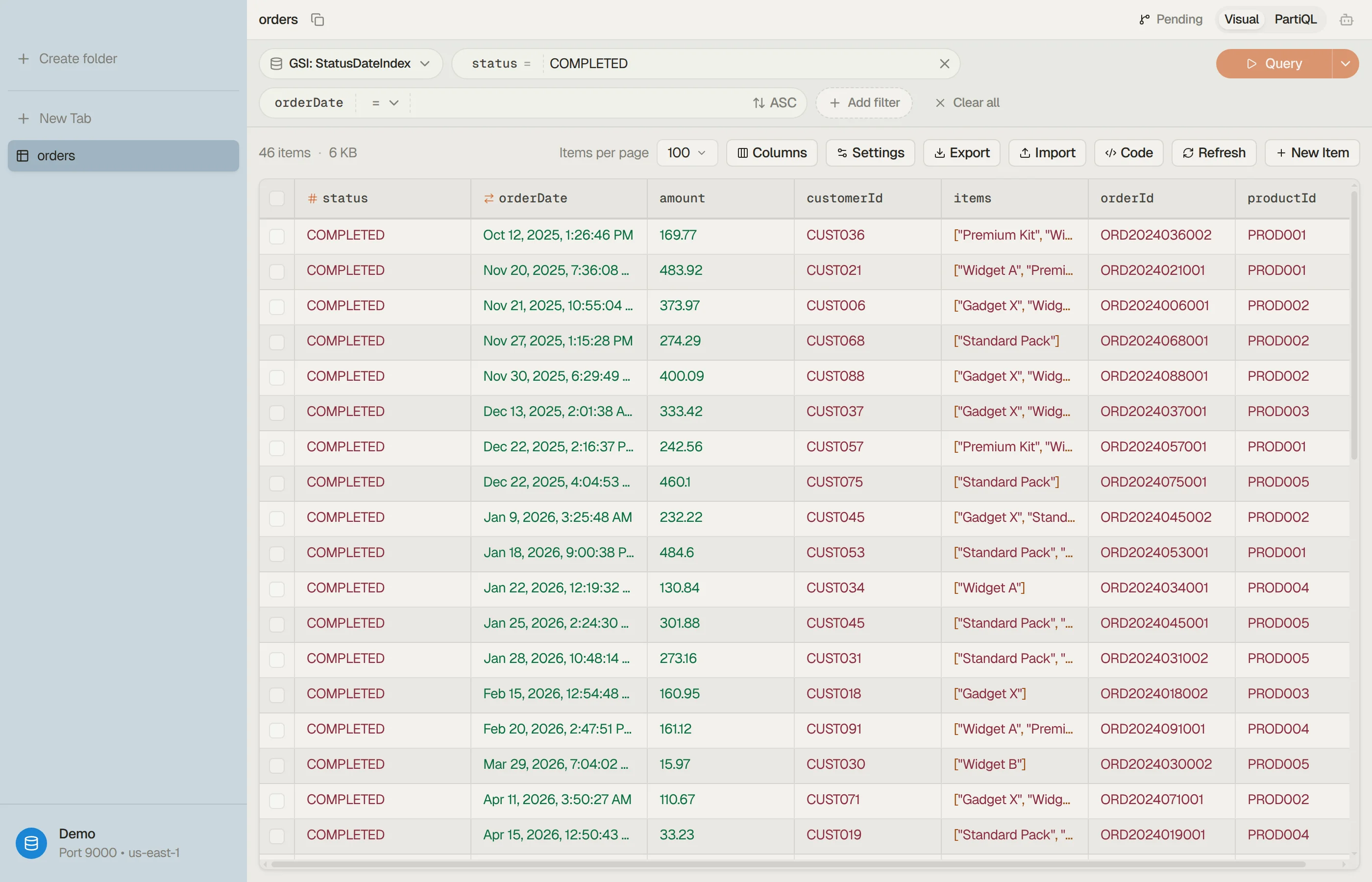

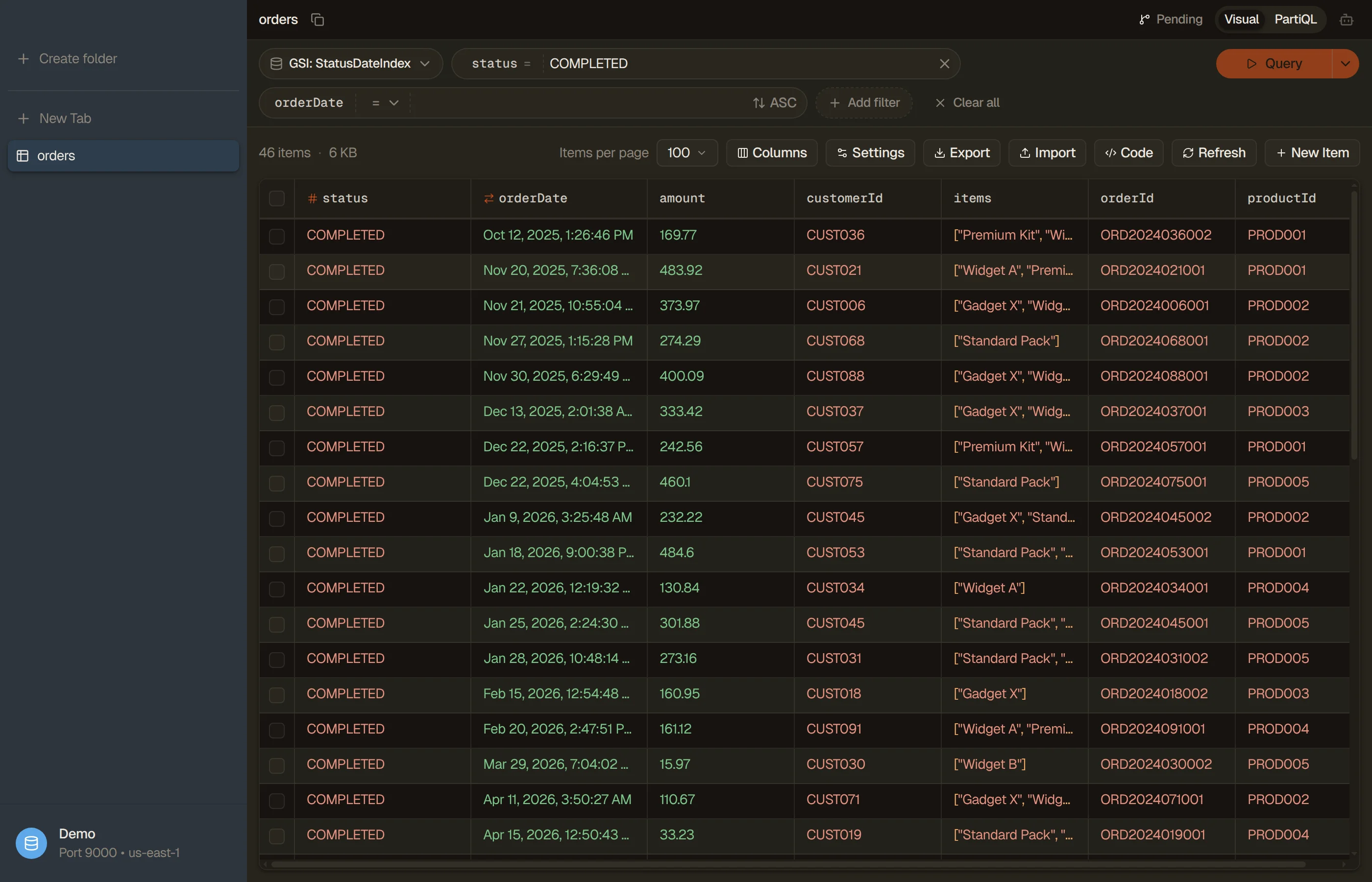
Where DynoTable lands against the rest of the field, feature by feature:
For any specific tool, the head-to-head page has the full verdict: Dynobase · Dynomate · NoSQL Workbench · dynamodb-admin · DataGrip · TablePlus · the AWS Console.
Is there a free DynamoDB GUI?
Yes, several. AWS NoSQL Workbench is free and cross-platform; DocKit's Community edition is free, open-source and a live-data client, with its AI agent, MCP server and AWS SSO sign-in in the paid Ultimate edition; dynamodb-admin and DynamoIt are free and open-source; Dynomate has a free Community tier; DbVisualizer's Free edition leaves the query builder and the table data viewer and editor to Pro; and DataGrip is free for non-commercial use. DynoTable's Free plan has no time limit and needs a free account sign-in. It covers browsing, PartiQL SELECT, data, code and schema exports, and read-only MCP.
None of the free options runs a JOIN, GROUP BY or aggregate over live tables. Dynomate's licensing table doesn't gate its DuckDB snapshot SQL, so it appears to be in the free Community tier.
What's a good DynamoDB GUI for Mac, Windows, or Docker?
DynoTable's macOS build is Apple Silicon only, while most of the field ships Intel builds, including DocKit, DbVisualizer, Dynomate and TablePlus; the Platforms column of the ten-tool table near the top records what each vendor publishes. For Docker-based local setups, dynamodb-admin is the usual pick: point --dynamo-endpoint at the amazon/dynamodb-local container's exposed port. DynoTable, Dynobase and Dynomate also connect to local endpoints, including LocalStack on a localhost port.
Can a DynamoDB GUI run real SQL, with JOINs and aggregates?
Not through PartiQL. DynamoDB's PartiQL SELECT grammar has no JOIN, GROUP BY, or aggregate functions (per the AWS reference), so a client whose SQL is PartiQL (Dynobase, DataGrip, DbVisualizer, DocKit) hits the same wall. Dynomate instead runs DuckDB SQL over a local snapshot of one table, not over the live table. To run JOINs and aggregates over live tables, a tool has to compile them into DynamoDB's Query/Scan operations itself. DynoTable's SQL Workbench does that, and an aggregate with no key condition still scans the whole table. If you only need the raw filter or key conditions for a single API call, the DynamoDB Expression Builder generates the correct FilterExpression / KeyConditionExpression without any SQL surface at all.
Do I still need a GUI if I have the AWS Console?
The Console covers the basics, with limits: weak filtering, clumsy pagination, and no CSV export of a full result (its Export to S3 writes DynamoDB JSON or Ion to a bucket). A purpose-built GUI adds fast filtering, inline editing, query building with cost visibility, and one-click export. The DynamoDB Console alternative page walks the gap feature by feature.
How do I check if a DynamoDB GUI is still maintained?
Open its GitHub releases page or public changelog and read the date of the latest entry. A dated release in recent months is the only maintenance signal that counts; a refreshed download or a version number with no date is not one. Check before a lifetime purchase, not after.
Why does a DynamoDB GUI show different columns as I scroll?
Because there is no column list to show. DescribeTable declares the key
attributes only, so every other column comes from the items already fetched.
New attributes in older items produce new columns.
Why does my item look like {"N": "3"} instead of 3?
That is DynamoDB's wire format, where every value carries a type tag and numbers travel as strings to maximize compatibility across languages and libraries. Converting between it and plain JSON is what the free DynamoDB JSON converter does.
How to choose a DynamoDB UI
- Live data ops: browse, filter, and edit items in live tables, fast, without the AWS Console. This is the daily-driver case.
- Data modeling: design tables, sort keys, and GSIs around your access patterns before you write code.
- Analytics-shaped questions: JOINs,
GROUP BYand aggregates, which a tool has to compile itself because PartiQL can't express them.
| Your main job | Reach for |
|---|---|
| Design tables / GSIs before coding | NoSQL Workbench |
| Browse & edit live data daily | Dynobase or DynoTable |
| Git-shareable saved query collections | Dynomate |
| One GUI for DynamoDB + Elasticsearch / MongoDB | DocKit or DbVisualizer |
| Just see what's in a local table | dynamodb-admin / DynamoIt |
| Already live in a JetBrains IDE | DataGrip |
JOIN / GROUP BY / aggregates over live tables | DynoTable (SQL Workbench) |
Try DynoTable free on your own tables: download.
Related
- Concepts the right tool should make easy: query vs scan, single-table design, and the PartiQL vs SQL gap that the SQL Workbench fills (with worked PartiQL examples).
- Free tools that run in your browser, no install: the DynamoDB JSON converter and the Expression Builder.
- Browse the full comparison hub for every DynoTable alternative.
Last verified 2026-10-09 against each vendor's own pages. The API responses shown were reproduced 2026-07-28 against DynamoDB Local 3.3.0, reformatted for width, with attribute order as returned. Re-check before relying on any of them. Product names are trademarks of their respective owners; referenced here for identification only.