Dynobase Alternative: DynoTable vs Dynobase
DynoTable and Dynobase are both cross-platform desktop clients for browsing, editing and querying DynamoDB without the AWS Console. This page compares them the way you would check them yourself: every Dynobase price, version and quote below was re-checked on dynobase.dev on 2026-09-26, after Dynobase 3.0 shipped, and every DynoTable claim is verified against the shipping app — including what it does not do. 3.0 is a large release, and it closed several gaps this page used to list, so the list of what Dynobase has is longer than it was.
What DynoTable adds over Dynobase
Five differences carry the decision. Each is a specific, checkable claim.
An AI agent that works inside the client. DynoTable's agent operates the app itself: it reads your key schema, runs queries, filters tables and drafts item edits. It runs on your own Amazon Bedrock credentials, you pay AWS for the tokens, and it cannot write to DynamoDB directly, because its writes go through the staged diff below. The AI chat docs cover the setup. Dynobase has no agent of its own. Its AI feature generates JS/TS, Rust, Golang and Python snippets, and 3.0 added an MCP server so an outside tool such as Claude Code or Cursor can read your tables through it. Item writes stay off until you turn on Allow writes, and after that they go straight to the table (dynobase.dev, checked 2026-09-26). DynoTable runs an MCP server too, and there an outside tool's writes land in the staging area for you to review.
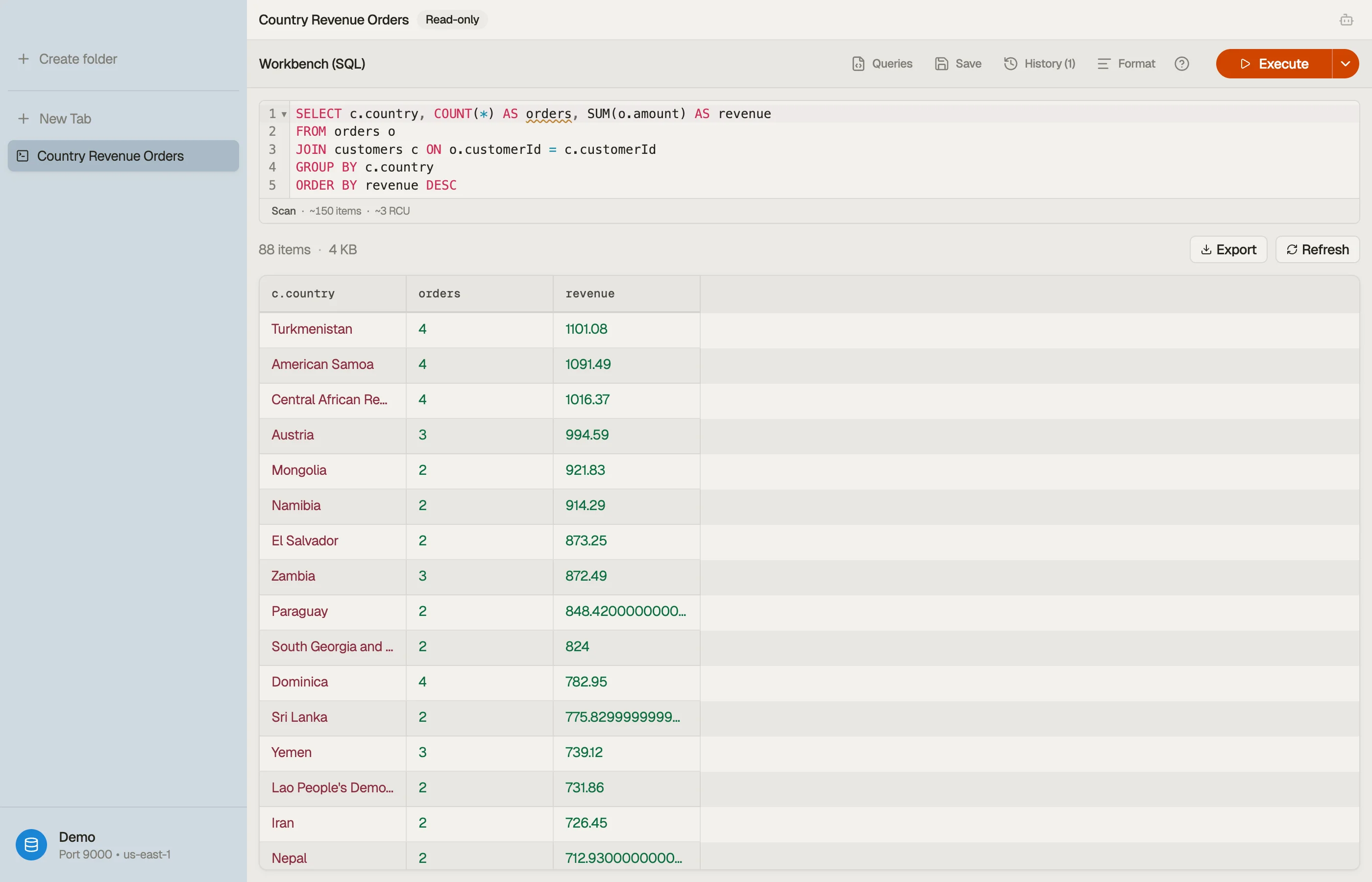
Real SQL beyond the visual builder. Both tools have a visual query builder;
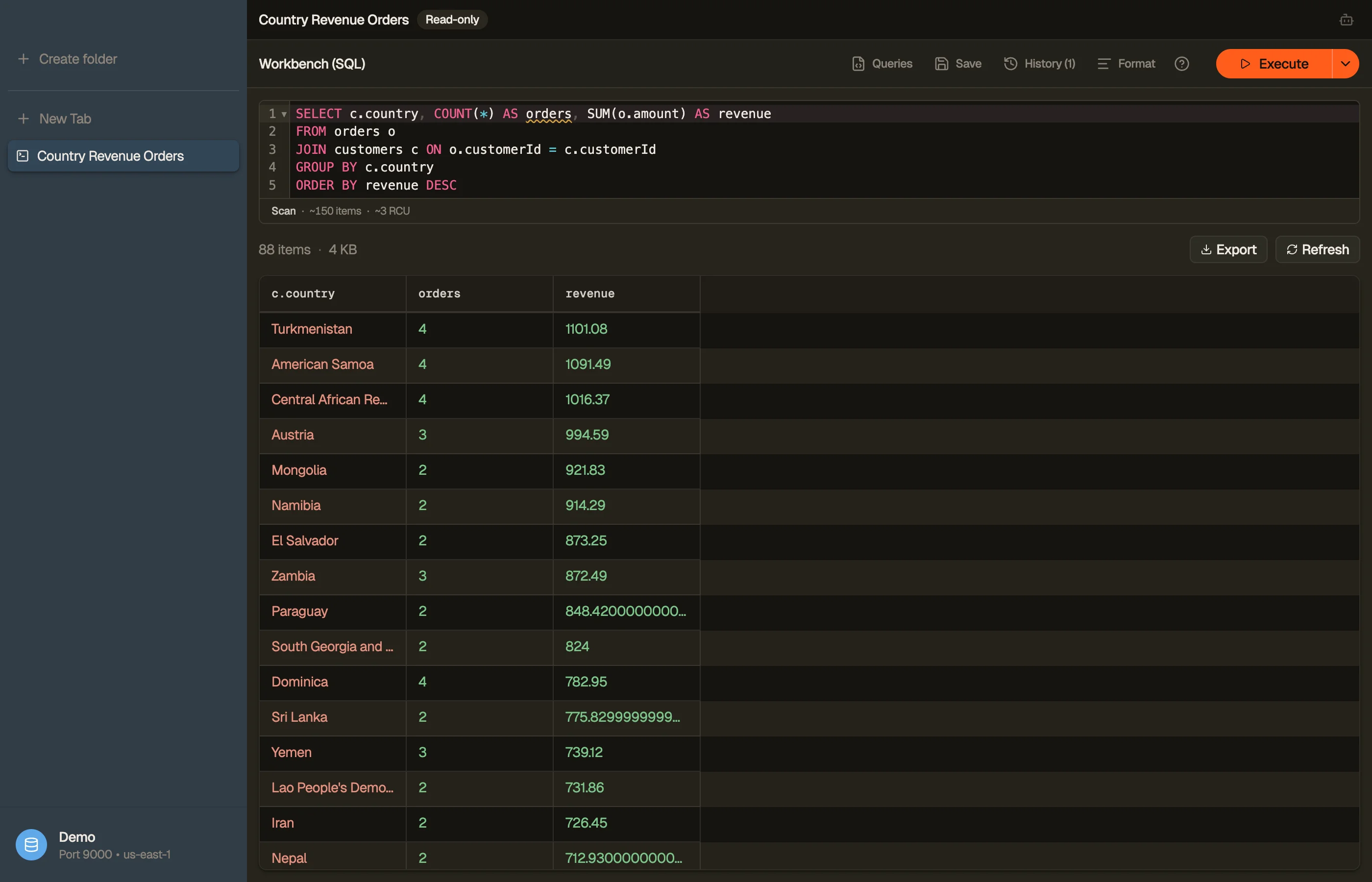
that axis is a tie. DynoTable's SQL Workbench additionally compiles INNER/LEFT JOIN, GROUP BY and aggregates (COUNT, SUM, AVG, MIN, MAX) down to
DynamoDB's real Query and Scan calls, joining and aggregating on the client —
DynamoDB has no server-side join for any tool to call. Dynobase says so about
itself: "Dynobase does not turn DynamoDB into a relational database or add
joins" (dynobase.dev, checked 2026-09-26). The honest limits on DynoTable's
side: one SELECT at a time, and the join target must be a partition key or a
GSI partition key. That is SQL within DynamoDB's access-pattern rules.
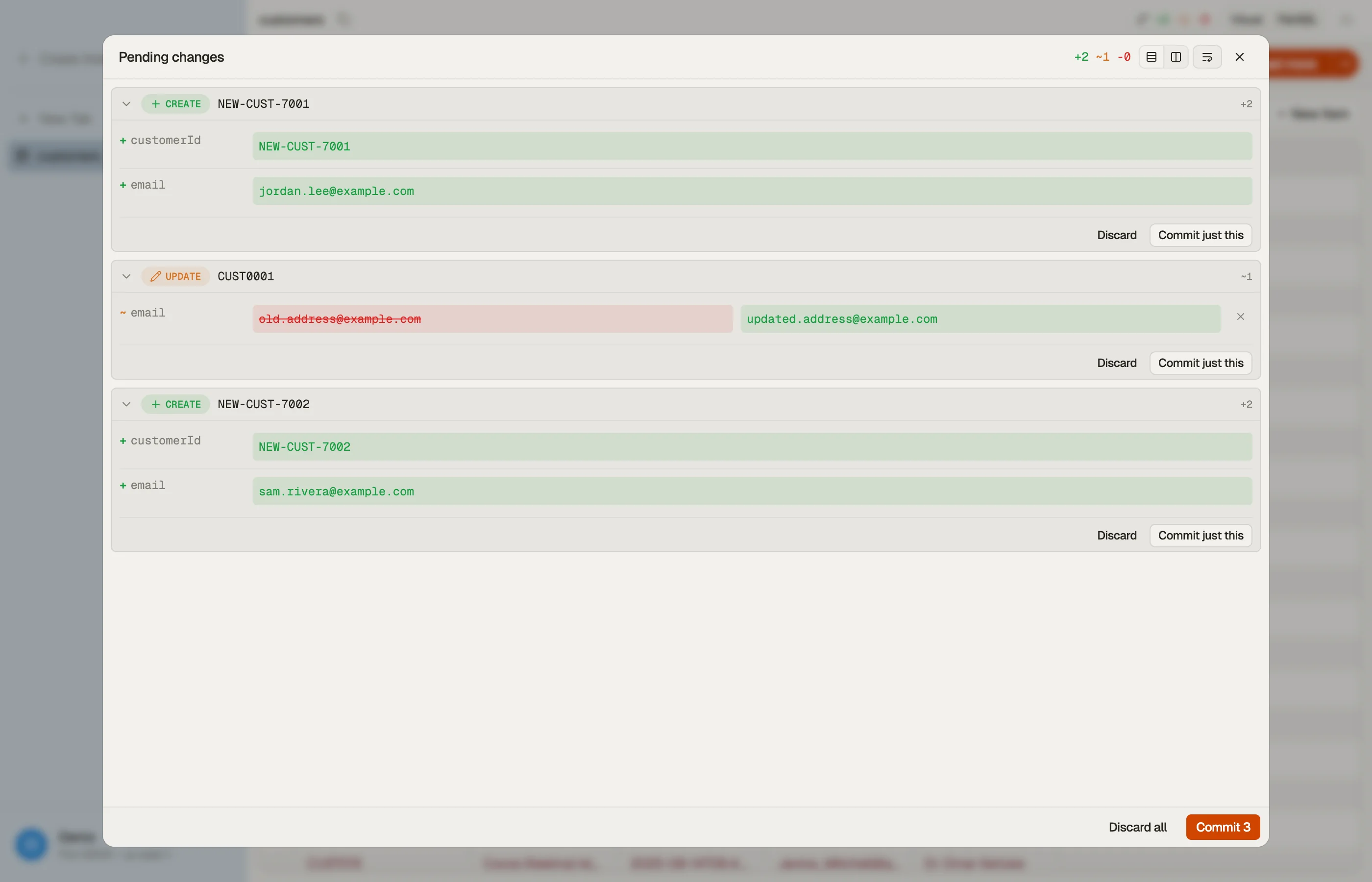
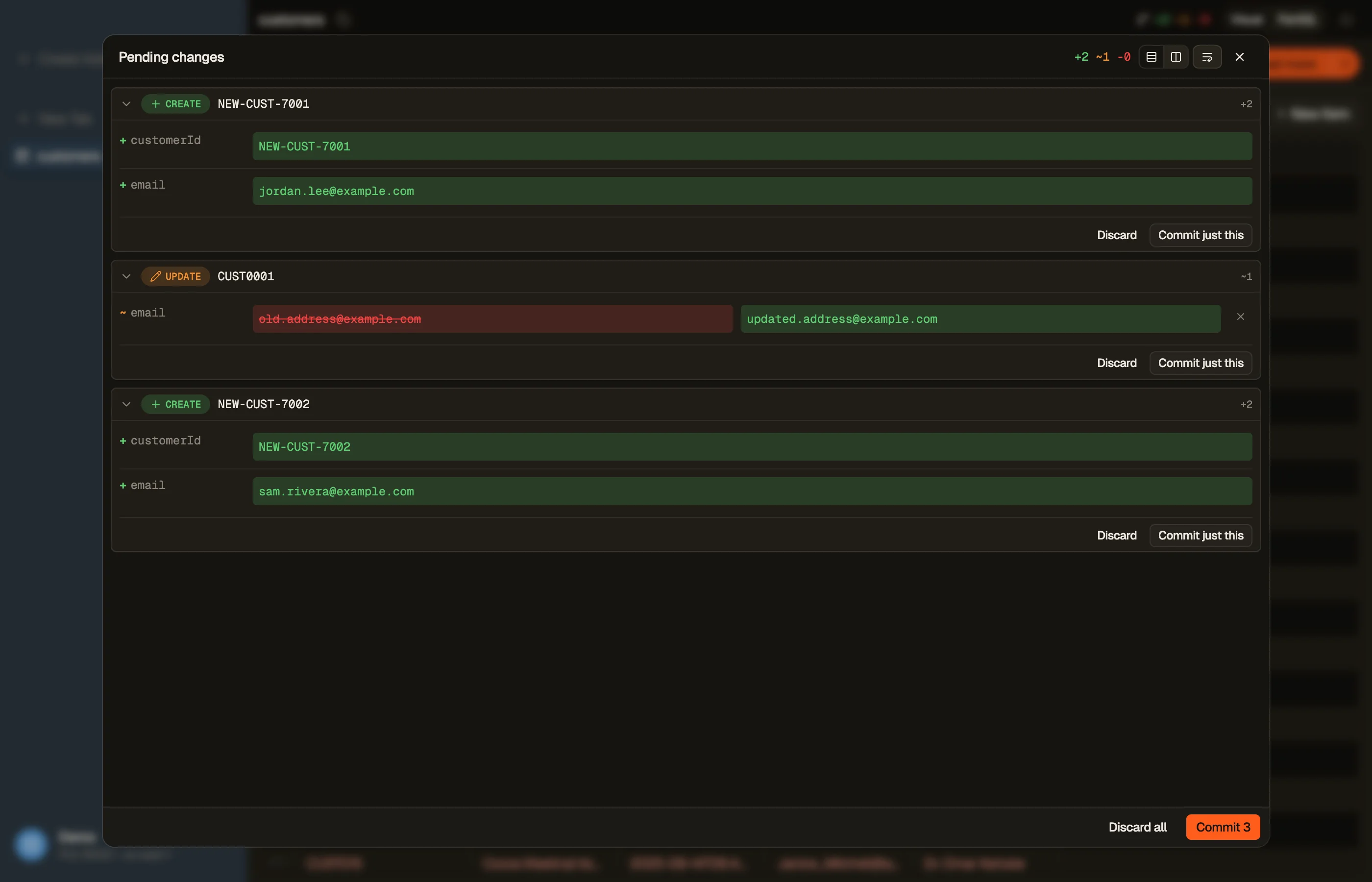
Writes stage as a diff, not a confirmation. Dynobase 3.0 added a confirmation step before PartiQL writes and bulk edits run, and it keeps a local item history with undo. That is a real safety net. DynoTable works at a finer grain: item edits and PartiQL DML land in a local staged diff you review — split or stacked, with per-attribute reject — and then commit in whole or in part, and every commit from the staging area is journaled with per-attribute diffs you can revert. Two gestures commit in one step by design: save-and-commit, and the batch-delete chord.
Vector search, including the half before the search. Both tools search a DynamoDB vector index, and Dynobase 3.0 does it well — text through Bedrock Titan, a pasted embedding, or Find similar on an item. It also draws the line itself: "Dynobase does not create vector indexes or backfill embeddings" (dynobase.dev, checked 2026-09-26). DynoTable covers that half. You create and delete the vector index from the table's Table indexes pane, bind an embedding model and the attributes it reads to it, and every save rewrites the item's embedding from its new text, so the index keeps matching what the item says. Without that, something else has to call Bedrock and write the vector back — DynamoDB never recomputes one for you. Vector search covers the setup.
Table data stays between you and AWS. DynoTable's reads and writes go from the app to your AWS account; your table data never touches a DynoTable server, and your AWS credentials never leave your machine.




When Dynobase last shipped a build
Release cadence matters most for a lifetime license, which is priced on the releases still to come. Dynobase 3.0 is the current release, and it is the strongest sign of active development Dynobase has shown in years. It still publishes no dated release history: its changelog URL shows the homepage, and the "New in 3.0" page carries only a 12 September 2026 modified date (dynobase.dev, checked 2026-09-26). One bound is certain. 3.0 searches DynamoDB vector indexes, which AWS launched on 5 August 2026, so 3.0 shipped after that date. Before you buy a lifetime license, ask the vendor how often it plans to ship. DynoTable publishes a dated entry per release on the changelog.
When the filter stops being enough, you write JavaScript
Dynobase's answer to that moment is its Terminal, which invites you to "slice and dice your data inside Dynobase to get results filtered and transformed beyond normal capabilities using Javascript" (dynobase.dev, checked 2026-09-26). It is a real escape hatch, and it is worth being exact about which side of the line the work lands on.
Say you want sessions per plan, over a sessions table and a users table.
DynamoDB will serve the key condition and stop there. It has no join, and
PartiQL adds none: its SELECT takes a single FROM with no JOIN, no
GROUP BY and no aggregate functions
(AWS PartiQL SELECT reference).
So the question becomes a script:
const byPlan = {};
for await (const session of scanAllPages('sessions', {region: 'eu-west-1'})) {
  const {Item: user} = await ddb.getItem({
    TableName: 'users',
    Key: {userId: {S: session.userId.S}}
  });
  const plan = user.plan.S;
  byPlan[plan] ??= {sessions: 0, lastSeen: 0};
  byPlan[plan].sessions += 1;
  byPlan[plan].lastSeen = Math.max(byPlan[plan].lastSeen, Number(session.startedAt.N));
}A code generator can hand you that loop. It cannot own it. The pagination
behind scanAllPages, the one GetItem per session, and the rollup are code
in your repository from then on, and every key-schema change is a chance to
break them quietly.
DynoTable's SQL Workbench takes the same question as one statement:
SELECT u.plan, COUNT(*) AS sessions, MAX(s.startedAt) AS lastSeen
FROM sessions s
JOIN users u ON s.userId = u.userId
WHERE s.region = 'eu-west-1'
GROUP BY u.planDynoTable plans that against your real keys and indexes, issues the Query and
Scan calls itself, and joins and aggregates the results on the client. What
disappears is the loop, and with it the pagination and the rollup you were
maintaining. DynamoDB JOIN walks through the plan.
What Dynobase has that DynoTable doesn't
An honest comparison lists the traffic in both directions. If these are your daily needs, Dynobase (or another tool) is the better fit:
- Backups, metrics, streams and replicas. Dynobase 3.0 lists, creates, restores and deletes on-demand backups, shows CloudWatch metrics, tails DynamoDB Streams, and manages replicas, tags and resource policies (dynobase.dev, checked 2026-09-26). DynoTable creates and deletes tables and global secondary indexes and configures TTL, capacity and deletion protection, but it has no backups or point-in-time recovery, no streams configuration, no CloudWatch monitoring of any kind, and no replica management. Those stay in the AWS console. An existing GSI can be created or deleted, never edited.
- Bulk edit. Dynobase 3.0 applies one attribute change to a selection or to every matching item. DynoTable has batch delete but no batch update path.
- Copying items between tables. Dynobase 3.0 copies selected items to another table and maps their keys.
- Infrastructure code and scheduled exports. Dynobase 3.0 generates CDK, CloudFormation or Terraform for a table, and it schedules recurring local exports.
- Import that overwrites in place. Dynobase imports CSV or JSON into a table, and 3.0 adds import from S3. DynoTable imports CSV, JSON and NDJSON into an existing table — but never into a new one, and an import is not staged or revertible; it writes through the ordinary path.
- A lifetime license. Dynobase sells one; DynoTable is subscription-only.
- Intel Macs. Dynobase lists Mac support including Apple Silicon; DynoTable's macOS build is Apple Silicon only.
- More machines. A Dynobase license activates up to 3 devices. A DynoTable license covers 2 machines.
Dynobase pricing vs DynoTable pricing
Both re-verified 2026-09-26, and Dynobase's prices did not change with 3.0. Dynobase: Solo at $9/month billed annually ($108/yr), a one-time lifetime license at $199 (struck from $249), Team at $79/month billed annually, and a 7-day trial with no credit card. The only "free" on its pricing page is that trial — there is no free tier.
DynoTable: Individual at $12/month, or $9/month billed annually ($108/yr); Team
at 2× that; a 30-day trial of the plan you pick, no credit card; and a Free plan
with no time limit after the trial. Free includes browsing, PartiQL SELECT,
data, code, and schema exports, and MCP schema/item reads; paid seats add the
SQL Workbench, Smart Tables, writes, and AI. See pricing for the
current plans.
A lifetime license is a bet on future releases, so read the build-date section before pricing that bet.
How to switch from Dynobase
Dynobase reads the profiles in your ~/.aws directory, and so does DynoTable,
so there is no credential setup to redo and nothing to migrate out of DynamoDB.
Download DynoTable, pick the same profile and region you use today,
and open the SQL Workbench on two of your own tables.
30-day trial, no credit card, then the Free plan with no time limit. Windows, Linux, and Apple Silicon Macs.
Other Dynobase alternatives
DynoTable is the alternative this page can verify in depth, but it is not the only one worth weighing. The short list, with where each fits:
- NoSQL Workbench — AWS's own free desktop tool. Strong for data modeling and visualizing key designs before a table exists; not built for day-to-day querying and editing.
- Dynomate — the newer maintained commercial rival, closest to Dynobase in shape.
- The AWS Console — free and always current, but slow for cross-table work and has no local query workspace; it is the thing all of these tools exist to escape.
- dynamodb-admin and other open-source GUIs — fine for a local DynamoDB-Local instance, thin against production features like SSO credentials and staged writes.
The hands-on best DynamoDB GUI clients roundup compares the full field with screenshots and a feature matrix, and the comparison hub has a page per tool.
FAQ
Is DynoTable a Dynobase alternative?
Yes. DynoTable is a desktop DynamoDB client whose SQL Workbench runs JOINs, GROUP BY and aggregates — queries you can't express in a plain visual client — and whose AI agent works inside the app on your own AWS Bedrock account. Dynobase has neither.
Can DynoTable run SQL against DynamoDB?
Yes. DynoTable's SQL Workbench compiles SQL — including INNER/LEFT JOIN, GROUP BY and aggregates — down to DynamoDB's real Query/Scan operations, so it stays within DynamoDB's access-pattern rules.
Does Dynobase have a free tier?
No. Dynobase lists a 7-day free trial and paid licenses after it — $9/month billed annually or $199 once for a lifetime license (dynobase.dev, checked 2026-09-26). DynoTable has a Free plan with no time limit, plus a 30-day trial of the plan you pick. Free includes browsing, PartiQL SELECT, data, code, and schema exports, and MCP schema/item reads; paid seats add the SQL Workbench, Smart Tables, writes, and AI.
When did Dynobase last ship a build?
Dynobase 3.0 is the current release. Dynobase publishes no dated release history, so no exact date can be cited, but 3.0 searches DynamoDB vector indexes, which AWS launched on 5 August 2026, so it shipped after that date (checked 2026-09-26). DynoTable's release history is public on the changelog.
Related
- Browse the full comparison hub for every DynoTable alternative.
- Weighing the newer maintained rival too? See the Dynomate comparison.
- See also the NoSQL Workbench comparison and the hands-on best DynamoDB GUI clients roundup.
- Build queries fast with the free DynamoDB Expression Builder.
Last verified 2026-09-26. Dynobase is a trademark of its respective owner; referenced here for identification only.