dynotable-orm: a type-safe DynamoDB ORM for TypeScript
What is dynotable-orm?
dynotable-orm is a type-safe DynamoDB ORM for TypeScript on Node.js. You define a model from a Zod 4 schema, or from any Standard Schema, and the compiler checks every key, update path, condition value and index name. It keeps dynamoose's call shapes, and a whole-item write stores the same item as dynamoose 4.2.0. A codemod moves dynamoose code over.
Why dynotable-orm
- dynamoose call shapes.
get,create,update,query,scan, conditions, transactions and batches keep the shapes that dynamoose users know. Your schema gives the types: a wrong key, a misspelled path or a value of the wrong type does not compile. - The same stored items as dynamoose 4.2.0 on whole-item writes. Both store a
Dateas epoch milliseconds by default. The library's equivalence suite runs each case through both libraries on DynamoDB Local: every create, put, batch, transaction write and top-level update stores the same bytes, and each library reads the other's items. A nested update path is not the same: for$SET: {'a.b': 1}, dynamoose 4.2.0 writes a top-level attribute nameda.b, and dynotable-orm writes the fieldbinsidea. The migration guide lists every difference seen, and sharing a table during a rollout says what to move first. - Any Standard Schema validates. The Zod 4 adapter adds keys, indexes, Date storage and per-path checks on updates. Refinements run on every whole-item write.
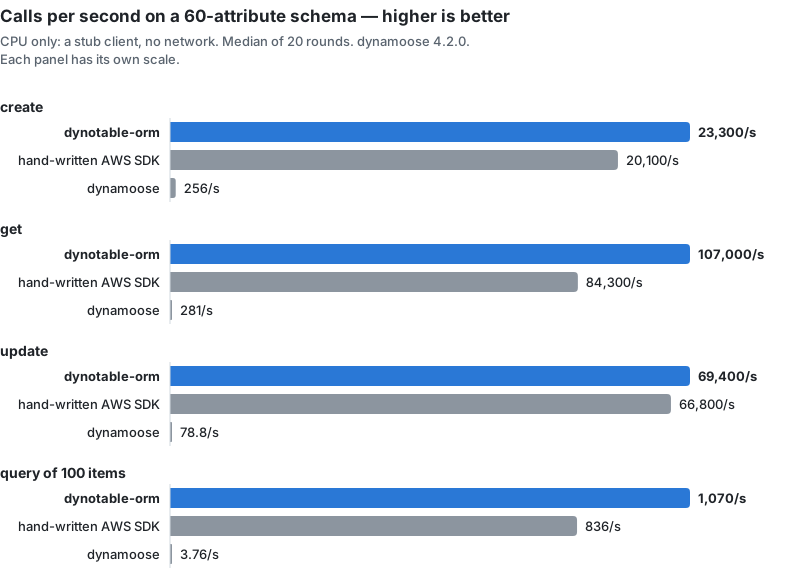
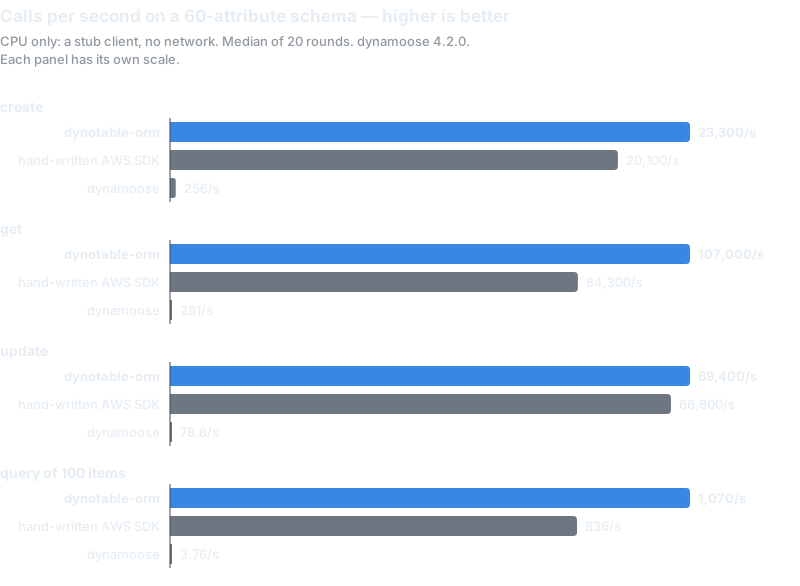
- Fast. In a CPU benchmark on a stub client, measured 2026-11-06, a create, get or update on a schema of about 60 attributes is 93 to 854 times faster than dynamoose 4.2.0, and as fast as hand-written AWS SDK code or faster. On a 5-attribute schema, hand-written SDK code is faster on some calls. The numbers are CPU only, with no network time: see the benchmarks.
- A codemod.
dynotable-orm-codemodmoves dynamoose code and schemas over, and marks what it cannot move with a TODO.
Install
npm install dynotable-orm @aws-sdk/client-dynamodb zoddynotable-orm needs Node 24 or later. @aws-sdk/client-dynamodb v3 is a peer dependency. zod (v4) is
optional: without it, give the keys and indexes as model options. The package ships ES module and
CommonJS builds with their types.
A 30-second example
import {DynamoDBClient} from '@aws-sdk/client-dynamodb';
import {model, setClient} from 'dynotable-orm';
import {extendZod} from 'dynotable-orm/zod';
import {z} from 'zod';

extendZod(z); // once, before you build a schema

setClient(new DynamoDBClient({region: 'eu-west-1'}));

export const User = model(
  'User',
  z.object({
    id: z.string().hashKey(),
    email: z.email().index({name: 'byEmail'}),
    plan: z.enum(['free', 'team']).default('free'),
    logins: z.number().default(0),
    createdAt: z.date().optional(),
    updatedAt: z.date().optional()
  }),
  {timestamps: true}
);

await User.create({id: 'u1', email: 'ada@example.com'});

const user = await User.get('u1'); // the item, or undefined

await User.update(
  {id: 'u1'},
  {plan: 'team', $ADD: {logins: 1}},
  {condition: User.condition().where('plan').eq('free')}
);

const found = await User.query('email').eq('ada@example.com').exec();
console.log(user?.plan, found.count);createwrites only when the key is not stored yet. Pass{overwrite: true}to replace an item.getresolves to the item, typed from the schema, or toundefined.updatetakes plain fields as an implicit$SET, next to$ADD,$REMOVEand$DELETE. A wrong path or value type does not compile.query('email')picks thebyEmailindex from the condition. No index name is written by hand.- Dates are stored as epoch milliseconds by default, as in dynamoose. For a table that holds ISO strings or seconds, read the Date storage trap before you point a model at it.
Getting started walks through the same steps with a local table, and DynamoDB with TypeScript builds a complete small app.
Packages
| package | what it is |
|---|---|
dynotable-orm | the library: models, queries, conditions, transactions, errors |
dynotable-orm/zod | the Zod 4 adapter: field marks and extendZod() |
dynotable-orm-codemod | the command that migrates dynamoose code and schemas |
All three are MIT licensed. The source is on GitHub: dynotable/dynamodb-orm.
When to use something else
dynotable-orm maps one model to one table, named after the model. It has no entity type attribute and no collections, so it is not the tool to put many entity types in one table: for that single-table design, ElectroDB and DynamoDB-Toolbox are built around it. For one table and a few access patterns, the AWS SDK alone can be enough. Should you use an ORM with DynamoDB? compares the options honestly.
The documentation
Getting Started
- Getting started: install, connect a client, define a model, create its table.
- DynamoDB with TypeScript: a complete small app, from the model to a transaction.
- Should you use an ORM with DynamoDB?: raw SDK, ElectroDB, DynamoDB-Toolbox or dynotable-orm.
Guides
- Schema validation: what is checked on each call,
unknownKeys, and Standard Schema without Zod. - The Zod adapter: the key, index, combine and storage marks.
- Keys and indexes: primary keys, secondary indexes and
createTableInput(). - Reads, writes and updates:
get,create,update,delete, the update operators andextend(). - Conditions: conditional writes and
isConditionalCheckFailed. - Query and scan: key conditions, filters, index choice and pagination.
- Transactions and batches:
transaction(),batchGet,batchPutandbatchDelete. - Dates and timestamps: the three Date storage modes and
timestamps.
Migrating
- A dynamoose alternative: what changes for dynamoose users, and why.
- Migrating from dynamoose: the full list of changed and removed APIs.
- The codemod: options, exit codes and the
migrate()function. - Benchmarks: the method and every number, with its limits.
Reference
- Troubleshooting: every error, what it means and how to fix it.
- Models:
model(), theModelmethods and the model options. - Queries and conditions:
Query,Scan,Conditionand the update types. - Transactions and the client:
transaction(), batches,setClient(), the errors and the converters. - The Zod adapter:
dynotable-orm/zod.
To look at the items a model stores, open the table in DynoTable, a desktop DynamoDB GUI.