A dynamoose alternative for TypeScript: dynotable-orm
What is a good alternative to dynamoose?
For TypeScript code that should keep the dynamoose API, dynotable-orm. It keeps dynamoose's call shapes, a whole-item write stores the same item as dynamoose 4.2.0, and a codemod moves the code over. The difference is the types: they come from your schema, so keys, update paths, condition values and index names are checked at compile time.
dynamoose is maintained, and for JavaScript code it may be all you need. This page is for teams whose dynamoose code is TypeScript, and who want the compiler to check it. The dynamoose facts below are from its docs and from the types it publishes in version 4.2.0, the latest on npm as of 2026-11-06.
Where dynamoose's TypeScript support stops
The dynamoose TypeScript docs say that its "TypeScript Support is in beta", and that this support "does not have typings or contracts between your Schema and Items you create". The types in dynamoose 4.2.0 show what that means:
dynamoose.model<T>(name, schema)takes the item type as a type parameter that you write. Without one, it isAnyItem. The schema does not produce it, so the two can drift apart.- A key is
string | number | {[attribute: string]: string | number}. - A condition's
where(key: string)takes any string, andeq(value: any)any value.
So this code compiles, with each mistake left for runtime:
import dynamoose from 'dynamoose';

const User = dynamoose.model(
  'User',
  new dynamoose.Schema({id: {type: String, hashKey: true}, plan: String, logins: Number})
);

await User.get({userId: 'u1'}); // the key attribute is `id`
await User.update({id: 'u1'}, {plna: 'team'}); // a misspelled attribute
await User.query('plan').eq(42).exec(); // a number for a string attributeThe same model in dynotable-orm, where each of these lines is a compile error:
import {model} from 'dynotable-orm';
import {extendZod} from 'dynotable-orm/zod';
import {z} from 'zod';

extendZod(z);

const User = model(
  'User',
  z.object({id: z.string().hashKey(), plan: z.string().optional(), logins: z.number().default(0)})
);

// @ts-expect-error: the key attribute is `id`
await User.get({userId: 'u1'});

// @ts-expect-error: the schema has no attribute `plna`
await User.update({id: 'u1'}, {plna: 'team'});

// @ts-expect-error: plan is a string
await User.query('plan').eq(42).exec();@ts-expect-error marks each line, so this block compiles only while the error is still caught. The
item type is ItemOf<typeof User>, read from the schema, and the same schema validates every
whole-item write at runtime. DynamoDB with TypeScript shows the full set of
checks in a complete app.
What stays the same
- Stored items. For the same schema and input, a whole-item write and an update of top-level
fields store the same bytes as dynamoose 4.2.0, and each library reads the other's items. Both store
a
Dateas epoch milliseconds by default. The library's equivalence suite checks this on DynamoDB Local, through both libraries. Nested update paths differ: see sharing a table during a rollout. The migration guide lists every difference seen. - Table names.
${prefix}${name}${suffix}, withsetDefaults({prefix, suffix})in place ofdynamoose.Table.defaults.set(). - Call shapes.
get(key),create(item),update(key, changes)with$SET,$ADD,$REMOVEand$DELETE,delete(key), the query and scan chains, theConditionchain,Model.transaction.*,batchGet,batchPutandbatchDelete. - Result fields. Query results carry
lastKey,countandtimesQueried; scan results carryscannedCountandtimesScanned.
Sharing a table during a rollout
Old dynamoose code and new dynotable-orm code can share a table. The main exception is an update of a
nested path. For update(key, {$SET: {'address.city': 'Paris'}}), dynamoose 4.2.0 sends SET #a0 = :v0
with #a0 = address.city, so it writes a top-level attribute with that literal name. dynotable-orm
sends SET #a0.#a1 = :v0 and writes the field city inside address. A nested $REMOVE from
dynamoose 4.2.0 names the same literal attribute, so it removes nothing.
While both run on one table:
- a nested
$SETfrom the old code leaves the nested field unchanged, and adds a top-leveladdress.cityattribute; - dynotable-orm does not read that attribute: a Zod schema drops it on read, with no error.
Items written whole, and updates of top-level fields, need no migration. A table whose Dates are not in milliseconds needs a setting (see the Date storage trap). Before a rollout, find the nested update paths in the dynamoose code. Move them first, or check the table for attributes with a dot in their name.
The Date storage trap
dynamoose and dynotable-orm both store a Date as a number of epoch milliseconds by default, timestamps
included. A table that dynamoose wrote with its defaults needs no setting.
A table that holds another form does: attributes that the dynamoose schema stores in seconds or as ISO
strings, or ISO strings that your own code wrote. Without a setting, a model writes milliseconds next to
the old values, and nothing throws: an old ISO item reads back with a string where the type says Date.
Set the storage before the first write:
import {model} from 'dynotable-orm';
import {z} from 'zod';

export const Payment = model(
  'Payment',
  z.object({id: z.string(), paidAt: z.date(), dueAt: z.date().optional()}),
  {
    hashKey: 'id',
    defaultDateStorage: 'iso', // the table holds ISO strings
    dates: {dueAt: 'seconds'} // an attribute that dynamoose stored in seconds
  }
);The codemod reads each attribute's storage from the dynamoose schema, and adds a dates entry only for
one in seconds or ISO. ISO strings that your own code wrote are not in the schema: set
defaultDateStorage: 'iso' yourself on each such model. The Date storage
trap in the migration guide has the rounding rules
and the timestamp details.
The deliberate differences
Some dynamoose features are gone on purpose. The migration guide lists each one with its replacement:
- Items are plain objects. There is no
item.save(): writeM.create(item, {overwrite: true, keepCreatedAt: true})for an item you read.item.toJSON()becomestoJSON(item). - No callbacks,
populateor serializers. Every method returns a Promise. - No
Tableobject, and no table management. A model names its own table, so a dynamooseTablethat holds several models has no direct equivalent. The library never creates or changes a table;M.createTableInput()gives theCreateTableinput. - A model must name its hash key. dynamoose takes the first attribute by default.
- Stricter checks. Every whole-item write runs the full schema, refinements included. An update with
nothing to write, an
undefinedcondition value or an emptyin()throws anExpressionErrorbefore anything is sent. See stricter checks. queriedCountis DynamoDB'sScannedCount. dynamoose's is alwaysundefined.
The codemod
npm install --save-dev dynotable-orm-codemod
npx dynotable-orm-codemod tsconfig.json --dry-run   # lists the files it would change
npx dynotable-orm-codemod tsconfig.jsonIt uses the type checker, so run it while the project still resolves dynamoose. It converts schemas to
Zod, moves the dynamoose names to named imports, rewrites item.save() where the model is certain, and
leaves a TODO(dynotable-orm-codemod) comment above anything it cannot move. The exit code is 0 when
nothing is left to do and 1 when a TODO is left. The codemod page has every option.
Performance against dynamoose 4.2.0
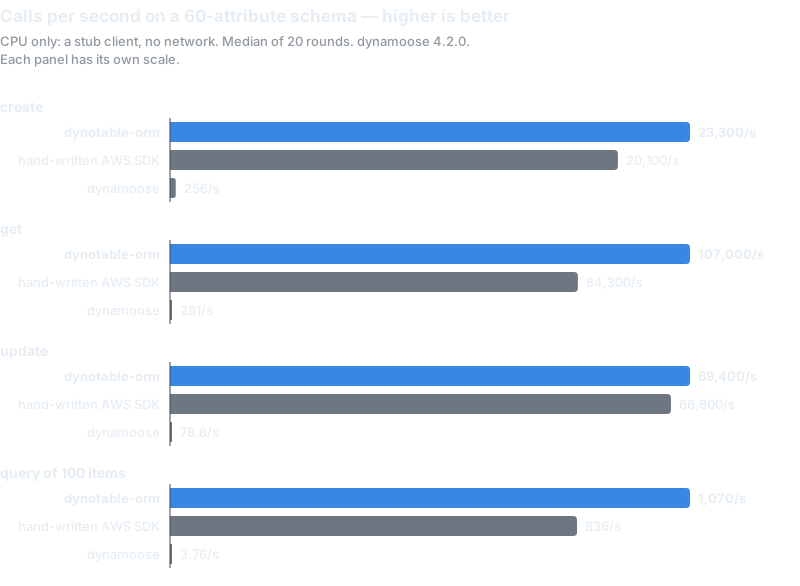
In a CPU benchmark on a stub client, measured 2026-11-06, a create, get or update on a schema of about 60 attributes is 93 to 854 times faster than dynamoose 4.2.0, and as fast as hand-written AWS SDK code or faster. On a 5-attribute schema, hand-written SDK code is faster on some calls. A query of 100 items is 288 times faster than dynamoose.
These numbers are CPU only, with no network time. In a real call, DynamoDB's latency is usually larger than any of them. The benchmarks give the method and every number.
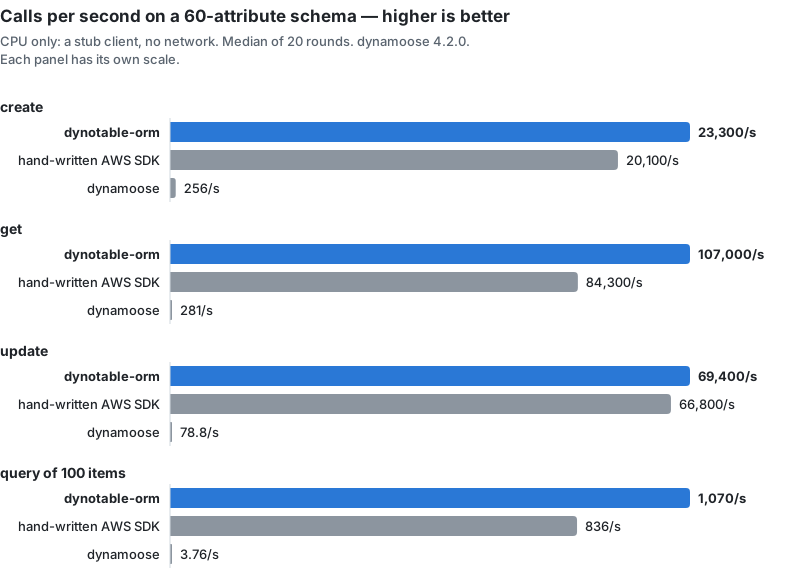
A nested update has no dynamoose number. dynamoose 4.2.0 writes a path such as notification.status as
one top-level attribute with that literal name, not as a change to the nested field, so it does
different work and is not timed.
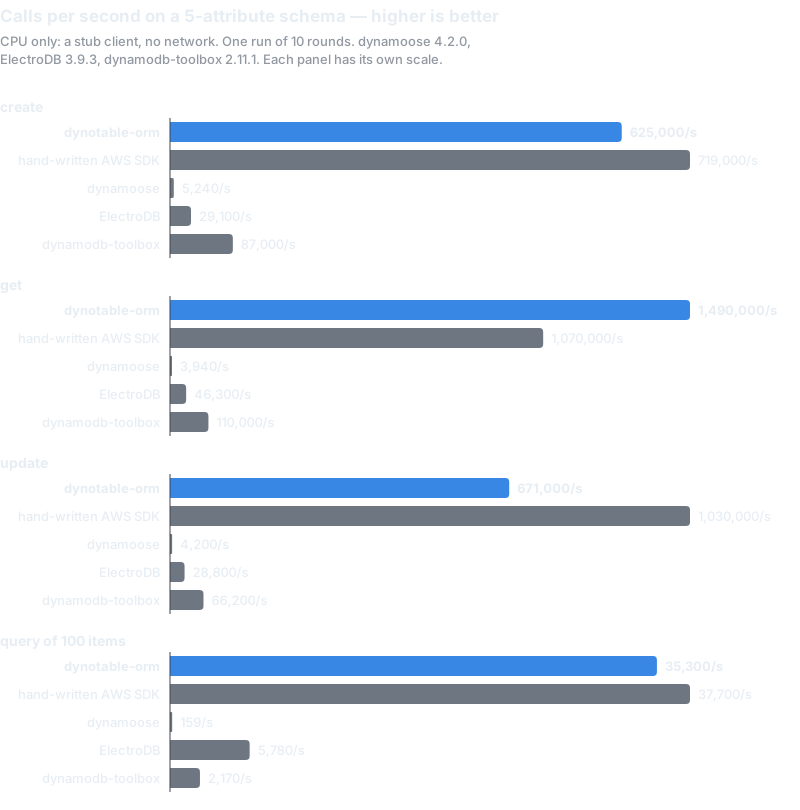
On the 5-attribute schema, all five contenders ran in one process:
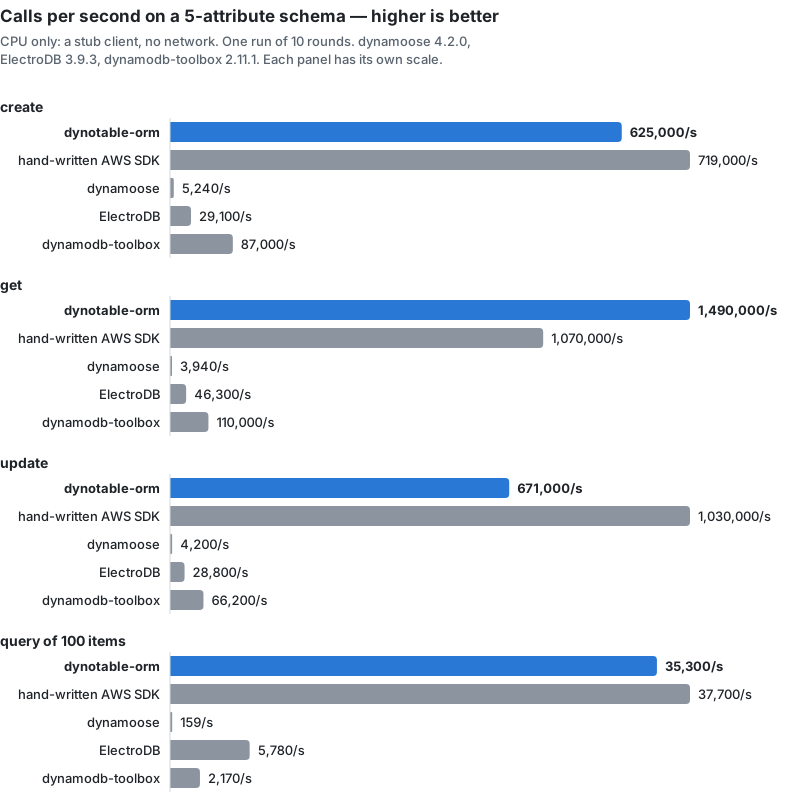
- dynotable-orm is 119 to 379 times faster than dynamoose.
- ElectroDB 3.9.3 and dynamodb-toolbox 2.11.1 are slower than dynotable-orm on every operation.
- Hand-written SDK code is faster than dynotable-orm on create, update and query. dynotable-orm is faster on get.
These are CPU numbers for one small schema. They say nothing about features, other schemas or network time.
How it compares
As of 2026-11-06, from each project's docs and npm page:
| dynotable-orm | dynamoose 4.2.0 | ElectroDB 3.9.3 | DynamoDB-Toolbox 2.11.1 | |
|---|---|---|---|---|
| Item types from the schema | yes | no: the item type is a type parameter you write | yes | yes |
| Schema | Zod 4, or any Standard Schema | dynamoose.Schema | ElectroDB entities | its own schemas, which import from and export to Zod and JSON Schema |
| Models or entities per table | one model per table | a Table takes several models | many entities, with collections | many entities, tagged by an entity attribute |
| License | MIT | Unlicense | ISC | MIT |
For single-table design with many entity types, ElectroDB or DynamoDB-Toolbox is the better fit. Should you use an ORM with DynamoDB? compares all four options with the raw SDK.
Next steps
- Read the Date storage trap for every model that reads an existing table.
- Run the codemod with
--dry-run, then without it, and fix each TODO. - Work through the migration guide, and run your type check and tests.