A Better AWS DynamoDB Console Alternative
The AWS DynamoDB console gives you a table list, an item browser and a PartiQL
editor. That covers a quick look, and it stops there. DynoTable is a desktop
DynamoDB client built for daily work: a SQL Workbench that runs JOIN,
GROUP BY and aggregates within DynamoDB's access-pattern rules, an AI agent
on your own AWS Bedrock keys, MCP access for coding agents like Claude Code
and Cursor, and the workflow the console never grew — tabs, folders, saved
queries, one-keystroke profile switching and full exports. DynoTable reads your
standard AWS credential chain and talks to the same tables in your account, so
there is nothing to migrate.
When the AWS console wins vs DynoTable
| Your workflow | Choose |
|---|---|
| Set up backups or PITR, configure streams, or add a replica | AWS console |
Peek at a handful of items or run a one-off GetItem | AWS console |
| Create a table, add a GSI, tune capacity, or flip TTL | Either |
JOIN, GROUP BY, or aggregates over live tables daily | DynoTable |
| Export a full filtered result set without paging 1 MB at a time | DynoTable |
| Staged writes, saved queries, or MCP for Claude Code / Cursor | DynoTable |
Why use a paid app when the AWS console is free?
Start with what stays free. DynoTable's Free plan has no time limit: browse and
filter tables, run PartiQL SELECT, export data, code and schemas, and serve
schema and item reads to your coding agent over MCP. For reading and exporting,
the console and DynoTable cost the same: nothing.
The subscription buys things the console doesn't offer at any price: the SQL
Workbench (JOIN, GROUP BY, COUNT/SUM/AVG — PartiQL supports none of
them), editing with a staging area that holds your item edits as a reviewable
diff before they touch the table, Smart Tables, and the AI agent.
Then there is your time. In the console, a full export means downloading a page, clicking next and downloading again; walking a large table means paging 1 MB at a time; and the filter you built yesterday is gone today. DynoTable exports whole result sets, pages for you, and keeps queries saved. If DynamoDB is part of your daily work, that busywork costs more than the subscription does. If you open the console once a week to check a value, keep the console; the last section of this page is about exactly that.
Can you query DynamoDB with SQL in the console?
Only the SQL-flavored subset PartiQL exposes. The console has a built-in PartiQL
editor (in the left navigation pane) that runs PartiQL statements
(AWS docs),
and PartiQL's SELECT grammar is deliberately narrow:
SELECT expression [, ...]
FROM table[.index]
[ WHERE condition ]
[ ORDER BY key [DESC|ASC], ... ](AWS docs.)
One table, an optional WHERE, optional ordering: no JOIN, no GROUP BY, and
PartiQL lists exactly one aggregate function, SIZE, noting that "any SQL
functions that are not included in this list are not currently supported"
(AWS docs).
That faithfully exposes DynamoDB's single-table access model, but it means
analytical questions are off the table in the console. The
PartiQL vs SQL guide walks through exactly where the
grammar stops, and the PartiQL examples guide has
copy-paste statements for what it can do.
DynoTable's SQL Workbench compiles richer SQL — INNER/LEFT JOIN, GROUP BY,
COUNT, SUM and friends — down to DynamoDB's real Query/Scan operations on
the client. You write relational-shaped SQL; DynoTable plans it against your keys
and GSIs, so it stays within DynamoDB's access-pattern rules rather than
pretending the table is a relational database.

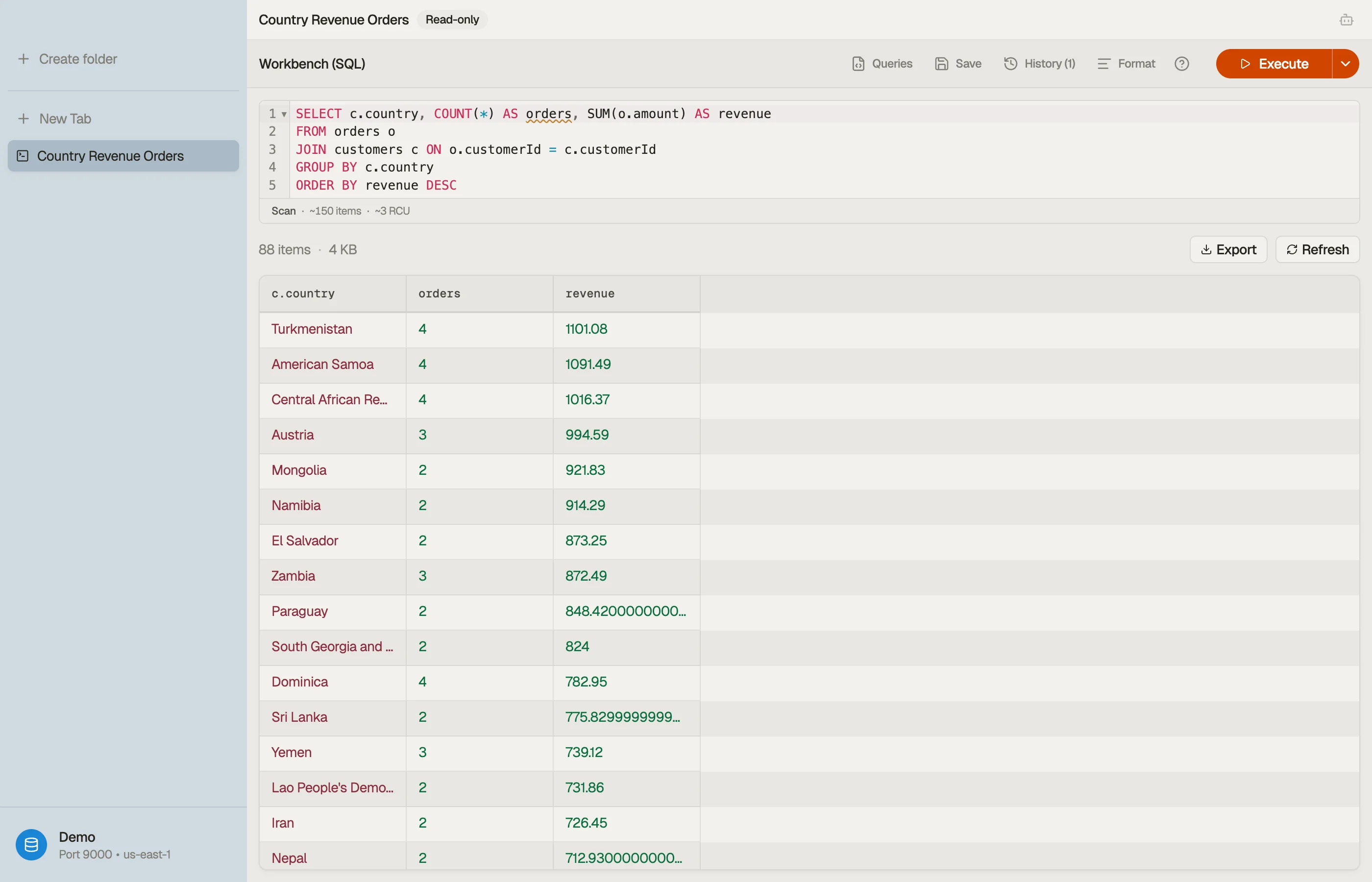

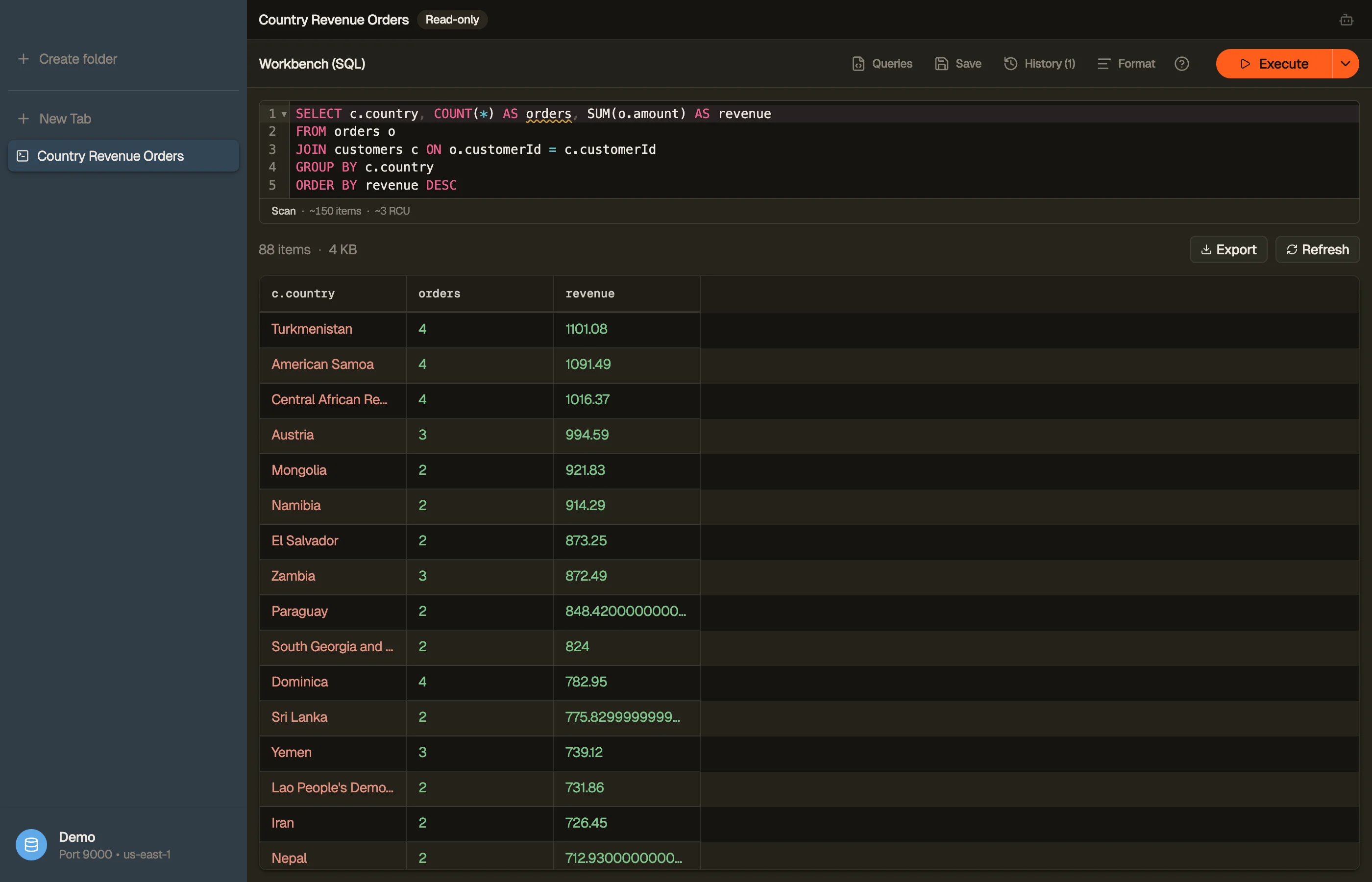


When a plan is available, the Workbench preview identifies Scan versus Query
and the index; the RCU estimate appears only when table metadata supports it. An
ordinary partition Query shows no RCU.
If you've hit the wall where the console's PartiQL editor stops, the
SQL for DynamoDB guide explains what works and what
doesn't, the DynamoDB JOIN guide shows how the Workbench
joins two tables, and the GROUP BY guide covers
aggregating without a GROUP BY clause.
An AI agent on your keys, and MCP for the agent you already use
The console ships Amazon Q, a hosted assistant that answers AWS questions from
the console chrome (aws.amazon.com/q/developer, checked 2026-07-29). DynoTable's
agent is a different kind of tool. It runs on Amazon Bedrock through your own
AWS credentials, so prompts, schema and rows never leave your AWS boundary, and
you pay AWS at cost with no markup. It reads your real key schema and GSIs
before it queries, prefers a Query over a Scan when your keys allow it, and
drafts writes as a diff you approve; nothing is committed without your say-so.
The AI chat docs cover setup, models and permissions.
If you already work with Claude Code, Cursor or Codex, point that agent at your tables instead: DynoTable exposes them over MCP, with a scope you pick per connection (read-only, read + stage, or full). External agents never write directly. Their changes land in the same staging area as a reviewable diff, and you commit. The MCP setup guide has the details, and the Free plan serves read-only MCP with no time limit.
Built for daily DynamoDB work
Day-to-day speed is mostly small things repeated hundreds of times, and this is where a desktop client separates from a browser tab:
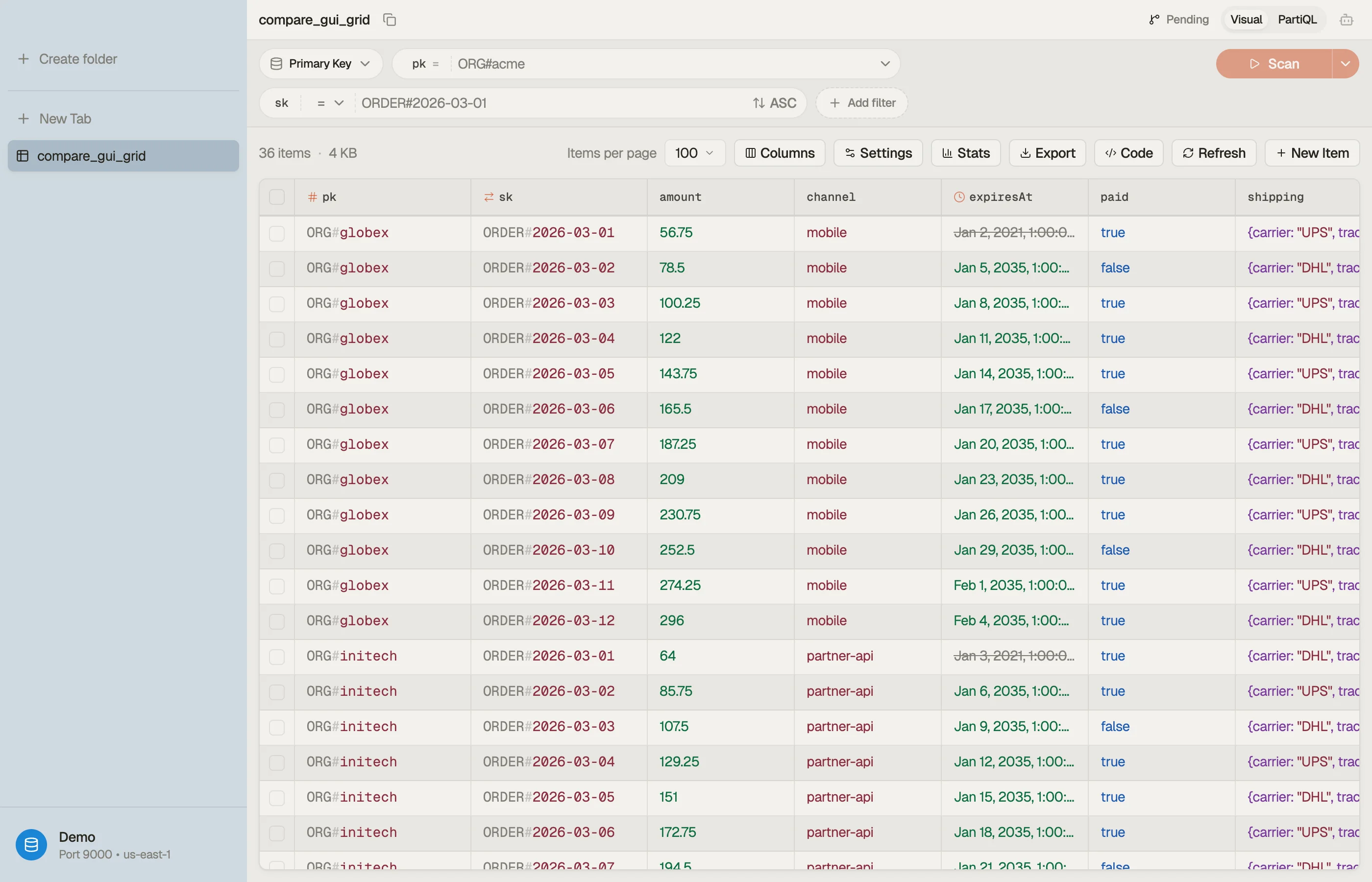
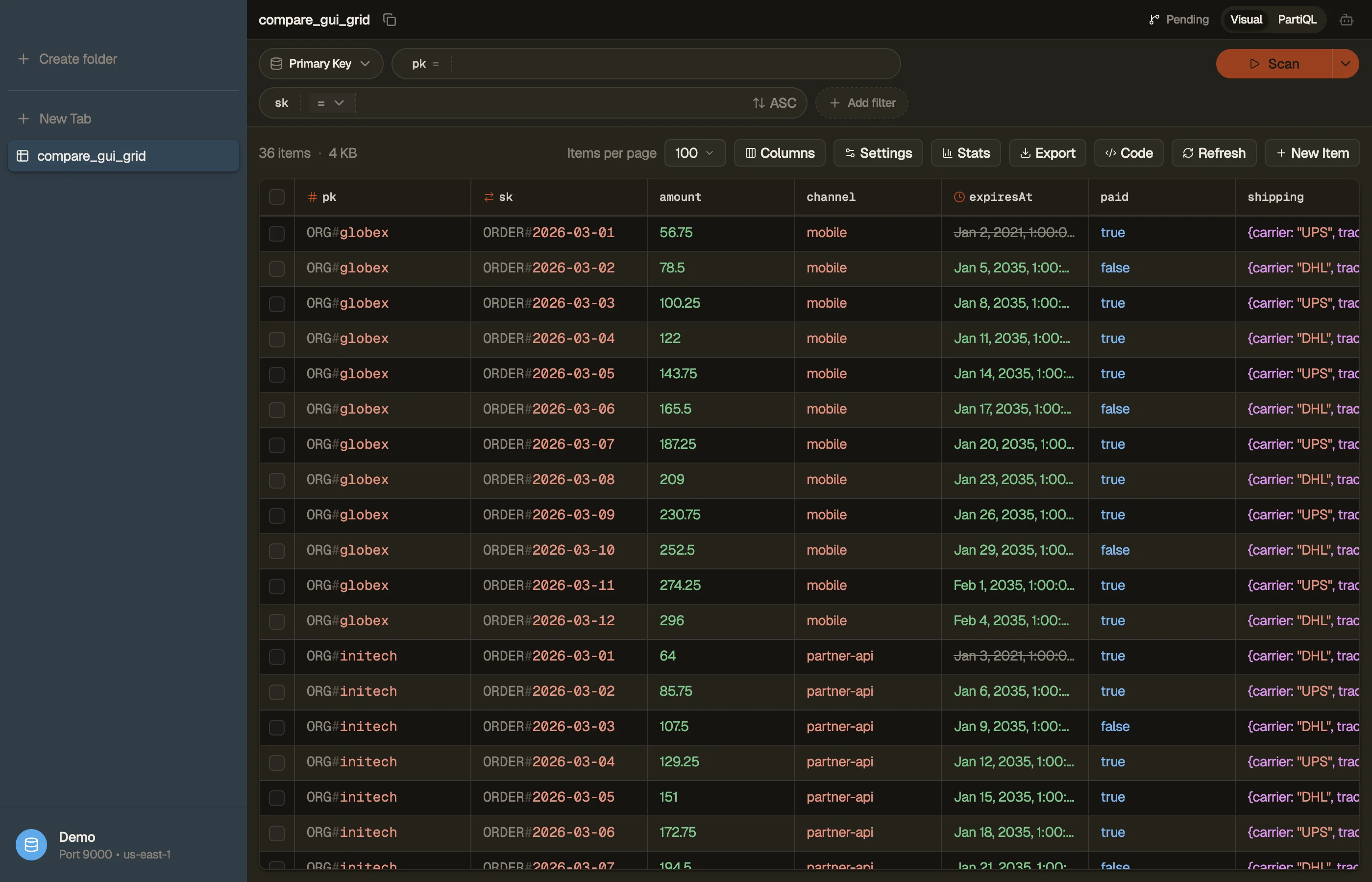
- Tabs and folders: keep tables, queries and item editors open side by side, group them into folders, and get the whole workspace back when you restart.
- Saved queries: one query library across PartiQL and SQL, so the statement you tuned last sprint is a keystroke away instead of rebuilt from memory.
- Profile and region switching: every profile from your
~/.awsconfig, switchable with ⌘P (or ⌘1–⌘9). No re-sign-in, no role-switch dance. - Autocomplete: filters suggest attribute names from your actual items, and the query editors complete table names and SQL as you type.
- Keyboard-first: ⌘K opens anything — a table, a saved query, a command.
- Staged writes: an item edit, a staged delete or an agent-drafted change queues in a per-table staging area as a diff you review and commit. Console edits save the moment you click.
- DynamoDB Local: point a profile at localhost and browse local tables like any region. The downloadable DynamoDB runs "without accessing the DynamoDB web service" (AWS docs), and the web console shows only the web service, so local tables are invisible to it.
Vector search is the newest of these, and the console deserves its due: it creates a vector index from a table's Indexes tab, and Explore items has a Search mode that runs one, with an index picker and a Top K. What it does not do is produce the vector. AWS's own launch walkthrough generates the query embedding outside the console and then "paste[s] the query vector into the Search vector field", and the guide is blunt about the stored side: "DynamoDB does not recompute embeddings for you. If you change the source content that produced an embedding … the stored vector does not update automatically" (working with vector search, checked 2026-09-15). PartiQL is no way round it: "Vector indexes are not accessible through PartiQL" (requirements). What the console leaves you is a script — call an embedding model, write the vector back, redo it whenever the text changes. DynoTable closes that loop: bind an embedding model and its source attributes to the index once, then type a sentence instead of a float array, right-click a row for Find similar, and let each save rewrite that item's embedding from its new text. Vector search covers it, including what stays paid — creating an index is a control-plane write, and turning text into a vector calls Bedrock on your own account.
The busywork the console hands you
The console's item browser is a thin wrapper over the DynamoDB API, and the API has sharp edges. None of what follows is a console bug — a filter really does run after the read, and a page really is capped at 1 MB — but the console makes you handle each edge by hand, and a client can absorb them.
- Filters don't reduce what you pay for. A filter expression "is applied
after a
Scanfinishes but before the results are returned," so aScan"consumes the same amount of read capacity, regardless of whether a filter expression is present" (AWS docs). That is true in any client, DynoTable included. When a plan is available, DynoTable's preview identifiesScanversusQueryand the index; the RCU estimate appears only when table metadata supports it. An ordinary partitionQueryshows no RCU, while the console gives you no cost signal at all. The query vs scan guide covers why this matters. - Pagination is manual, 1 MB at a time. "A single
Scanrequest can retrieve a maximum of 1 MB of data," and "the absence ofLastEvaluatedKeyis the only way to know that you have reached the end of the result set" (AWS docs). In the console that means clicking through page after page to walk a table. DynoTable's grid follows the cursor for you and can run a query to the end of the result set; the pagination guide explains how the cursor works under the hood. - CSV export is one page at a time. AWS's own CSV-export documentation states it plainly: "you can export results one page at a time to a CSV file. If there are multiple pages of results, you must export each page individually" (AWS docs). DynoTable exports the whole result set in one pass, in CSV, JSON or NDJSON.
How to export a DynamoDB table to CSV without the page-by-page clicking
AWS's native CSV export is page-by-page. For NoSQL Workbench's Operation Builder, the docs are explicit: you "can export results one page at a time to a CSV file" and "must export each page individually" (AWS docs). The web console's Explore items view is page-oriented the same way: it scans a page of results at a time and you export the rows in front of you, so a full export of a large table still means filtering, paging, and downloading by hand.
DynoTable exports the whole result set of a query or scan in one go, filtered
views included, as CSV, a JSON array or NDJSON, in plain values or raw DynamoDB
JSON, and it streams the export so a million-row table doesn't need a
million-row's worth of memory. The longer-form options (AWS CLI, S3 export,
scripts) are covered in the export DynamoDB to CSV guide.
One gotcha worth knowing up front: DynamoDB's low-level API uses type descriptors
(S, N, B, BOOL, …) as tokens telling DynamoDB how to interpret each
attribute
(AWS docs),
so a naive CSV dump of DynamoDB JSON leaks {"S": "..."} wrappers unless the
tool flattens them (the data types guide explains the type
tags).
When the console is fine (and when it isn't)
The console is genuinely fine for occasional, small jobs: eyeballing a handful of
items, a one-off GetItem, creating a table, or checking a setting. If you open
DynamoDB once a week and never page past the first screen, you don't need
anything else.
It starts to hurt the moment your work is repetitive or analytical: paging through thousands of items, rebuilding the same filter every session, exporting a full result set, or answering a "how many / what's the total" question. That's where a dedicated client, and specifically the SQL Workbench, pays for itself.
Download DynoTable for macOS, Windows or Linux, point it at the same
profile and region you use in the console, and run a JOIN or GROUP BY you
couldn't express before. The trial is free for 30 days, no credit card required.
Paid Individual seats start at $9/mo billed annually ($108/yr); see
pricing for monthly and Team rates. DynoTable stays on the Free plan after the trial — browsing, PartiQL SELECT,
exports and MCP schema/item reads, with no time limit.
FAQ
Is there a better alternative to the AWS DynamoDB console?
Yes. DynoTable is a desktop DynamoDB client that adds what the console never had: a SQL Workbench for JOINs, GROUP BY and aggregates, an AI agent on your own Bedrock keys, MCP access for coding agents, staged writes, full exports, and tabs, folders and saved queries.
Why would I pay for a DynamoDB app when the AWS console is free?
DynoTable's Free plan is also free, with no time limit. Free includes browsing, PartiQL SELECT, data, code, and schema exports, and MCP schema/item reads; paid seats add the SQL Workbench, Smart Tables, writes, and AI.
Why can the DynamoDB console not run JOIN or GROUP BY?
The console queries with PartiQL, whose SELECT grammar is single-table with an
optional WHERE and ORDER BY, and the only aggregate function it supports is SIZE
(AWS docs).
DynoTable's SQL Workbench plans those queries on the client, compiling them down
to DynamoDB's real Query/Scan operations.
Do I need to migrate my data to use a console alternative?
No. DynoTable reads your standard AWS credential chain and points at the same regions and tables; your data stays in DynamoDB, so there's nothing to migrate.
Related
- Browse the full comparison hub for every DynoTable alternative.
- See also DynoTable as a DynamoDB GUI and the NoSQL Workbench comparison.
- Build queries fast with the free DynamoDB Expression Builder.
Last verified 2026-07-29. AWS, DynamoDB, Amazon Q and the AWS console are trademarks of Amazon Web Services; referenced here for identification only.