The DynamoDB Item Size Limit (400 KB)
A single DynamoDB item can hold at most 400 KB of data. Coming from MongoDB
(16 MB documents) or a relational row with no practical cap, that ceiling feels low —
and you tend to discover it the hard way, when a write that worked for months suddenly
fails with a ValidationException because one item finally grew too big.
The limit isn't arbitrary, and it isn't a quota you can raise. It's a modeling constraint, and the items that hit it are usually telling you the data was modeled wrong.
What is the maximum item size in DynamoDB?
DynamoDB caps a single item at 400 KB — a hard limit you cannot raise. The size counts attribute names plus values together, including every nested list, map, and set element. Items usually hit it through unbounded growth, like an ever-expanding embedded list; the fix is modeling, splitting the collection into separate items, not compression.
- 400 KB per item, hard cap. Not adjustable, not a soft quota.
- Size = attribute names + values, together. Long attribute names count, on every item.
- Nesting and sets count too. Lists, maps, and their nested values all add up.
- The usual cause is unbounded growth — embedding a list that grows without limit on a parent item.
- The fix is modeling, not compression. Split the growing collection into its own items under a shared partition key.
The problem: the item that grows forever
Say you track a fleet of vehicles, and you decide to store each vehicle's telemetry readings as a list on the vehicle item:
PK: VEHICLE#A1 readings: [ {ts, lat, lng, fuel}, {ts, lat, lng, fuel}, ... ]For a day or two it's fine. But readings arrive every few seconds and never stop, so
the list grows without bound. Eventually one more reading would push the item past
400 KB, and DynamoDB rejects the write with a
ValidationException: Item size has exceeded the maximum allowed size — you can no longer
record telemetry for that vehicle at all, because each update rewrites the whole item.
The bug isn't the size limit. It's modeling an unbounded one-to-many relationship as an embedded list. That only works when the "many" side is bounded and small.
What actually counts toward 400 KB
DynamoDB measures the item's total size as the sum of:
- Every attribute name, UTF-8 encoded. A 20-character name repeated across millions of items is both size and storage you pay for — this is why experienced modelers keep attribute names short.
- Every attribute value. Strings and binary by their byte length; numbers by a compact encoding; booleans and nulls by a tiny fixed cost.
- Nested structure. A list or map counts its own overhead plus the size of every element and key inside it, all the way down.
There's no separate per-attribute cap to plan around — it's the whole item against the 400 KB line. The AWS item-size documentation spells out the exact byte accounting.
Why the limit exists
Large items are expensive to move. DynamoDB reads are metered in 4 KB units, so a 400 KB item costs 100 RCU to read strongly — and reads, writes, and replication all get slower and pricier as items grow. The cap pushes you toward small, targeted items and away from the "fetch one giant blob" anti-pattern that NoSQL beginners reach for out of relational habit.
Modeling around it
For the fleet example, stop embedding. Give each reading its own item in the same partition as the vehicle, ordered by timestamp on the sort key:
PK: VEHICLE#A1   SK: READING#2026-06-27T10:00:05Z   lat, lng, fuel
PK: VEHICLE#A1 SK: READING#2026-06-27T10:00:10Z lat, lng, fuelNow no single item grows, writes never outgrow the cap, and a single Query on
VEHICLE#A1 still pulls a vehicle's readings back as one sorted
item collection. Bounded sub-lists (a handful of
tags, a fixed config block) are fine to embed; unbounded ones become items.
Checking item size in DynoTable
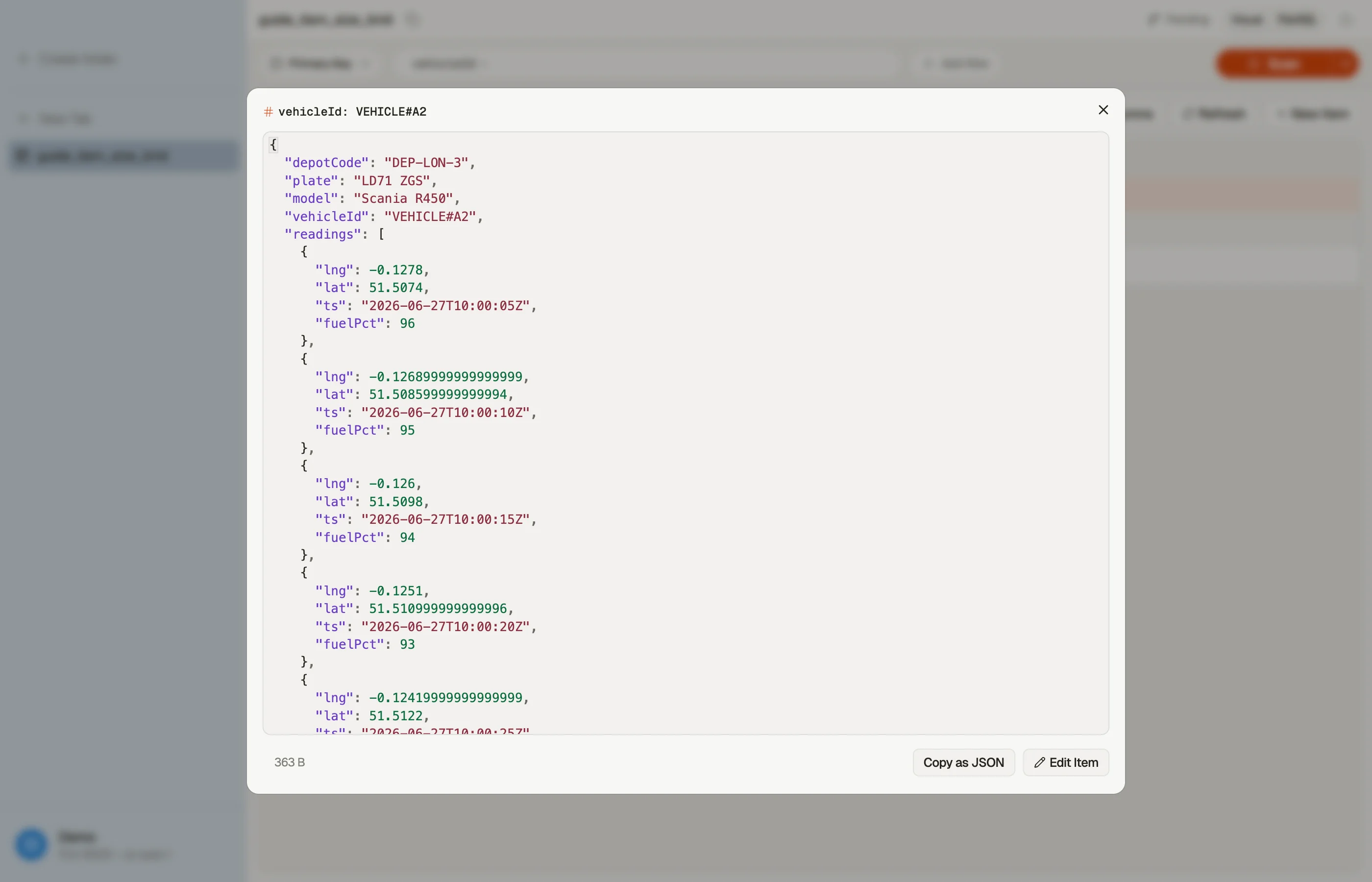
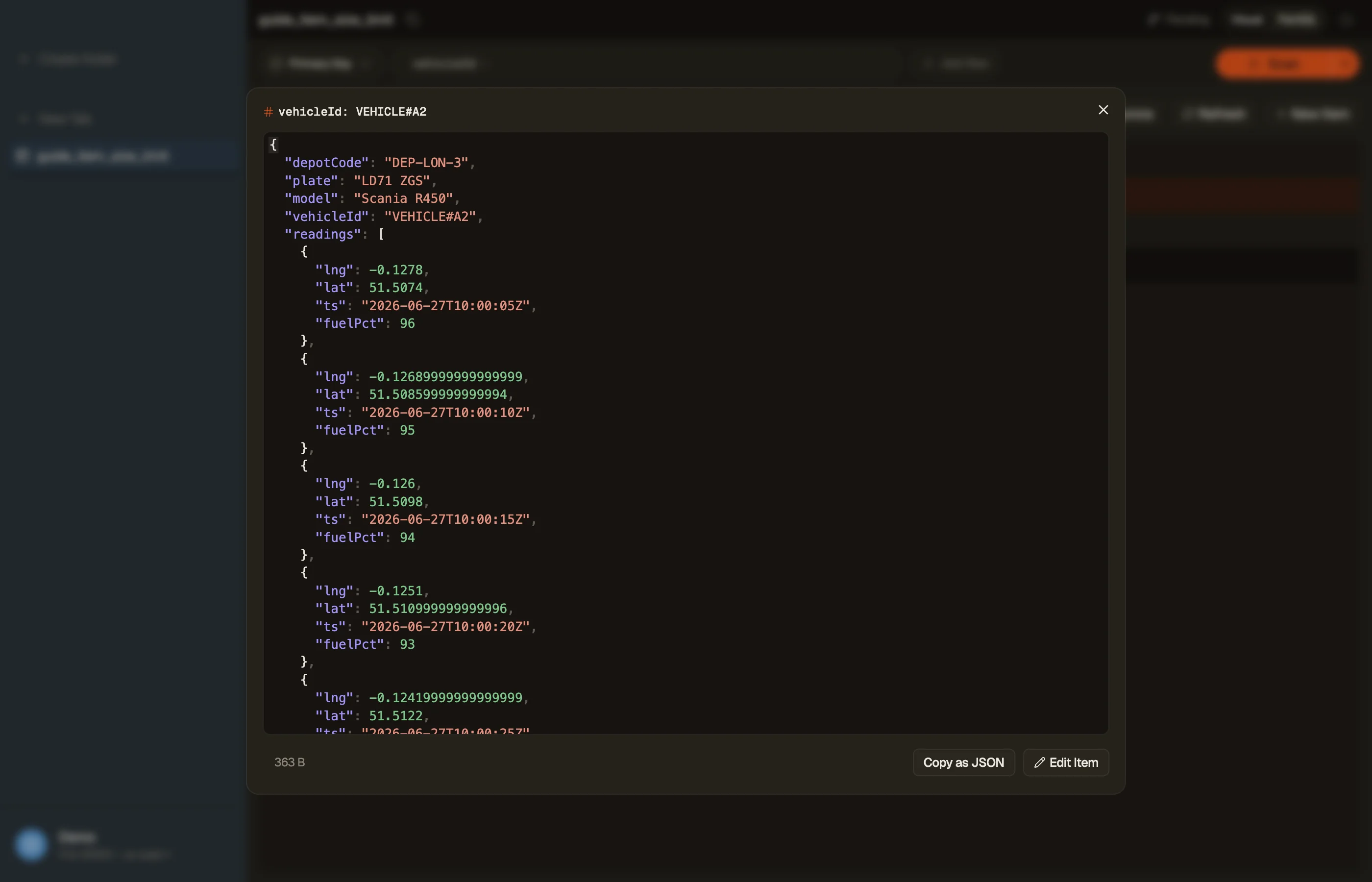
Before you commit to a shape, weigh a representative item. In DynoTable, open one in Quick View and it shows the item's byte size alongside its attributes — so you catch a too-heavy shape while browsing real data, at design time instead of at the failed write.
Prefer to stay in the browser? The DynamoDB item size calculator does the same from a pasted sample, reporting the exact KB and the RCU/WCU each read and write will cost.


Verified against DynamoDB
Sizing rules are easy to state and easy to get subtly wrong, so we checked ours against the only authority that matters: what DynamoDB actually bills.
The trick is that ConsumedCapacity reports units rather than bytes, and a write of N bytes costs ceil(N / 1024) WCU. Coarse in general — but exact on a boundary. An item built to land on precisely 1024 bytes must cost 1 WCU, and one built to land on 1025 must cost 2, so a single-byte error in the arithmetic flips the observed number.
| Item | Our bytes | Predicted WCU | Actual WCU |
|---|---|---|---|
| 1 KB exactly | 1,024 | 1 | 1 |
| 1 KB + 1 byte | 1,025 | 2 | 2 |
| 2 KB exactly | 2,048 | 2 | 2 |
| 2 KB + 1 byte | 2,049 | 3 | 3 |
| 4 KB exactly | 4,096 | 4 | 4 |
| Mixed types | 32 | 1 | 1 |
Six of six agree, and the boundary pairs are the ones that carry the proof: the 1,024 and 1,025 byte items differ by a single character of padding and DynamoDB charges them differently, exactly where our calculation says the step falls.
The practical consequence is the one that costs money. An item one byte over a kilobyte costs a whole extra WCU, and at 4 KB the same cliff appears on the read side — so trimming an item from 1,025 bytes to 1,024 halves its write cost, while padding it from 1,024 to 1,025 doubles it. Attribute names count toward the total, which is why shortening keys on a hot table is not micro-optimization.
Pitfalls + next steps
- Watch embedded lists that grow with traffic — they're the classic 400 KB time bomb. Bound them or split them out.
- Shorten attribute names on high-cardinality items — it's free size and storage back.
- Big values belong in S3. Store large blobs (images, documents) in S3 and keep only the key on the item.
- Related: denormalization and one-to-many relationships cover when to embed vs split.
Want to see real item sizes across a table at a glance? Download DynoTable and inspect your data directly.
Capacity figures verified 2026-07-26 against the live DynamoDB service in us-east-1 (pnpm content:verify-item-size).