Key Overloading in DynamoDB
Coming from SQL, a column means one thing forever: orders.created_at is always a
date, users.email is always an email. Key overloading throws that out. You
give the partition and sort key generic names — pk, sk — and let each item type
pour a different meaning into them. One table, many entities, one shape.
What is key overloading in DynamoDB?
Key overloading is storing many entity types in one table under generic key names like pk/sk, encoding the type in the value (USER#u_3001, INVOICE#2026-0014). The attribute name stays neutral so users, invoices, and events share one partition; the value carries the type, and a sort-key prefix lets one Query slice each entity via begins_with.
- Generic key names, typed values. Name your keys
pk/skand put the entity type in the value:pk = "TENANT#acme",sk = "USER#u_3001". The name is dumb; the value carries the type. - It's what makes single-table design work. Without overloading, a shared table
is just a junk drawer. With it, every entity sits in a partition you can
Query. begins_withis the payoff. A type prefix on the sort key lets oneQuerypull a whole entity, or one slice of it, with noScanand no filter.- The cost: readability. A raw
pk/skdump tells you nothing. You need a viewer that decodes the prefixes, or you'll be squinting at strings.
Why generic names beat real ones
DynamoDB gives you at most two key attributes per table, and a Query can only target a
single partition key. So if you name your key userId, only user items can live in
that table cleanly — everything else has to fake a userId or move to its own table.
Overloading sidesteps that. A neutral name like pk doesn't commit to any entity,
so a user, an invoice, and an audit event can all share the same key attribute and
the same table. The value, not the attribute name, says what the item is.
This is the move that turns single-table design from theory into something you can actually query. The shared table is the container; overloading is what lets distinct entities coexist inside it.
A multi-tenant example
Say you run a SaaS billing product. Each tenant has members, invoices, and an audit trail. Instead of three tables, put all of it in one and overload the keys:
| pk | sk | attributes |
|---|---|---|
| TENANT#acme | META | name="Acme Inc", plan="team" |
| TENANT#acme | USER#u_3001 | email, role="admin" |
| TENANT#acme | USER#u_3002 | email, role="member" |
| TENANT#acme | INVOICE#2026-0014 | amount_cents, status="paid" |
| TENANT#acme | INVOICE#2026-0015 | amount_cents, status="open" |
| TENANT#acme | EVENT#2026-06-23T09:12Z | actor="u_3001", action="invite" |
Every row shares pk = "TENANT#acme", so they form one item collection — all
co-located, all reachable in a single partition read.
The sort-key prefix is doing the real work. It groups entities and orders them.
Query the overloaded collection
Because the type lives in the sort-key prefix, begins_with slices the partition by
entity without scanning anything:
Query pk = "TENANT#acme"  -- the entire tenant, every type
Query pk = "TENANT#acme" AND begins_with(sk, "USER#")  -- just members
Query pk = "TENANT#acme" AND begins_with(sk, "INVOICE#")  -- just invoices
You pay only for the items the condition matches, not the whole partition — the
opposite of a filtered Scan, where you pay to read rows
you then throw away. AWS calls this a key condition; it runs on the keys before
any data leaves the partition.
If you build that begins_with condition by hand, get the type tags right — a stray
USERS# instead of USER# returns nothing, silently. The
expression builder generates the
KeyConditionExpression and the ExpressionAttributeValues map so the prefixes
match what you actually wrote.
Overload the index too
The same trick applies to a GSI. Give it generic key names — gsi1pk, gsi1sk —
and let each entity write whatever it needs. One index then answers patterns the
base table can't.
| pk | sk | gsi1pk | gsi1sk |
|---|---|---|---|
| TENANT#acme | INVOICE#2026-0015 | STATUS#open | 2026-06-30 |
| TENANT#acme | INVOICE#2026-0014 | STATUS#paid | 2026-06-12 |
| TENANT#beta | INVOICE#2026-0099 | STATUS#open | 2026-06-25 |
Now Query gsi1 WHERE gsi1pk = "STATUS#open" lists every open invoice across all
tenants, due-date-ordered — a cross-partition view the base table's tenant-scoped
keys could never serve. A different entity can reuse gsi1 with its own meaning
(say gsi1pk = "ROLE#admin"), so one index covers several reads. Just remember a
GSI is eventually consistent — its writes lag the base table.
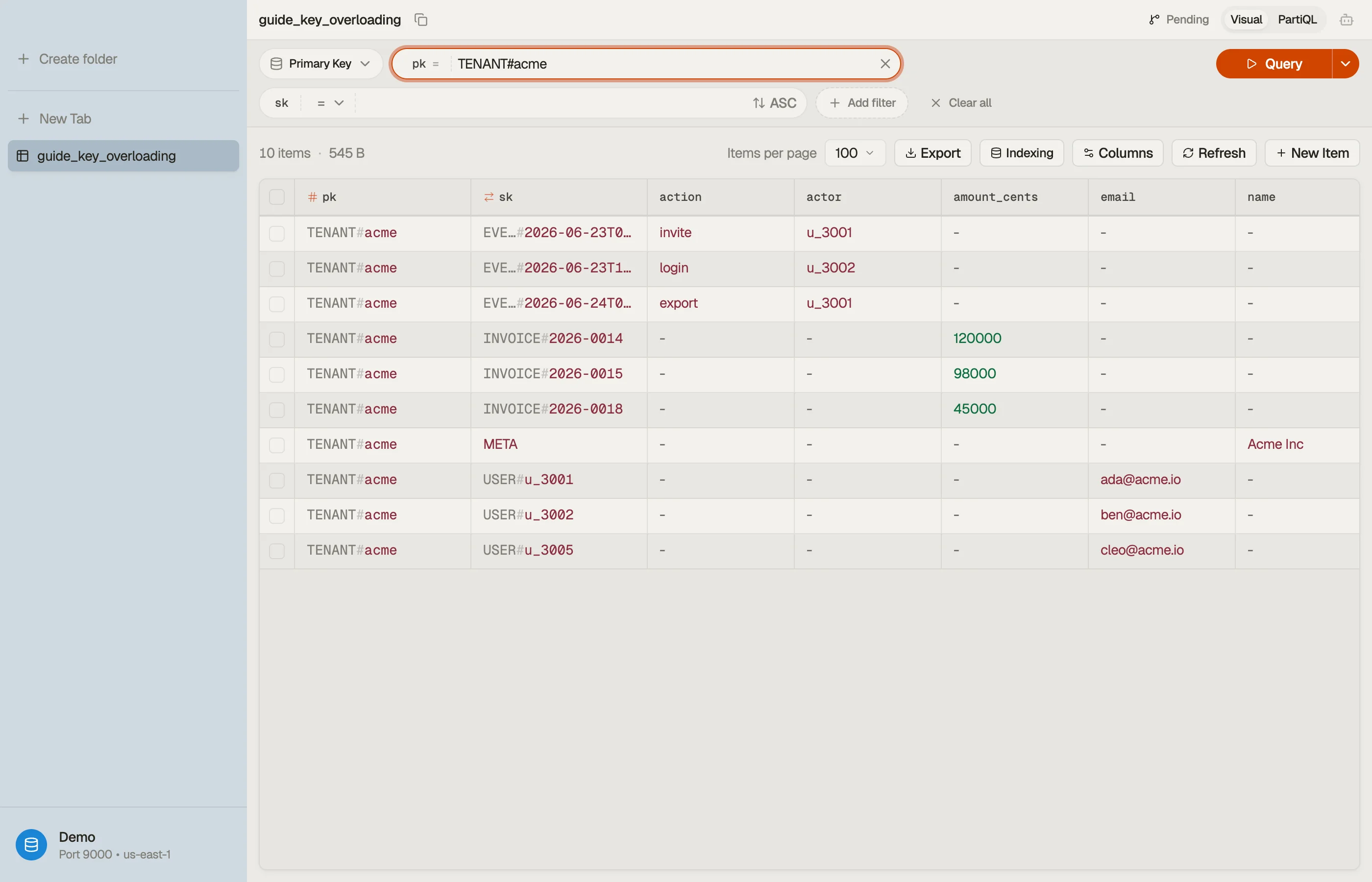
Do it in DynoTable
Raw overloaded keys are hostile to read: INVOICE#2026-0015 and
EVENT#2026-06-23T09:12Z blur together in a flat list. A viewer that groups by
partition and surfaces the prefixes turns the junk drawer back into entities.



Pitfalls
- Pick delimiters once and never change them.
#is the convention. Mixing#and:across entities breaksbegins_within ways nothing warns you about. - Don't overload values that need range math. A sort key of
INVOICE#2026-0015sorts lexically, not numerically — zero-pad ids and use ISO-8601 dates so string order matches the order you mean. - Reserve the prefix namespace. Two entity types that both start
USER(sayUSER#andUSERGROUP#) will collide underbegins_with(sk, "USER"). Make prefixes unambiguous from the first character. - Plan the read before the keys. Overloading serves access patterns you've enumerated. If you don't know your reads yet, see single-table design first — the keys are downstream of the queries.
Map out a partition, then download DynoTable to browse your own
overloaded keys and watch one Query pull a whole tenant back at once.
Query cost on an overloaded partition
Listing every member under TENANT#acme with
begins_with(sk, "USER#") reads only user rows — not invoices or events —
because the key condition filters before data leaves the partition. On a tenant
with 200 users (2 KB each) and 5,000 audit events (1 KB each), that query
touches ~400 KB (~100 eventually-consistent RCU). A Scan on the whole table
to find users would meter every item in every tenant.
Paste representative overloaded items into the item-size calculator, then estimate list queries in the pricing calculator.
Design with the single-table tool
Enter entities (Tenant, User, Invoice, Event) and access patterns ("list users
for tenant", "open invoices across tenants") into the
single-table design tool. It proposes
pk/sk templates and GSI keys that match the overload prefixes you will use
in production — before you commit CloudFormation.
Emit queries from patterns
Once prefixes are fixed, build key conditions in the
expression builder and export a paginated
program from the query builder. Prefix typos
(USER# vs USERS#) return empty sets without error — generated expressions
reduce that silent failure mode.
Entity type prefix registry
Maintain a short internal table developers can reference:
| Entity | Sort prefix | Example SK | Query slice |
|---|---|---|---|
| Tenant meta | META | META | Single-item get |
| User | USER# | USER#u_3001 | begins_with(sk, "USER#") |
| Invoice | INVOICE# | INVOICE#2026-0015 | begins_with(sk, "INVOICE#") |
| Event | EVENT# | EVENT#2026-06-23T09:12Z | time-ordered tail with descending read |
New entity types must choose prefixes that do not collide under begins_with of
existing prefixes — USER# and USERGROUP# both match begins_with(sk, "USER") unless you lengthen or delimiter-separate carefully.