Import
DynoTable imports CSV, JSON, and NDJSON files into an existing table, the other half of Export. The whole file is checked before a single row is written, so a bad file fails with line numbers instead of leaving half your data imported.
Open it with the Import button in the table toolbar. Import writes to the table, so it needs a Trialing or Active license.

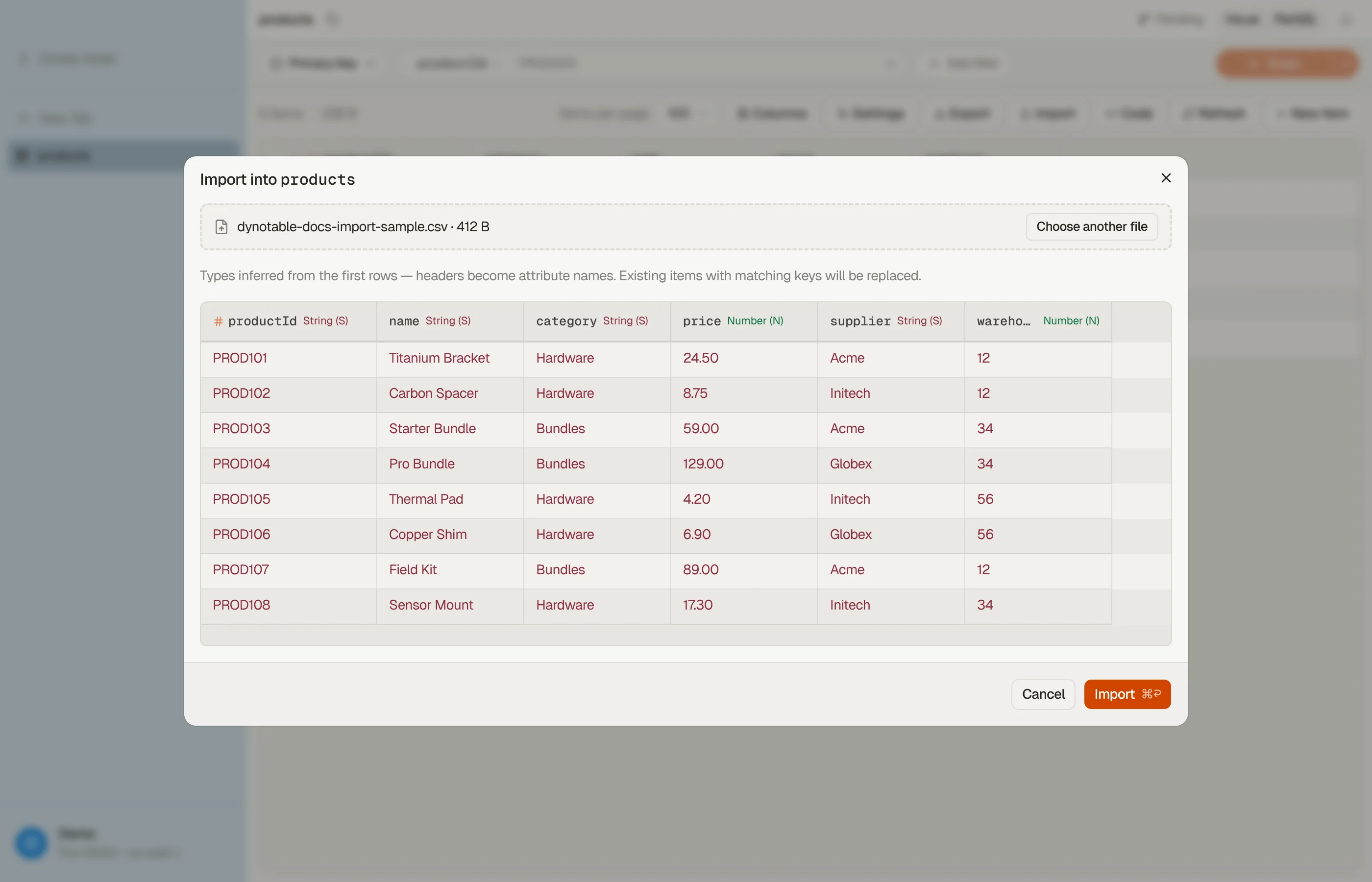

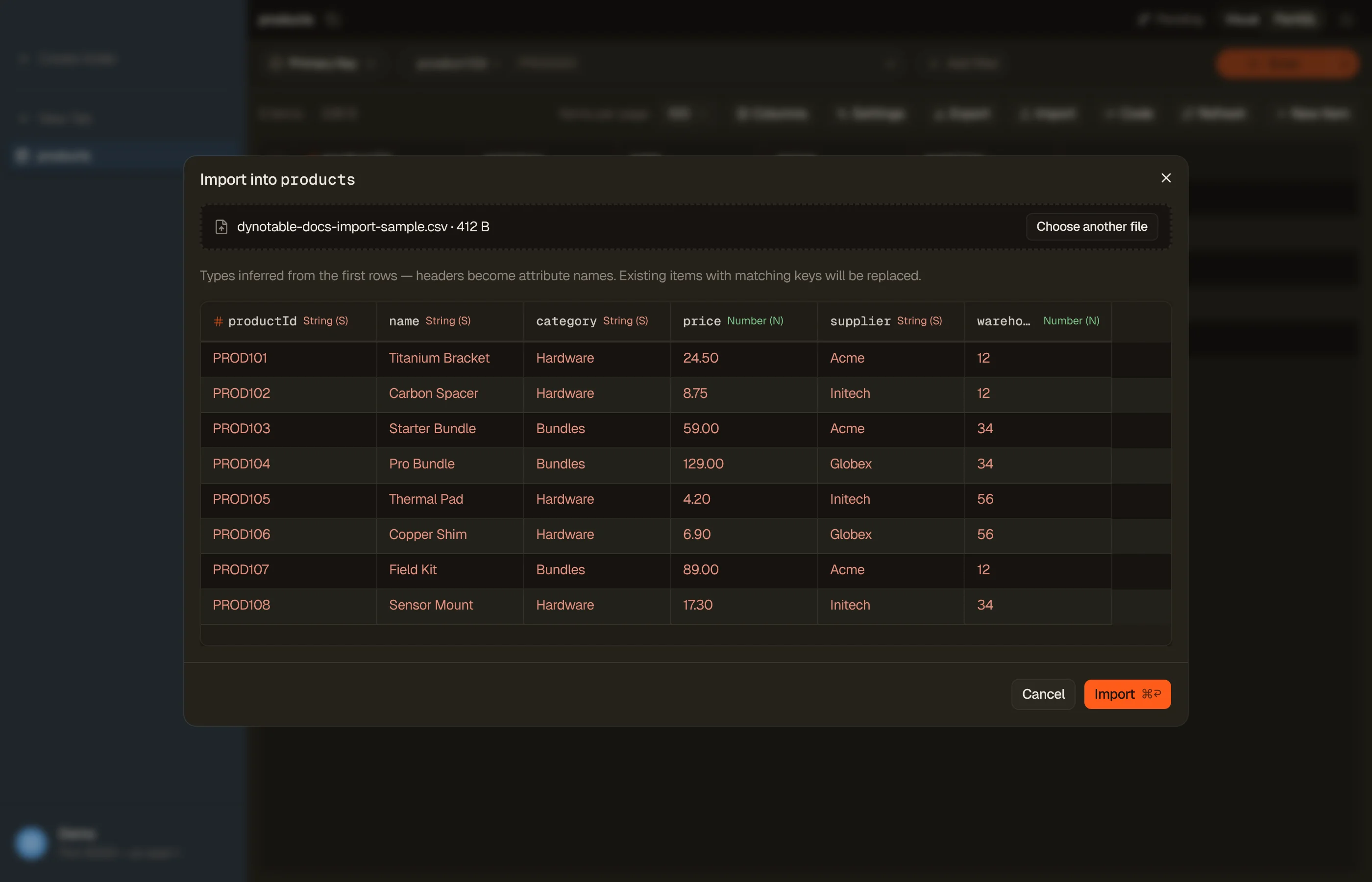
Import loads data into a table that already exists. It never creates one. Make the table (and its primary key) first, then import into it.
Two levels of fidelity
Exact: JSON / NDJSON written in the
marshalled (DynamoDB-JSON) wire form. Nothing is guessed: every
value already carries its own type, so an export taken in this format imports
back unchanged. This is the format to use when the data matters.
Convenience: CSV and plain (unmarshalled) JSON. These carry no type
information, so DynoTable infers a type per column and shows you what it picked
before you commit. Convenient, and lossy in documented ways: see
Where convenience files lose information.
Columns and types
The file's headers become attribute names. The preview lists every column with the type DynoTable inferred. For CSV and plain JSON, right-click a column header to rename it if the header doesn't match your attribute name, or to change its Data type when the inferred one isn't what you want: a product code made only of digits, say, that has to stay text rather than become a number. Marshalled DynamoDB-JSON files carry their own names and types, so there is nothing to adjust.
The type list only offers what that column's values can actually become, so a column of plain text won't offer Map or List. If a column has just one possible type, no list appears. There's no mapping screen beyond this.
Your file must supply the table's full primary key. A row missing a key attribute, or carrying the wrong type for one, is refused by name.
Nothing is written until the whole file passes
Import reads the file twice. The first pass validates every row and writes nothing; only if the file passes does the second pass write.
- Problems are reported with line numbers (or item positions, for a JSON array), up to 20 at a time.
- Two rows with the same key in one file are refused, and you're shown both positions. DynamoDB would silently keep only the last one.
- Fix the file and press Import again; the dialog stays on the file you picked.
Importing replaces matching items
An imported row replaces any existing item with the same primary key, attribute for attribute. It isn't merged into it. Attributes the old item had and the file doesn't are gone.
Import also does not go through staging, so there's no review step and no revert. Unlike a staged edit, an import can't be undone from the app's history. On data you care about, import into a copy of the table first and check the result.
Limits
| Limit | Value |
|---|---|
| CSV / NDJSON file size | 250 MB |
A single .json array | 50 MB (use NDJSON above that) |
| Rows per import | 2,000,000 |
| One item | 400 KB (DynamoDB's own ceiling) |
A .json file holds one big array that has to be parsed whole, which is why its
cap is lower. NDJSON — one item per line — streams instead, so it takes the full
250 MB.
Where convenience files lose information
These apply to CSV and plain JSON only. The marshalled DynamoDB-JSON format has none of them.
- Types are inferred from a sample of roughly the first 200 rows. A column that looks numeric there but turns non-numeric later in the file is refused during validation. The fix is to correct the file.
- Sets and binary can't be expressed in CSV, so they can't be imported from one.
- Binary exported as plain values re-imports as a String. An export with plain values writes a binary attribute as its base64 text, and import never infers binary from text. To round-trip binary, export with DynamoDB-JSON values.
- Empty cells are skipped, not written as empty strings. An item simply won't have that attribute.
- Maps and lists survive the trip. Export writes them into a CSV cell as JSON text, and import recognises that text and rebuilds the structure. If a column is genuinely text that happens to look like JSON, the preview shows what it became and you can set that column's Data type back to String.
- Very large numbers in plain JSON lose precision before DynoTable ever sees them. That's JSON's own limitation. Use DynamoDB-JSON for IDs and amounts that must stay exact.
- Spreadsheet-safety marks are handled on the way back in. Export prefixes
cells that a spreadsheet would treat as formulas with an apostrophe. On
import,
'-5becomes the number-5and'+7comes back as the text+7, but a genuine formula like'=SUM(A1)keeps its apostrophe, permanently. Removing it would re-arm the thing the mark exists to defuse.
Embedding rows as they're imported
If the table has a vector index with an embedding model and source attributes bound to it, the dialog offers Embed while importing. Turn it on and each row is embedded as it's written, so imported items are searchable by meaning straight away instead of needing a second pass. The option names the index and model it would use, and the per-row text limit.
It's opt-in for each run and never blocks the import: a row whose text is too long, or that the model refuses, is written without a vector and counted, and the summary says how many arrived un-embedded and why. Embeddings the file itself supplies are kept as they are. Embedding calls are billed by Bedrock, so this needs AI configured and an active plan, like every other AI feature.
Progress, cancelling, and failures
A running import appears in the Activity panel at the bottom of the sidebar with live progress, and keeps going while you work in other tabs. You can Stop it from there; rows already written stay written.
If DynamoDB throttles the table hard enough that some rows can't be written even after retries, the import finishes and tells you how many rows could not be written. Re-running the same file is safe: rows that did land are simply written again with the same values.
A clean import clears itself from the Activity panel after a few seconds. An import with failed rows, skipped embeddings, a stop, or an error stays until you dismiss it: that row is the only record of something you must act on. An import that finishes while you watch it in the Activity popup stays there until you click Done.