Many-to-Many Relationships in DynamoDB
A student enrols in many courses; a course holds many students. In SQL you reach
for a join table and a four-way JOIN.
DynamoDB has no joins, so the relationship has to live in the keys — and the
trick is to store each enrolment edge in a shape that both sides can Query
directly.
This guide walks the students ↔ courses problem end to end: the access patterns, the adjacency-list pattern that solves them, an original key schema you can copy, and how to read both directions back without ever scanning the table.
How do you model a many-to-many relationship in DynamoDB?
DynamoDB has no joins, so you model a many-to-many relationship with the pattern: store each link as its own edge item keyed by one side, then add an inverted GSI that swaps the keys. A single edge, written once, then answers queries from both directions cheaply.
- Store each enrolment as its own edge item, not a list attribute on either side.
- Key the edge by the student (
PK = STU#…,SK = ENROLL#CRS#…) so oneQueryreturns a student's whole course list. - Add an inverted GSI that swaps the roles (
GSI1PK = CRS#…) so the same edge also answers "who's in this course?". - One edge, written once, reads cheaply both ways — that's the entire game.
Frame the access patterns first
DynamoDB modelling is access-pattern-first: you decide the reads before you pick a single attribute name. A many-to-many relationship almost always has two symmetric reads plus the entity lookups:
- Get a student's profile, and list every course that student is enrolled in.
- Get a course's metadata, and list every student enrolled in that course.
- Look up a single enrolment edge — to update a grade or drop the course.
The pain: the two list reads point in opposite directions across the same set of
edges. A naive design serves one cheaply and forces a Scan for the other — the exact
footgun covered in Query vs Scan.
The job is to make both directions a single Query.
Use the adjacency-list pattern
DynamoDB's own guidance for relationships is the adjacency list: model each relationship as an item whose partition key is one endpoint and whose sort key is the other.
AWS documents this on the Best Practices for Managing Many-to-Many Relationships page of the DynamoDB Developer Guide.
Why keys and not a second table? Because the primitive DynamoDB gives you is a Query
against a single partition.
A Query reads a contiguous range of sort-key values under one partition key in one
billed operation — that is the only "join" the engine offers.
To get a relationship that reads cheaply from both sides, you duplicate the edge: write it once keyed by the student, then use a secondary index to project the same edge keyed by the course.
This is the overloaded-key thinking from Single-Table Design, applied to a relationship instead of a parent-child hierarchy.
The shape is two stacked views of the same edge — the base table keyed by student, the inverted GSI keyed by course:
Each edge is written once on the base table and projected into the GSI with its keys
swapped, so a Query against either partition reads the relationship cheaply.
The lineage goes back to the 2007 Amazon Dynamo paper: the partition key is the unit of distribution, and single-key access is the fast path.
Relationships in DynamoDB are an exercise in bending many-to-many reads into that fast path.
Work the example: students ↔ courses
Use one table with generic keys, PK and SK, and encode the entity type in the
value. The enrolment edge is the heart of it:
| PK | SK | attributes |
|---|---|---|
| STU#a91 | PROFILE | name, year, major |
| STU#a91 | ENROLL#CRS#math204 enrolledOn, grade | |
| STU#a91 | ENROLL#CRS#cs101 | enrolledOn, grade |
| CRS#math204 | METADATA | title, credits, term |
| CRS#cs101 | METADATA | title, credits, term |
A single Query PK = "STU#a91" returns the student's profile and every enrolment
in one read. Narrow it with SK begins_with "ENROLL#" to get just the course edges.
That solves "list a student's courses".
But "list a course's students" points the other way — and the base table can't answer it, because the student id is in the partition key, not the sort key.
Add an inverted global secondary index that swaps the roles. Give the edge items a
generic GSI1PK/GSI1SK pair holding the course on the partition side and the student
on the sort side:
| PK | SK | GSI1PK | GSI1SK |
|---|---|---|---|
| STU#a91 | ENROLL#CRS#math204 | CRS#math204 | STU#a91 |
| STU#b30 | ENROLL#CRS#math204 | CRS#math204 | STU#b30 |
| STU#a91 | ENROLL#CRS#cs101 | CRS#cs101 | STU#a91 |
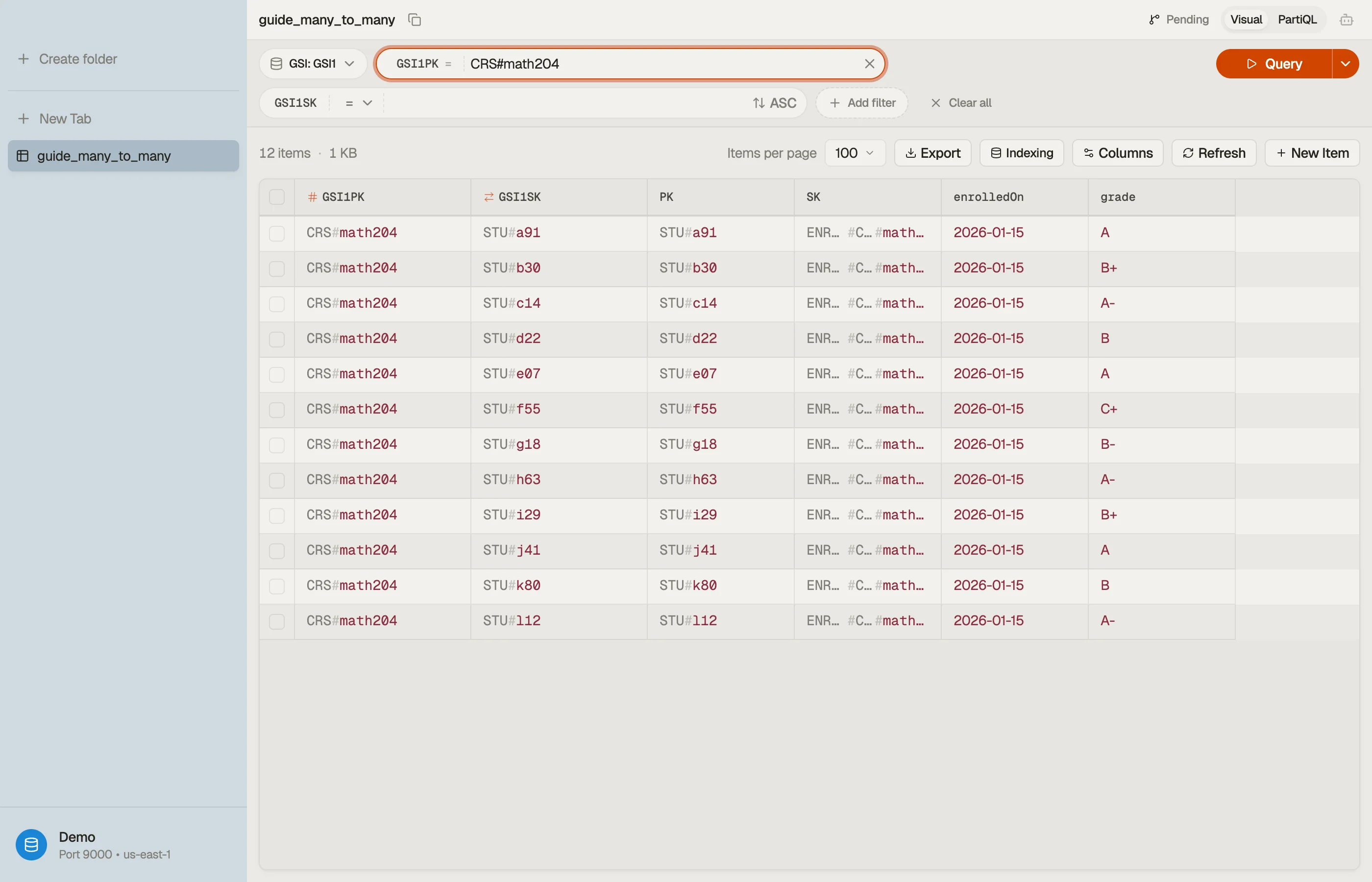
Now Query GSI1 WHERE GSI1PK = "CRS#math204" lists every student in that course — the
read the base table couldn't serve. One edge item, written once, answers both
directions.
It has to be a GSI, not an LSI: the course partition is entirely different from the student partition, and an LSI shares the base table's partition key.
The index spans multiple partitions, so it must be global — see GSI vs LSI.
One catch: GSIs in DynamoDB are populated asynchronously. A brand-new enrolment can
take a moment to appear in the CRS#… direction.
Treat the course-roster read as eventually consistent — which the Developer Guide calls out explicitly for global secondary indexes.
Write and read it in DynoTable
Writing the enrolment means setting four key attributes plus the edge's own data. The
condition that stops a student from enrolling twice in the same course is an
attribute_not_exists(PK) guard on the composite key.
That's exactly the kind of condition you can assemble visually with the
DynamoDB Expression Builder instead of
hand-writing the ExpressionAttributeNames and placeholder values.
In DynoTable you point a Query at GSI1, set GSI1PK = "CRS#math204", and the
roster comes back as a table you can read, sort, and edit in place — both directions of
the relationship browsable from one schema.


Pitfalls and next steps
- Don't store one side as a list attribute. A
courseIdsarray on the student item feels tidy until a course needs its roster, the array hits the 400 KB item ceiling, or two enrolments race and clobber each other. Discrete edge items scale and update independently. - Keep edge data on the edge. The enrolment's
gradeandenrolledOnbelong on the edge item, not duplicated onto the student or course — there's exactly one row per (student, course) pair to update. - Mind GSI propagation. The inverted-index direction is eventually consistent, so a read immediately after an enrolment may lag by a fraction of a second.
- Project only what the roster needs. A
KEYS_ONLYor narrow projection keeps the GSI small when the roster view only needs ids.
To go deeper on the surrounding patterns, read Single-Table Design for overloaded keys and GSI vs LSI for when the inverted index has to be global.
Then download DynoTable to model the students ↔ courses schema for real — write the edges, build the condition with the Expression Builder, and query both directions of the relationship without a single scan.