DynamoDB Transactions
A DynamoDB transaction groups several writes into a single all-or-nothing operation: either every action commits, or none does. It's how you keep two related items from drifting apart when a write half-fails.
In the audit-log scenario, every event you append should also bump a per-tenant
eventCount. If the event lands but the counter doesn't — or vice versa — the
log and the count disagree forever. A transaction makes that impossible.
Does DynamoDB support transactions?
Yes. DynamoDB supports ACID transactions through TransactWriteItems and
TransactGetItems, which group up to 100 actions into one all-or-nothing
operation across one or more tables. Either every write commits or none does, so
related items can't drift apart. Transactional writes cost twice the capacity of
normal writes, and a failed condition or conflict cancels the whole request.
TransactWriteItemsgroups up to 100 write actions across one or more tables, all-or-nothing. The aggregate item size can't exceed 4 MB.- Actions are
Put,Update,Delete, andConditionCheck. AConditionCheckasserts something about an item you aren't writing. - It costs double. A transactional write consumes twice the capacity of a normal write — DynamoDB prepares then commits.
- Conflicts and failed conditions cancel the whole thing with a
TransactionCanceledException; nothing partial is left behind.
The problem: two writes that must agree
You want each new audit event to also increment the tenant's running count. Done as two separate calls, any failure between them corrupts your data:
PutItemthe newEVENT#…item — succeeds.UpdateItemtoADD eventCount 1— times out.
Now the log has one more row than the counter claims. Retrying step 2 blindly risks double-counting; not retrying leaves them inconsistent. There's no safe recovery because the two writes were never linked.
Coming from SQL, you'd wrap both in BEGIN … COMMIT. DynamoDB's answer is a
single transactional request that carries both writes together.
How TransactWriteItems works
Per the
AWS Developer Guide,
TransactWriteItems "groups up to 100 write actions in a single all-or-nothing
operation" targeting up to 100 distinct items, and "the aggregate size of the
items in the transaction cannot exceed 4 MB." The actions complete atomically —
all succeed or none do.
You can mix four action types in one transaction:
Put— create or replace an item.Update— edit attributes (includingADDfor our counter).Delete— remove an item by key.ConditionCheck— assert a condition on an item you are not otherwise writing (e.g. "this tenant is still active").
Two more rules bite in practice. First, transactions consume double the capacity of the equivalent non-transactional writes — DynamoDB does a prepare phase and a commit phase. Second, you can't target the same item twice in one transaction, and transactions can't be performed against indexes.
A worked example: append + count, atomically
Back to the audit log. Appending an event for tenant acme and bumping its
counter is one transaction with two actions:
| action | item | effect | |
|---|---|---|---|
| Put | TENANT#acme | EVENT#2026-06-24T09:14Z#a1 | write the new audit row |
| Update | TENANT#acme | COUNTER | ADD eventCount 1 |
If either action's condition fails — say a ConditionCheck that the tenant isn't
suspended — the entire request is cancelled with a TransactionCanceledException
and neither write happens. The log and the counter can never disagree.
The ConditionExpression on each action is the lever. To assert the event row
doesn't already exist (so a retry can't duplicate it) and the tenant is active,
you compose conditions like attribute_not_exists(SK) on the Put and
status = :active as a ConditionCheck.
Build and copy those typed condition expressions in the
DynamoDB Expression Builder instead of
hand-assembling ExpressionAttributeNames and :val placeholders — the
conditional-write mode emits exactly the shape TransactWriteItems wants.
For safe retries on a flaky connection, attach a client token: a repeated
TransactWriteItems with the same token within 10 minutes returns success
without re-applying the writes
(idempotency).
Do it in DynoTable
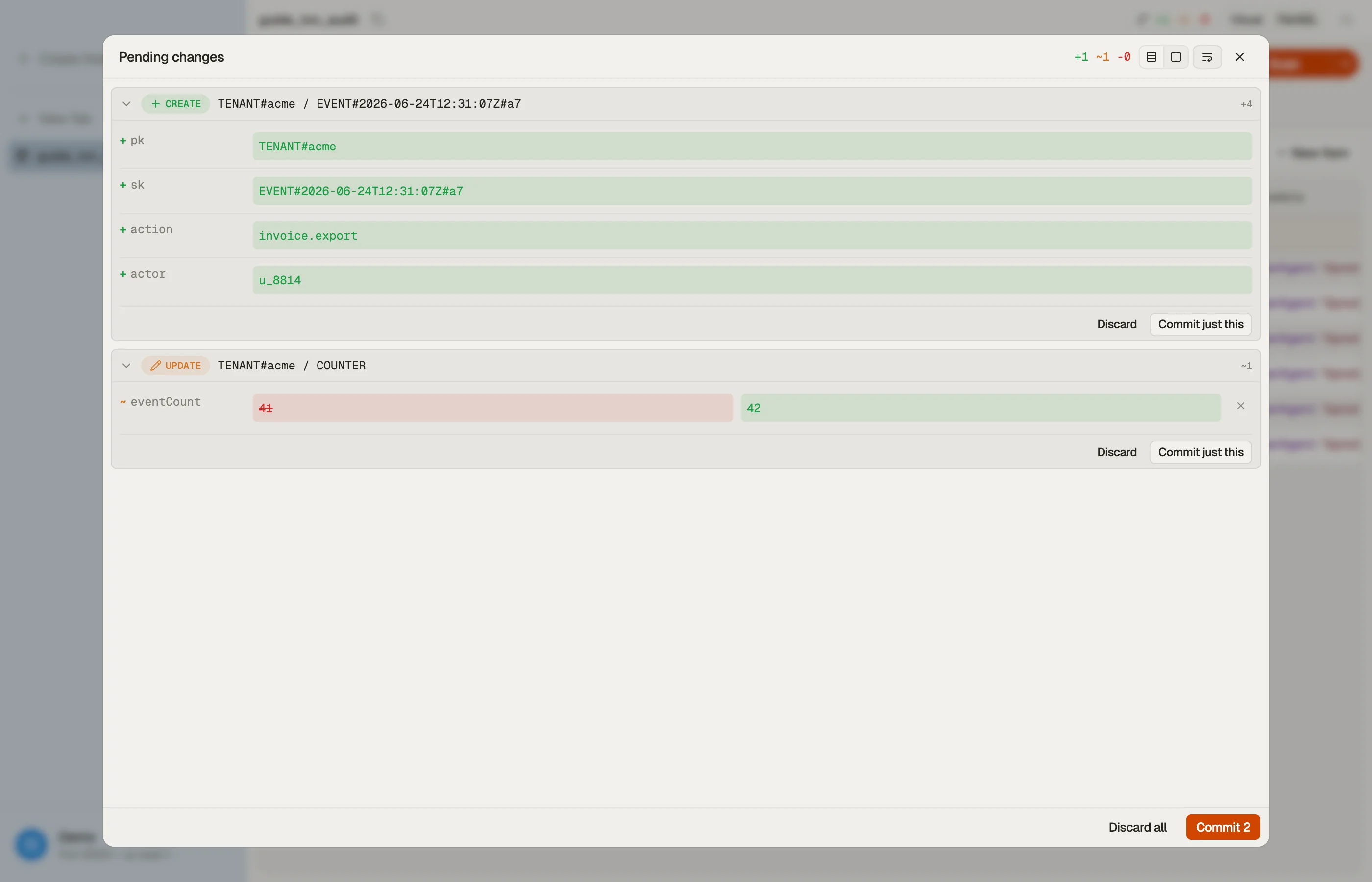
DynoTable uses transactions under the hood for its own writes: when you stage
several item edits and commit them, it sends them as TransactWriteItems with
optimistic-locking condition expressions, so your batch of edits is all-or-nothing
— you never half-apply a multi-item change.
That means you can edit the event row and the counter in the same staged batch, review the diff, and commit both atomically without writing any SDK code.


Pitfalls and next steps
- Budget for double capacity. A transactional write bills twice the WCU of a plain write — fine for the occasional consistency-critical pair, costly if you wrap every single write in a transaction. Use it where atomicity actually matters.
- Handle
TransactionCanceledExceptionexplicitly. It's returned for a failed condition or a conflict with another in-flight transaction on the same items. The cancellation reasons tell you which action failed — inspect them, don't blind retry. - Stream records aren't transaction-aware. Changes from one transaction propagate to Streams gradually and may interleave with others; consumers can't assume atomicity or ordering — see DynamoDB Streams.
- Not for high-throughput counters. A single hot counter under heavy concurrent transactional load will throttle; for that, look at atomic counters or sharding the counter.
Transactions are the tool for "these writes must agree." Once events are landing consistently, the next concern is reacting to them — that's DynamoDB Streams.
Download DynoTable to stage multi-item edits and commit them as a single transaction against your own table.