Enforcing uniqueness on multiple attributes in DynamoDB
DynamoDB guarantees uniqueness for exactly one thing: the primary key. There is
no UNIQUE (email) constraint, no UNIQUE (username), and nothing that spans
two attributes. Coming from SQL, that absence is the first surprise — and the
first place people quietly ship a race condition.
How do you enforce a unique constraint on multiple attributes in DynamoDB?
DynamoDB has no UNIQUE constraint beyond the , so you enforce uniqueness yourself: model each protected value as its own marker item whose key is that value, then write the record and every marker together in one TransactWriteItems, each put guarded by attribute_not_exists. The collision the engine already enforces becomes your constraint.
- There is no unique constraint — only the primary key is enforced unique by the engine. Every other "must be unique" attribute is your job.
- Model each uniqueness rule as its own item. A dedicated marker item whose key is the value you're protecting turns "is this email taken?" into a key collision the engine already enforces.
- Write them atomically with
TransactWriteItems. One transaction, each put guarded byattribute_not_exists, so all the markers and the real record commit together or none do. - Don't check-then-write. A read-before-insert is a textbook race; two concurrent signups both read "free" and both write.
Why the obvious approach is wrong
The instinct is to Query (or worse, Scan) for the email, see nothing, then
PutItem the new account. That's a check-then-act race.
Two people register ada@lovelace.io at the same millisecond. Both reads return
empty. Both writes succeed. You now have two accounts on one email — and nothing
in the table flags it.
A GSI on email doesn't save you either. GSIs are
eventually consistent, so the read that gates your write
can be stale by design. The fix isn't a faster check; it's making the write
itself refuse to land on a taken value.
Model each constraint as a marker item
The engine already enforces one uniqueness rule for free: you can't write two items with the same key. So encode every uniqueness rule as a key.
Alongside the real account item, write one marker item per protected attribute. The marker's partition key is the namespaced value. If the value is taken, the key exists, and a guarded put can't overwrite it.
For a signup that must keep both email and username unique, three items move
together — keyed in a single-table layout (see
single-table design):
| Item | PK | SK | Purpose |
|---|---|---|---|
| Account record | ACCT#a1f9c3 | PROFILE | The real account |
| Email lock | UNIQ#EMAIL#ada@lovelace.io | LOCK | Reserves the email |
| Username lock | UNIQ#HANDLE#ada | LOCK | Reserves the username |
The account's own PK is a generated id (ACCT#a1f9c3) — never the email — so
the user can change their email later without rewriting the primary key. The lock
items carry no profile data; they exist only so their key is occupied.
Write all three atomically
TransactWriteItems
applies up to 100 writes as one all-or-nothing unit. Guard each put with
attribute_not_exists(PK) so it fails if that key is already present.
If any one condition fails — the email lock, the handle lock, or the account
itself — DynamoDB rolls the whole transaction back and throws
TransactionCanceledException. No partial signup, no orphaned lock.
{
  "TransactItems": [
    {
      "Put": {
        "TableName": "accounts",
        "Item": {
          "PK": {"S": "ACCT#a1f9c3"},
          "SK": {"S": "PROFILE"},
          "email": {"S": "ada@lovelace.io"},
          "username": {"S": "ada"}
        },
        "ConditionExpression": "attribute_not_exists(PK)"
      }
    },
    {
      "Put": {
        "TableName": "accounts",
        "Item": {
          "PK": {"S": "UNIQ#EMAIL#ada@lovelace.io"},
          "SK": {"S": "LOCK"}
        },
        "ConditionExpression": "attribute_not_exists(PK)"
      }
    },
    {
      "Put": {
        "TableName": "accounts",
        "Item": {
          "PK": {"S": "UNIQ#HANDLE#ada"},
          "SK": {"S": "LOCK"}
        },
        "ConditionExpression": "attribute_not_exists(PK)"
      }
    }
  ]
}
The condition is the entire mechanism. Without attribute_not_exists, a second
signup with the same email silently overwrites the first lock. With it, the put
refuses, the transaction cancels, and your app surfaces "email already in use."
Building the ConditionExpression and value map by hand is where typos creep in.
The DynamoDB Expression Builder emits the
condition and the typed Item for each put so you can paste a correct transaction
straight into your SDK call.
Read the failure, don't guess at it
When the transaction is cancelled, DynamoDB returns a CancellationReasons array
positionally — one entry per item, in request order. A ConditionalCheckFailed
in slot 1 means the email is taken; slot 2 means the username is. Map the slot
back to a precise, field-level error instead of a generic "signup failed."
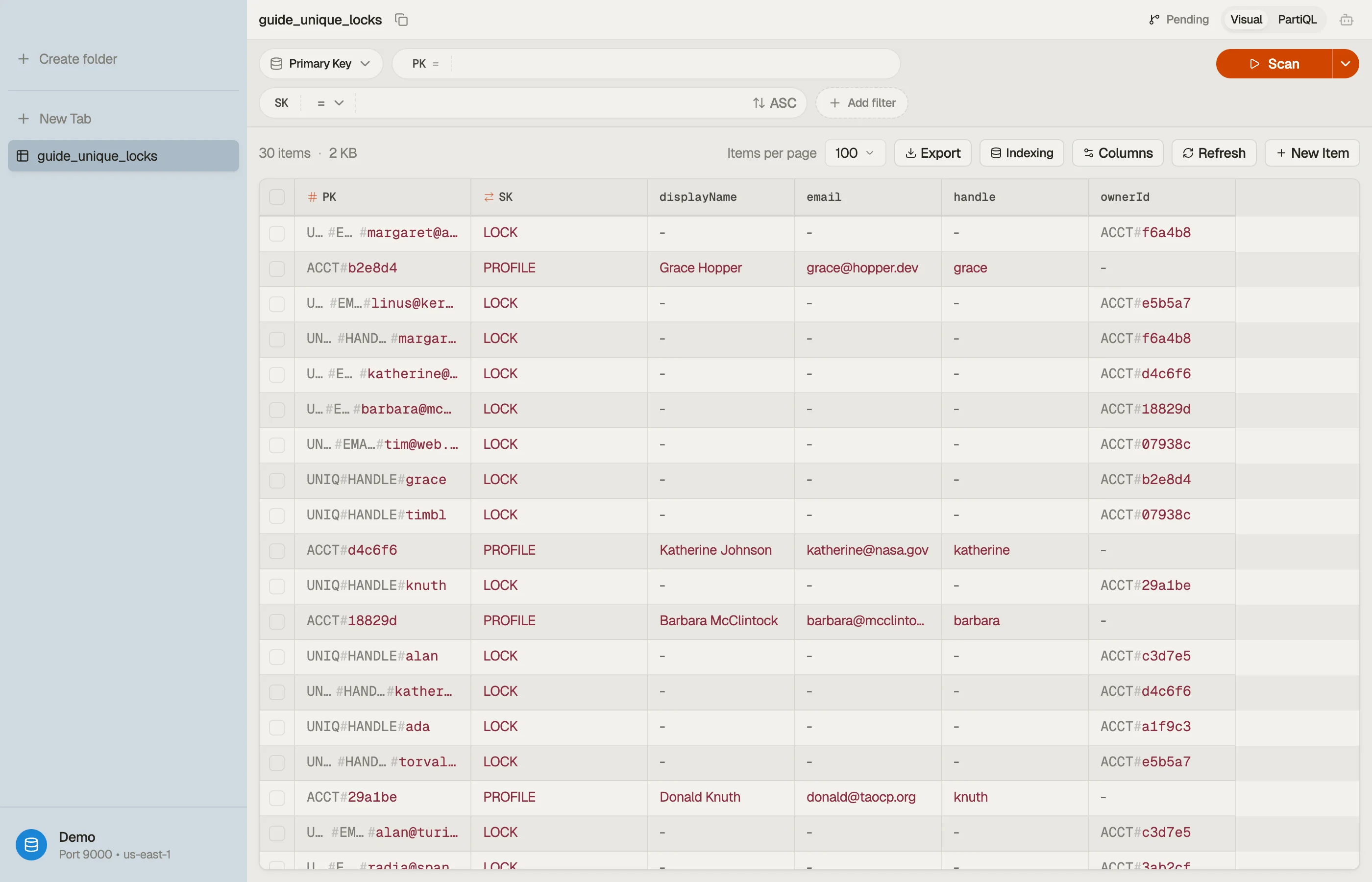
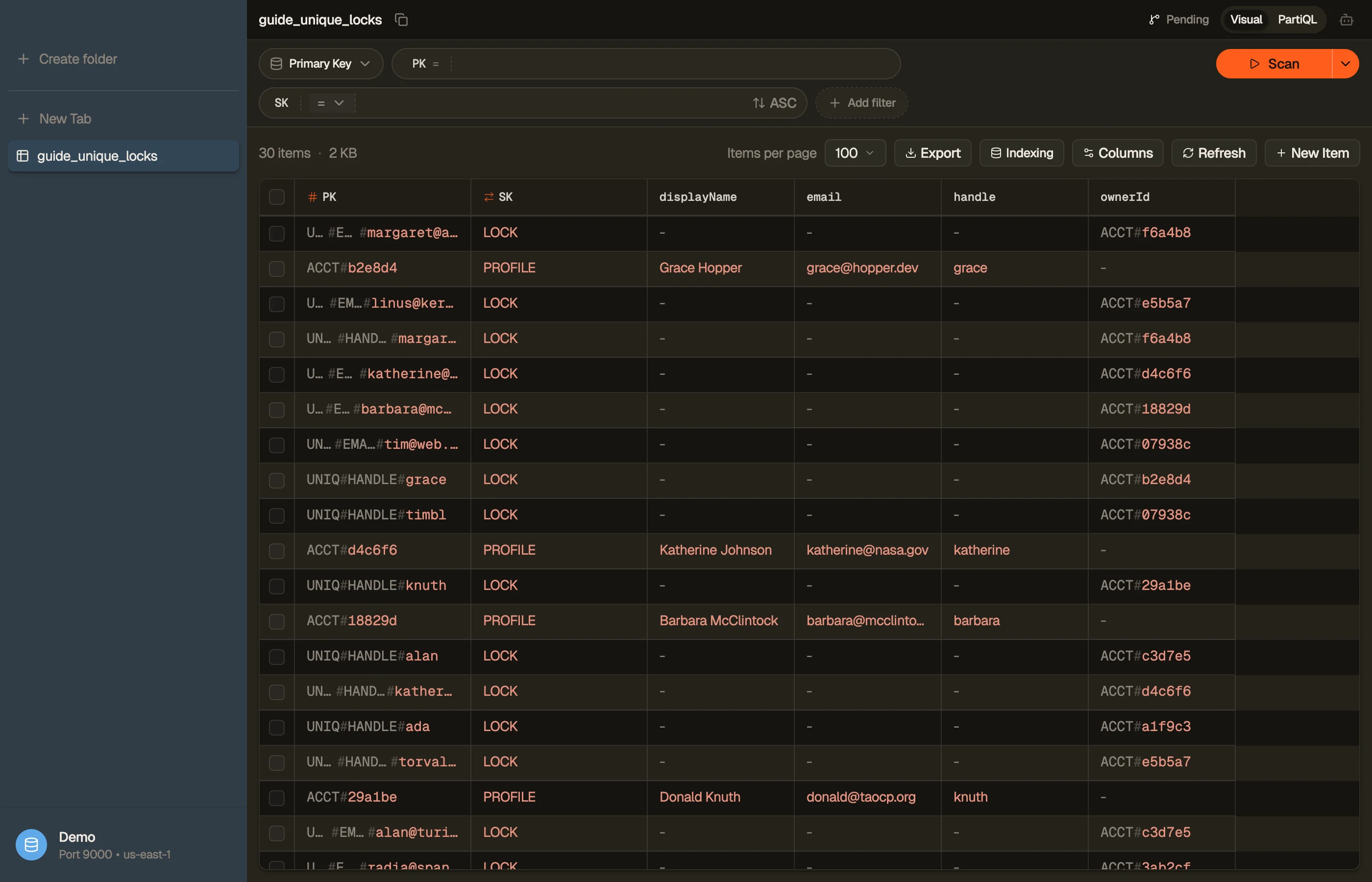
Inspect the locks in DynoTable
The marker items are invisible in your app's UI — they're plumbing. When a signup mysteriously fails, you need to see whether the lock actually exists.
Open the table in DynoTable and Query the UNIQ# prefix. The account and its
two lock items sit together, so a stuck signup (a lock left behind by a botched
delete) is obvious at a glance.


Keep the locks honest on change and delete
Locks aren't write-once. They mirror the live value, so the lifecycle has to keep them in sync — every operation that touches a protected attribute is a transaction too.
- Change email. One transaction: put the new
UNIQ#EMAIL#…lock withattribute_not_exists, delete the old lock, update the account. Same all-or-nothing guarantee. - Delete account. Delete the account item and both lock items in one transaction, or you'll strand a lock that blocks the value forever.
- Retry safely. Pass a
ClientRequestTokenso a resent transaction (after a network blip) is idempotent rather than a double-write.
The trap is treating the lock as fire-and-forget. A lock created on signup but never deleted on account removal is a value no one can ever reuse — and it won't show up until a real user can't claim their own old handle.
Next steps
Uniqueness markers are a single-table pattern, so they sit naturally next to your
other items — read single-table design for the key
layout, and Query vs Scan so you never reach for a
Scan to check a lock. The pattern was first walked through in AWS's
re:Invent / AWS Summit 2018 DAT374 — DynamoDB Transactions session.
Draft the condition-guarded puts with the DynamoDB Expression Builder, then try DynoTable to inspect the lock items against your own table.