DynamoDB TTL
Time to Live (TTL) lets DynamoDB delete items automatically once a timestamp you store on them passes. You name one attribute holding a Unix-epoch expiry, and DynamoDB reaps expired items in the background — no reaper job, no extra cost.
In the audit-log scenario each tenant has a retention policy: keep events for 90 days, or 1 year, or 7 for the compliance-heavy ones. TTL is how you enforce that without running your own delete sweep.
How does DynamoDB TTL work?
DynamoDB TTL auto-deletes items once a Unix-epoch (seconds) timestamp you store in a designated attribute passes. You enable TTL on the table, name the expiry attribute, and DynamoDB reaps expired items in the background — typically within 48 hours, with no write-capacity cost. Expired items stay readable until they're physically deleted.
- TTL is one attribute holding a Unix-epoch (seconds) timestamp. When that time passes, the item becomes eligible for deletion.
- Deletion is background and best-effort — typically within a couple of days of expiry, not the exact second. AWS targets within 48 hours.
- TTL deletes are free — they don't consume write capacity.
- Expired-but-not-yet-deleted items still appear in reads, so filter on the expiry attribute if you need to hide them immediately.
The problem: expiring old data yourself is expensive
Without TTL, enforcing "drop events older than 90 days" means running your own
reaper: scan (or query) for old items on a schedule and DeleteItem each one.
That scan burns read capacity, the deletes burn write capacity, and you own the
schedule, the failures, and the retries.
For a high-volume audit log that's a constant, growing tax just to throw data away. TTL moves the entire job into DynamoDB, for free.
How TTL works
You enable TTL on a table and tell it which attribute holds the expiry. Per the AWS announcement, you "specify an item attribute containing a Unix epoch expiration timestamp, and DynamoDB handles deletion automatically in the background — without affecting table performance."
Two properties matter for correctness:
- It's best-effort, not exact. DynamoDB scans for expired items and deletes them in the background; AWS targets deletion within 48 hours of expiry. An item is eligible at its timestamp but may linger briefly.
- Expired items are still readable until reaped. A
Querycan return an item whose TTL has passed but which hasn't been deleted yet — so add aFilterExpressionon the expiry attribute if "expired = invisible immediately" is a hard requirement.
And TTL deletes do not consume write capacity, which is what makes it strictly cheaper than a self-run reaper.
A worked example: per-tenant retention
Each audit event carries an expiresAt attribute set when the event is written —
now + the tenant's retention window, in epoch seconds:
| PK | SK | action | expiresAt | note |
|---|---|---|---|---|
| TENANT#acme | EVENT#2026-03-26T…#a0 | login.success | 1758873600 | 90-day tenant: eligible now |
| TENANT#acme | EVENT#2026-06-24T…#a1 | invoice.export | 1766620800 | still inside window |
| TENANT#globex EVENT#2026-06-24T…#b9 | role.granted | 1798156800 | 7-year compliance tenant |
TTL is enabled with expiresAt as the TTL attribute. When acme's 90-day event
crosses 1758873600, DynamoDB deletes it on its own within roughly two days. The
compliance tenant's events carry a far-future expiresAt, so they survive — same
table, same mechanism, different retention per item.
The write side is just adding one number when you create the event. You can
compose the SET expiresAt = :ttl clause and verify the typed :ttl value in the
DynamoDB Expression Builder.
To hide an expired-but-unreaped event from a read immediately, add
expiresAt > :now to the query's FilterExpression — though remember a filter
doesn't reduce read cost (query vs scan).
Do it in DynoTable
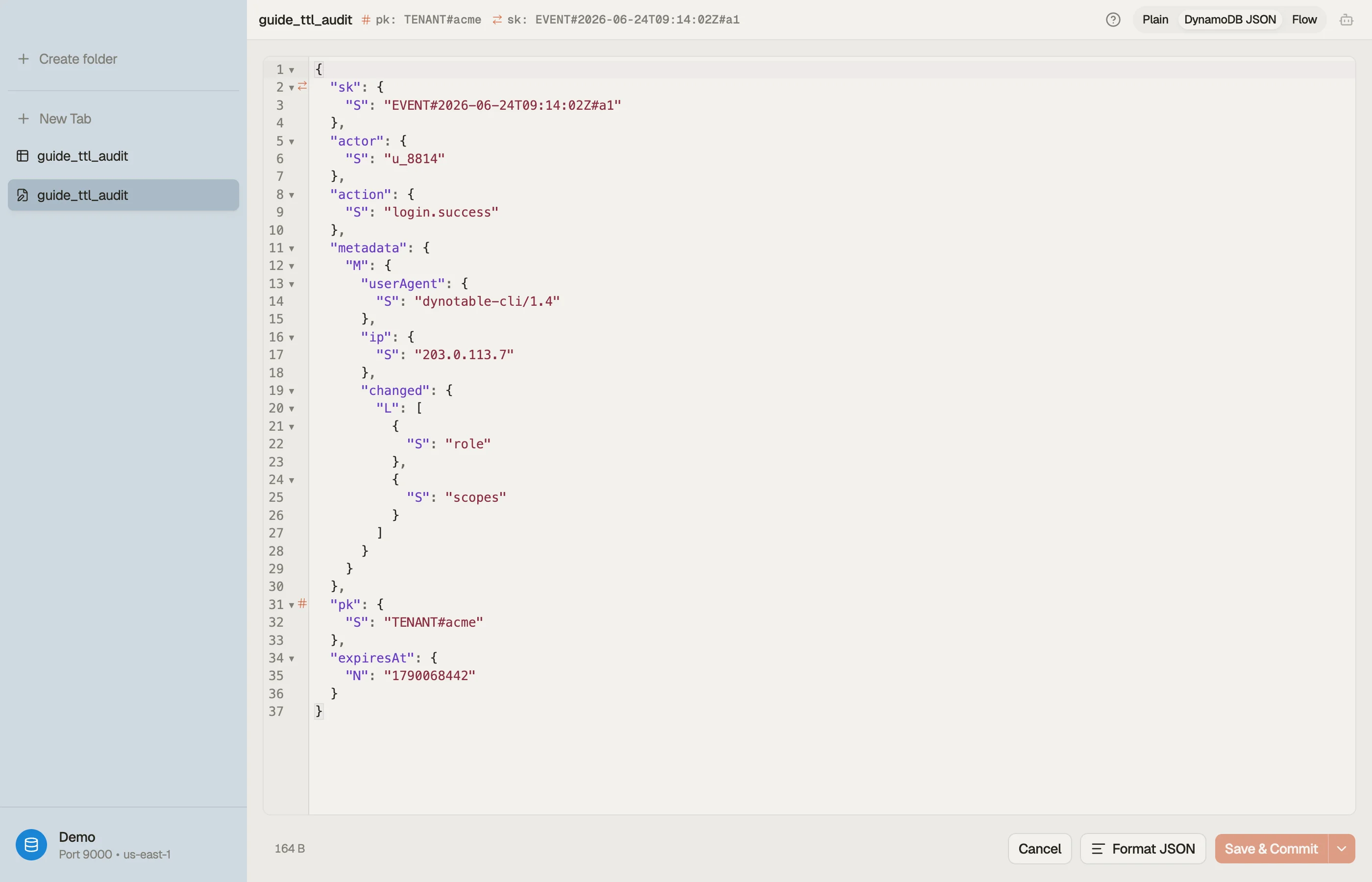
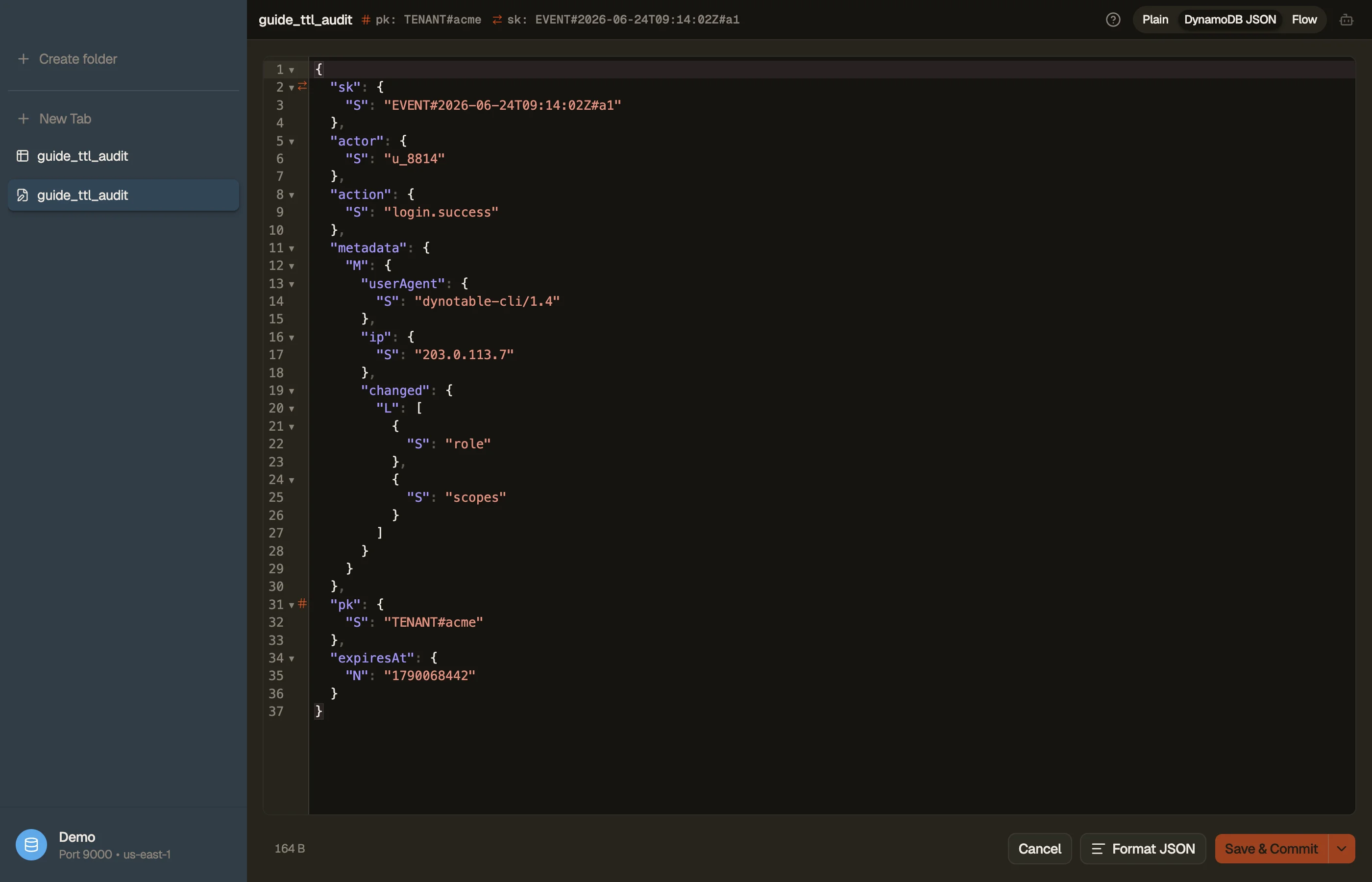
The classic TTL bug is a wrong expiresAt: stored in milliseconds instead of
seconds, or as an ISO string, so the item either never expires or vanishes
immediately. The only way to catch it is to look at the actual stored value and
its type.
DynoTable shows each item's attributes with their DynamoDB types, so you can
confirm expiresAt is a Number in epoch seconds — not a String, not
milliseconds — before you trust TTL with real retention.


Pitfalls and next steps
- Epoch seconds, as a Number. This is the single most common TTL mistake. A millisecond value pushes expiry ~50,000 years out; an ISO string is ignored entirely. Verify the type and unit.
- Don't rely on the deletion timing. Up to ~48 hours can pass between expiry and deletion. If "gone the instant it expires" matters, filter on the attribute in reads; don't assume the row is physically gone.
- TTL deletes appear in Streams. A TTL deletion emits a stream record flagged as system-generated — the standard hook for archiving expiring events to S3 before they disappear. See DynamoDB Streams.
- TTL deletes still hit . Removing an item also removes it from any secondary index it was in — which is the intended cleanup, but worth knowing if an index drove a count.
TTL handles the end of an event's life cheaply. The next question is what you pay for the writes in the first place — On-Demand vs Provisioned capacity.
Download DynoTable to inspect your items' attribute types and confirm your TTL attribute is a Unix-epoch Number before you flip TTL on.