Composite Sort Keys in DynamoDB
A composite primary key is a partition key plus a sort key. The trick that
makes it powerful is what you put in the sort key: encode a hierarchy as one
delimited string, and a single Query reads an entire subtree in sort order — no
joins, no recursion, no second round-trip.
How do composite sort keys work in DynamoDB?
A composite sort key packs a hierarchy into one delimited string — root/photos/2026/ — that DynamoDB stores in UTF-8 byte order. Because the layout already matches the tree, a single Query with begins_with(SK, "root/photos/") reads an entire subtree in path order. No joins, no recursion, no second round-trip — just a prefix scan over a contiguous slice.
- The sort key is a sortable string, not just an ID. Pack a path into it —
root/photos/2026/— and DynamoDB stores the partition's items in UTF-8 byte order automatically. - A delimiter turns prefix matches into subtree reads.
begins_with(SK, "root/photos/")returns every descendant of that folder in one query. - Sort keys support range conditions, not arbitrary filters. You get
begins_with,between,>,<— design the key so the read you need is a prefix or a range, not aScan. - The delimiter is load-bearing. Pick one that can't appear in a path segment, or two unrelated branches collide.
Why the sort key is the whole game
Coming from SQL, you'd model a folder tree with a parent_id self-join and walk
it recursively — one query per level. In DynamoDB that's an N+1 footgun against a
key-value store that has no joins.
DynamoDB stores every item under a partition key sorted by its sort key, in UTF-8 byte order for strings (AWS: Query key conditions). So if your sort key is the path, the physical layout already matches the tree. A read becomes a prefix scan over a contiguous slice — not a graph walk.
That's the shift: the sort key isn't an identifier you match exactly. It's a sortable address. Design it and the query falls out for free.
Model a file-system tree
Say you're storing per-account file trees. One drive per account is the natural partition; the path inside it is the sort key.
| PK | SK | node_type | bytes |
|---|---|---|---|
| DRIVE#a91 | root/ | folder | - |
| DRIVE#a91 | root/photos/ | folder | - |
| DRIVE#a91 | root/photos/2026/ | folder | - |
| DRIVE#a91 | root/photos/2026/beach.jpg | file | 284910 |
| DRIVE#a91 | root/photos/2026/sunset.jpg | file | 512004 |
| DRIVE#a91 | root/docs/ | folder | - |
| DRIVE#a91 | root/docs/taxes.pdf | file | 88210 |
Two original conventions doing the work here:
PK = DRIVE#<account>keeps one account's whole tree in a single item collection, so any subtree read is a single-partitionQuery.SKis the full path with a trailing/on folders. The trailing slash is deliberate — it makes a folder sort before its own children and keepsroot/photos/distinct from a sibling file namedroot/photos.
Read a subtree in one query
List everything under root/photos/ — folder, subfolders, and files, recursively:
Query
KeyConditionExpression = PK = :drive AND begins_with(SK, :prefix)
:drive   = "DRIVE#a91"
:prefix  = "root/photos/"
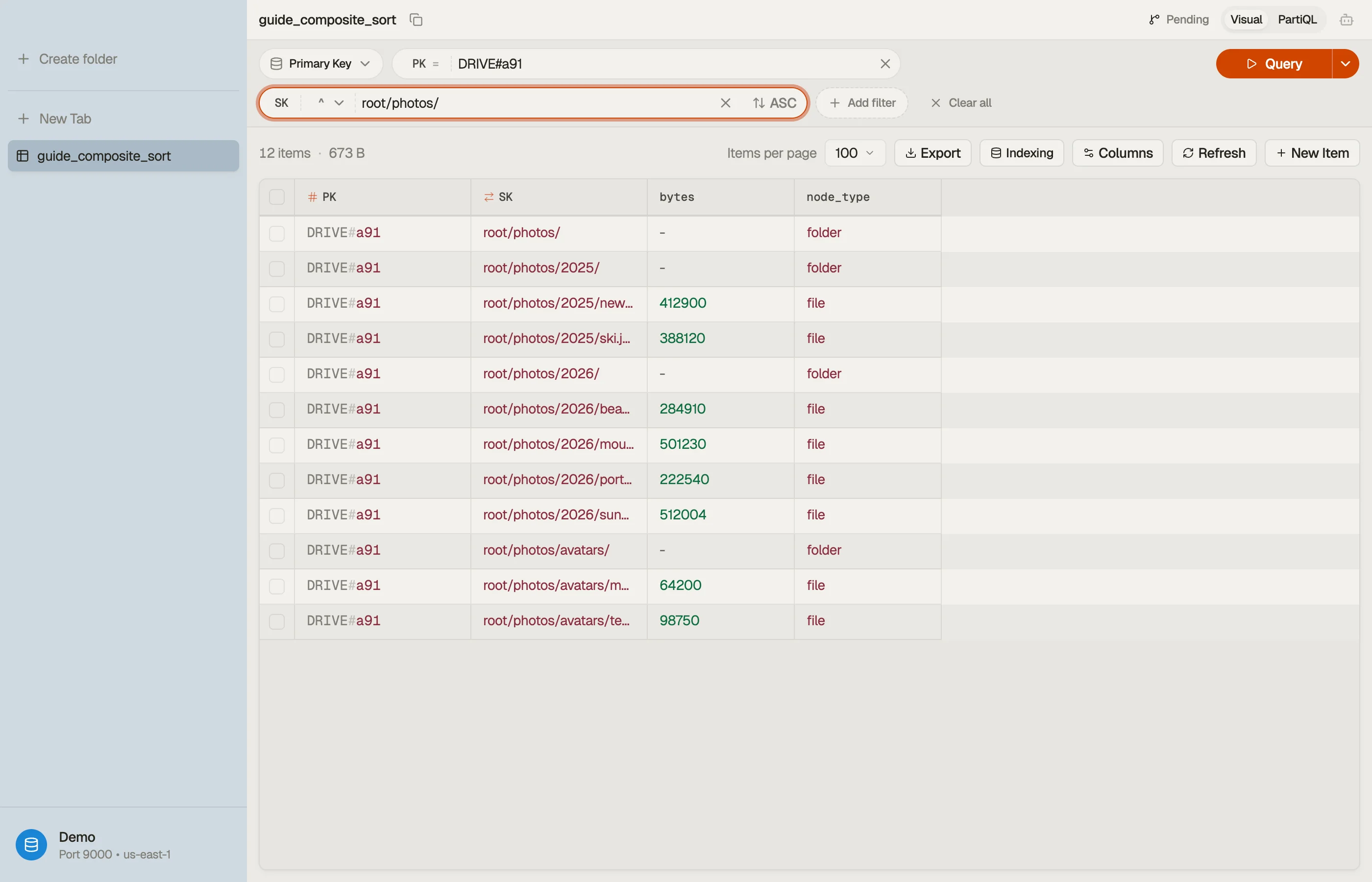
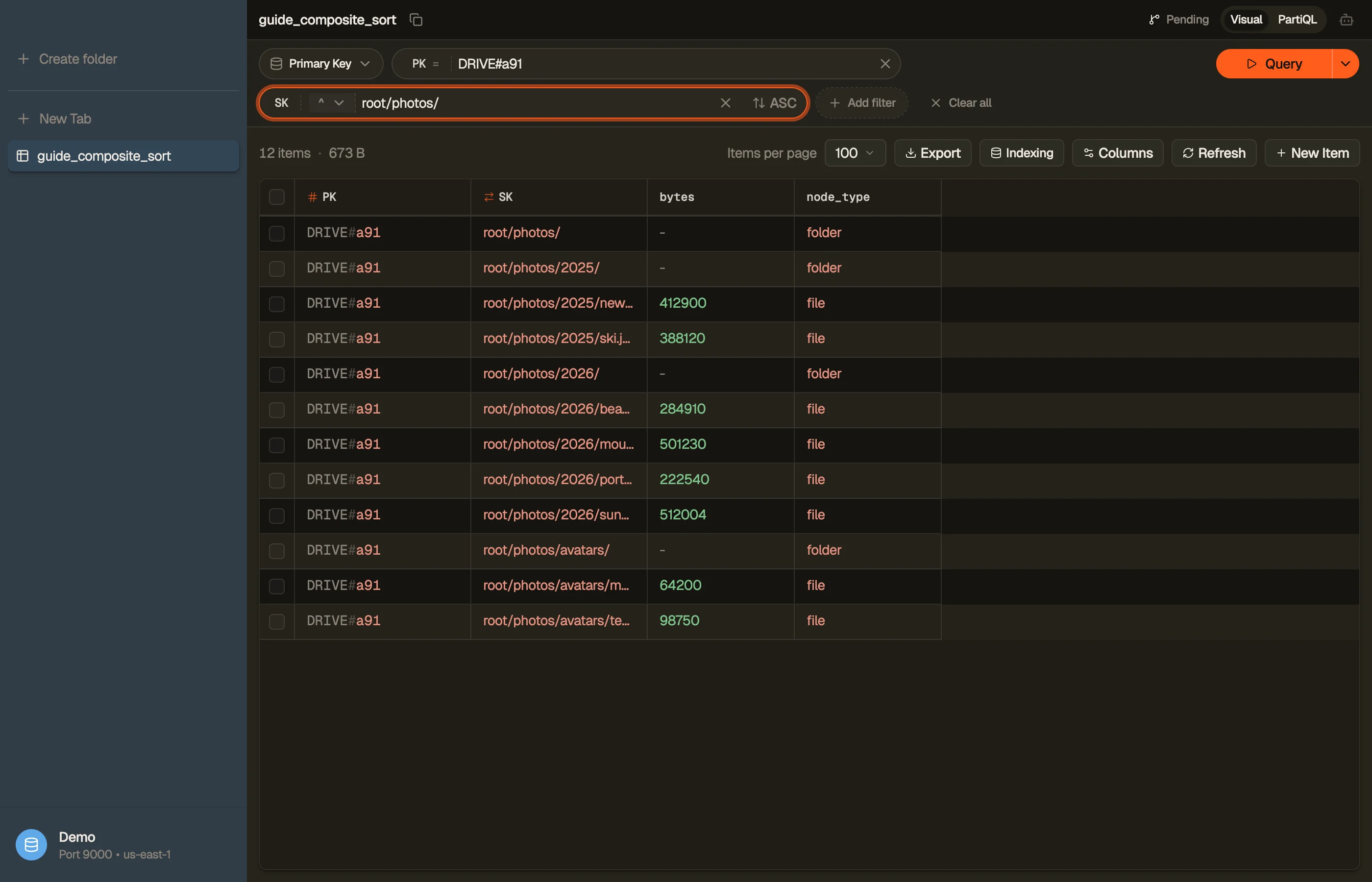
That returns root/photos/, root/photos/2026/, beach.jpg, and sunset.jpg —
in path order, in one billed read. You pay only for the items in that slice, not
the whole drive.
In DynoTable, you run exactly this begins_with query against the path sort key and the
folder plus its descendants come back in path order — no placeholder syntax to hand-write.
Need the raw KeyConditionExpression (names, values, and begins_with) for your own
code? Build and copy it in the
DynamoDB Expression Builder.


List one level, not the whole subtree
begins_with gives you the recursive read. For a non-recursive directory
listing — the immediate children of root/photos/ and nothing deeper — store a
depth attribute and add a sort-key range plus a filter, or split the path into
a parent GSI. The simplest version: keep a parent attribute (root/photos/)
and a GSI keyed on it.
The point: a sort key answers prefix and range questions cheaply. "Direct
children only" is a different question — model it explicitly rather than hoping a
FilterExpression makes it efficient. A filter runs after the read and you pay
for every item it discards.
Pick the delimiter carefully
The delimiter is part of your data contract. Two rules:
- It must never appear inside a path segment. If filenames can contain
/,/is the wrong delimiter — a file nameda/bis indistinguishable from a folderaholdingb. Pick a reserved byte (some teams use#or a control char) and forbid it in segments. - Mind the sort order at boundaries.
/(0x2F) sorts before digits and letters, which is usually what you want for tree order. Change the delimiter and you change the ordering — verify it against real data.
Composite sort key vs. a separate sort attribute
Composite sort key (root/photos/2026/x) | Plain ID sort key + parent attribute | |
|---|---|---|
| Subtree read | One begins_with query | Recursive queries (N+1) or a GSI walk |
| Ordering | Path order, free | Must add an explicit sort attribute |
| Move / rename | Rewrite all descendants | Update one parent pointer |
| Direct-children list | Needs depth attr or GSI | Natural (parent = x) |
Composite keys win when reads are subtree-shaped and ordering matters; the flat-ID model wins when the tree mutates constantly. Most read-heavy hierarchies — file trees, category trees, org charts — lean composite.
Pitfalls and next steps
- Don't over-stuff the key. Everything you encode is immutable and indexed by prefix only. Attributes you query by equality belong in their own fields or a GSI, not jammed into the sort key.
- A sort key can't do arbitrary
WHERE. Onlybegins_with,between, and comparisons. If you find yourself reaching for aFilterExpression, you've probably modelled the key wrong — see Query vs. Scan. - Going deeper on key design lives in single-table design; for when a subtree read needs an index instead of the base table, see GSI vs. LSI.
Build the begins_with key condition with the
Expression Builder, then
download DynoTable to run these prefix queries against your own
tables and watch a subtree come back in path order.