How to Query DynamoDB in Descending Order
By default a DynamoDB Query returns items in ascending sort-key order. But most
"give me the latest" access patterns want the opposite — newest first. The knob is a
single boolean on the Query: ScanIndexForward. Set it to false and the same
query reads the partition in reverse.
It's one parameter, but it trips people up because it's easy to confuse with sorting the results after the fact (which DynamoDB doesn't do) and because the name reads backwards from what it controls.
How do I query DynamoDB in descending order?
Set ScanIndexForward=false on the Query. By default DynamoDB returns items in ascending sort-key order; flipping this single boolean reads the partition in reverse, giving you newest-first results when your sort key is a timestamp or sequence. It only changes ordering, not which items match, and reverse reads cost exactly the same as forward ones.
ScanIndexForward=true(default) → ascending sort-key order.ScanIndexForward=false→ descending order — newest-first when your sort key is a timestamp or sequence.- It only affects ordering, not which items match — the key condition still decides that.
- It's free. Reverse order costs the same as forward; DynamoDB reads the partition's stored order either way.
- Use
Limitwith it to get "the N most recent" in one cheap read.
The problem: "show me the latest first"
Say you run a multiplayer leaderboard and store each player's score events under one partition key, sorted by an increasing timestamp:
PK: GAME#42   SK: SCORE#2026-06-27T10:00:00Z   points
PK: GAME#42   SK: SCORE#2026-06-27T10:05:00Z   points
PK: GAME#42   SK: SCORE#2026-06-27T10:09:00Z   points
The dashboard needs the most recent scores. A plain Query on GAME#42 returns
them oldest-first, so you'd be tempted to read everything and reverse it in your app —
wasteful, and broken the moment you add Limit. DynamoDB can hand them back
newest-first directly.
How ScanIndexForward works
Items in a partition are physically stored ordered by sort key. A Query walks
that order; ScanIndexForward just picks the direction of the walk:
true(default) — start at the lowest sort key, walk up (ascending).false— start at the highest sort key, walk down (descending).
Crucially, this is a property of the read, not the table — the same items, same
key condition, just reversed. And because DynamoDB is only choosing a direction over
already-sorted data, descending reads are
exactly as cheap
as ascending ones. Pair it with Limit=10 and you get "the 10 most recent score
events" in a single, minimal-cost Query.
One subtlety: when paging backward through a descending result set, the
LastEvaluatedKey/ExclusiveStartKey cursor still works — just keep
ScanIndexForward=false consistent across every page of the same scan, or the cursor
direction and the order disagree.
Building the query in DynoTable
To assemble the key condition itself (and see the matching attribute-name/value maps), use the DynamoDB expression builder.
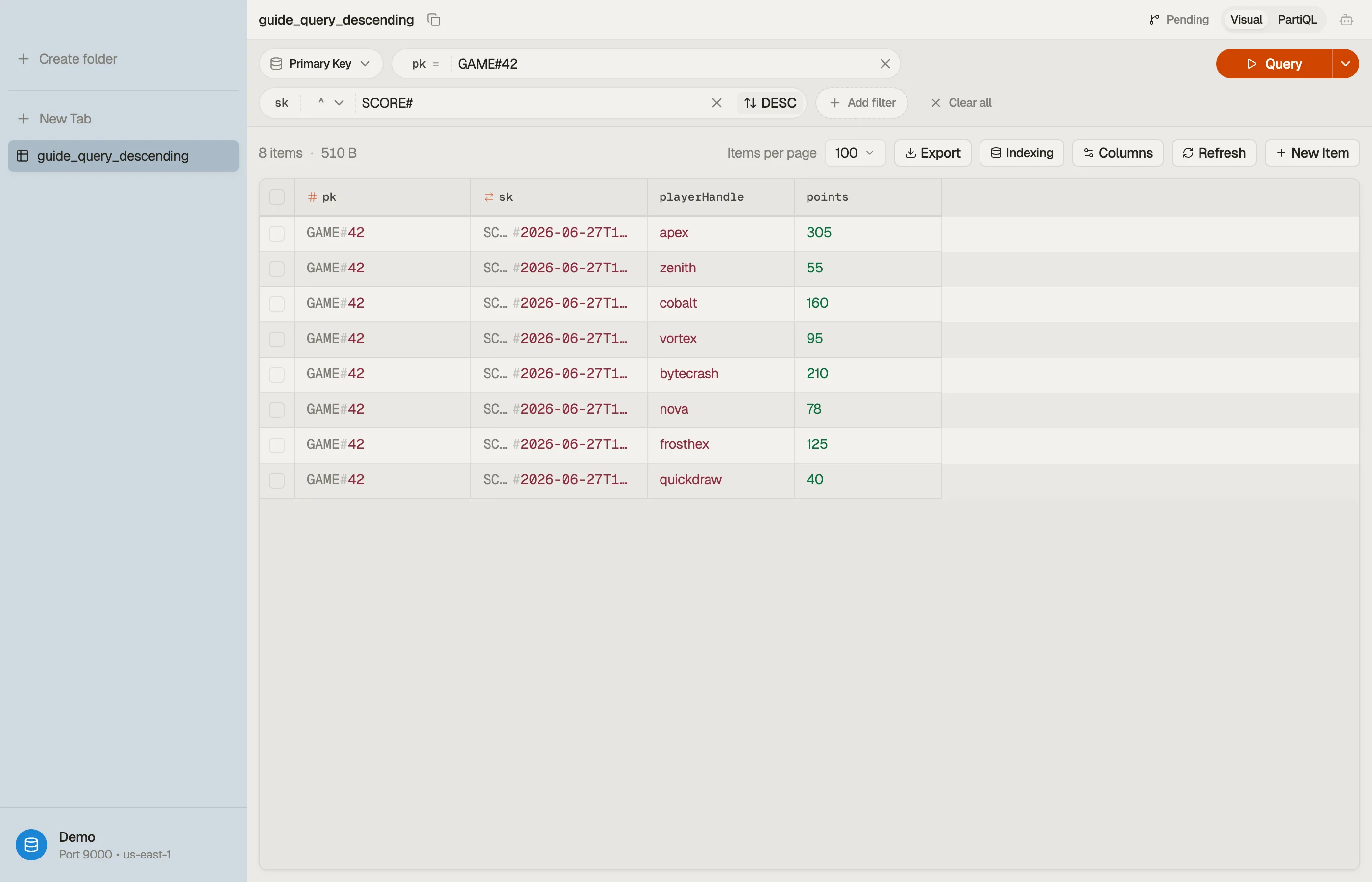
In DynoTable, you read a tab through a chosen key and set the sort direction on the tab
with a toggle — no need to hand-write ScanIndexForward. Flip it to preview
newest-first results.


Pitfalls + next steps
ScanIndexForwardreverses, it doesn't sort by an arbitrary attribute. Order is always by the sort key — to sort by something else you need that attribute as a sort key (often via a GSI).- Don't read-all-then-reverse in your app — set the flag and add
Limit. - Keep the flag consistent while paging a multi-page scan, or the cursor fights the order.
- Want numeric newest-first? Make sure the sort key sorts correctly — zero-pad numbers so lexicographic order matches.
- Related: sort-key strategies and pagination.
Want to flip result order without touching API parameters? Download DynoTable and query your tables directly.