DynamoDB JSON & Marshalling
The first time you read raw data from the DynamoDB API, it doesn't look like the JSON
you put in. A plain object like {"status": "open", "priority": 3} comes back as
{"status": {"S": "open"}, "priority": {"N": "3"}}. Every value is wrapped in a
one-key object naming its type. That wrapping is DynamoDB JSON, and converting to
and from it is called marshalling.
It's not noise — it's how DynamoDB keeps types unambiguous on the wire. But it trips up anyone expecting plain JSON, and hand-writing it is error-prone.
What is DynamoDB JSON?
DynamoDB JSON is the type-tagged wire format DynamoDB uses, where every value is wrapped in a one-key object naming its type — {"S": "open"} for a string, {"N": "3"} for a number. Converting plain JSON to it (and back) is called marshalling. It keeps types unambiguous, since plain JSON can't express sets, binary, or "3" versus 3.
- DynamoDB JSON tags every value with its type —
{"S": "..."}for a string,{"N": "..."}for a number, and so on. - Marshalling = plain JSON → DynamoDB JSON. Unmarshalling = the reverse.
- Numbers are strings on the wire —
{"N": "3"}, not{"N": 3}— to preserve precision. - The type tags are the data-type system you already model with: S, N, B, BOOL, NULL, L, M, SS, NS, BS.
- Don't write it by hand. The SDK's document client (or a converter) marshals for you; do it manually only when debugging or building expressions.
The problem: plain JSON isn't enough
JSON has exactly three scalar kinds — string, number, boolean — plus null, arrays, and
objects. DynamoDB has more: binary, and three set types (string set, number set,
binary set) that JSON can't express at all. JSON also can't tell a string "3" from a
number 3, or a list from a set.
So DynamoDB can't just store your JSON as-is — it needs each value's exact type stated explicitly. The type descriptor is how it does that, losslessly, on every request and response.
How the encoding works
Every attribute value becomes a single-key object whose key is a type descriptor:
| Descriptor | Type | Example |
|---|---|---|
S | String | {"S": "open"} |
N | Number (as a string) | {"N": "3"} |
B | Binary | {"B": "dGV4dA=="} |
BOOL | Boolean | {"BOOL": true} |
NULL | Null | {"NULL": true} |
L | List | {"L": [{"S": "a"}, {"N": "1"}]} |
M | Map | {"M": {"k": {"S": "v"}}} |
SS / NS / BS | String / Number / Binary set | {"SS": ["a", "b"]} |
Lists and maps nest the same descriptors all the way down, so a deeply structured item becomes deeply wrapped. Numbers ride the wire as strings on purpose — it lets DynamoDB preserve arbitrary precision that a JSON number (an IEEE-754 double) would quietly round. These are the same data types you model with; DynamoDB JSON is just their explicit on-the-wire form, defined in the AWS low-level API reference.
Worked example: an audit-log entry
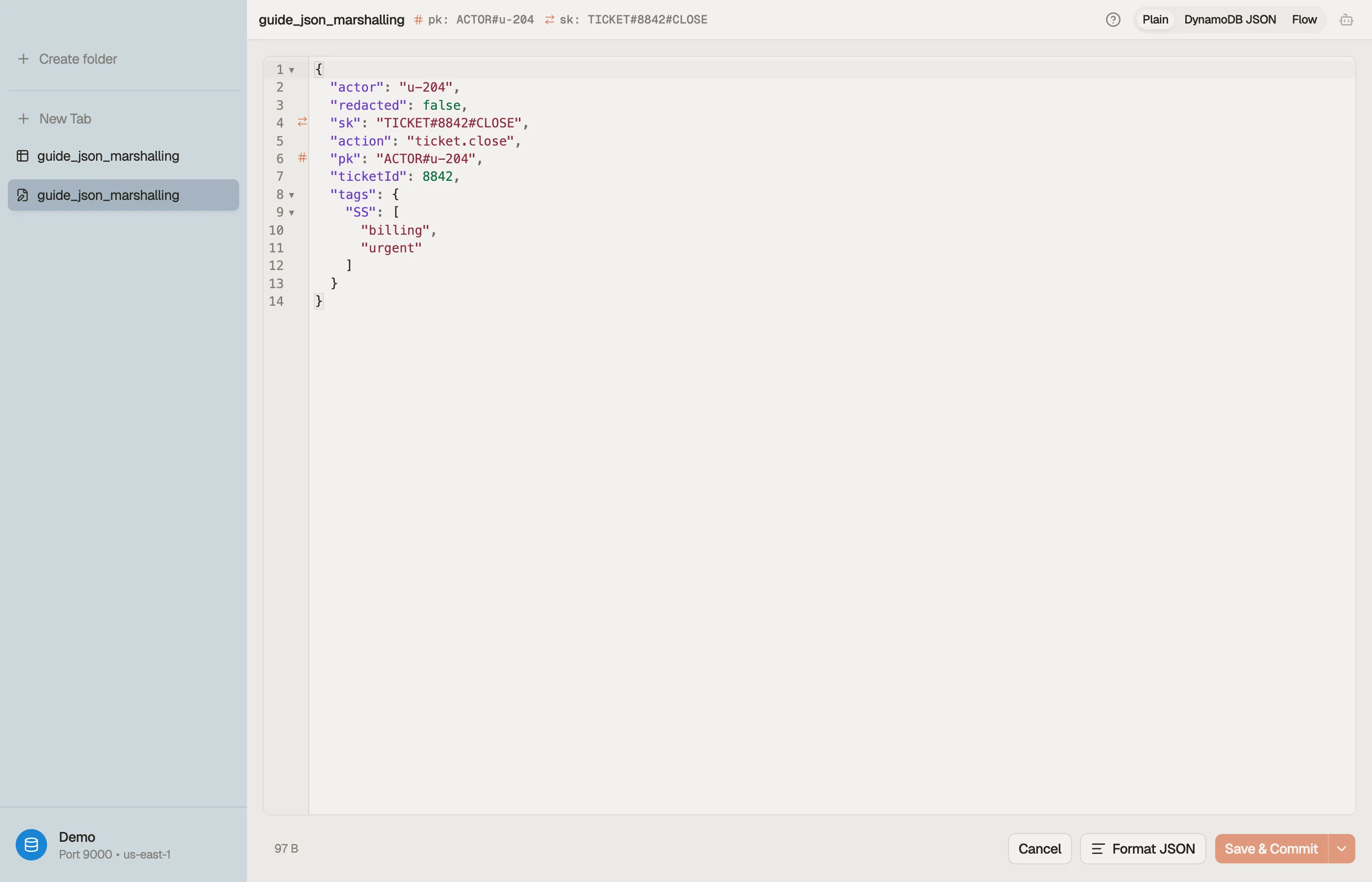
Plain JSON you'd write in your app:
{
  "actor": "u-204",
  "action": "ticket.close",
  "ticketId": 8842,
  "tags": ["billing", "urgent"],
  "redacted": false
}
Marshalled to DynamoDB JSON for the API:
{
  "actor": {"S": "u-204"},
  "action": {"S": "ticket.close"},
  "ticketId": {"N": "8842"},
  "tags": {"SS": ["billing", "urgent"]},
  "redacted": {"BOOL": false}
}
Note the choices the marshaller made: ticketId became N with a string value;
tags became a string set (SS), not a list — a deliberate decision, because a
set dedupes and is unordered. Whether tags should be SS or L is a modeling call
the converter can't make for you, which is exactly why understanding the encoding
matters.
Converting in DynoTable
You rarely need to read or write this by hand. Paste plain JSON into the DynamoDB JSON converter to marshal it (and back), and when you're assembling a request, the DynamoDB expression builder emits the correctly marshalled attribute-value map alongside the expression. In the app itself, DynoTable shows items as plain, readable values and marshals them for you on write.


Pitfalls + next steps
- Numbers are strings in DynamoDB JSON —
{"N": "3"}. Quoting matters; don't emit a bare number. - Sets vs lists is a modeling decision the encoding makes visible — pick deliberately (see data types).
- Prefer the SDK document client over hand-marshalling in app code; reserve manual DynamoDB JSON for debugging and expressions.
- Empty strings are allowed in items but have historically tripped tooling — validate edge cases.
Want to browse items as plain values instead of decoding type tags by eye? Download DynoTable and work with your data directly.