DynamoDB Batch Operations: BatchGetItem & BatchWriteItem
When you need to read or write many items at once, firing one GetItem or PutItem
per item means one network round trip per item — slow, and chatty. DynamoDB's batch
APIs fold many item operations into a single request: BatchGetItem for reads,
BatchWriteItem for writes.
They're a throughput-and-latency win, not a consistency guarantee — and that distinction is where people get burned. A batch is not a transaction.
What are DynamoDB batch operations?
DynamoDB batch operations fold many item reads or writes into a single request: BatchGetItem fetches up to 100 items, BatchWriteItem puts or deletes up to 25, each capped at 16 MB. They save round trips, not capacity. Critically, a batch is not a transaction — items succeed or fail independently, with no rollback.
BatchGetItem— fetch up to 100 items (or 16 MB) across one or more tables in one call.BatchWriteItem— up to 25 put/delete operations (or 16 MB) in one call. No updates — puts and deletes only.- Not atomic. Individual items can succeed while others fail. There's no rollback.
- Partial failure is normal. Throttled items come back in
UnprocessedItems/UnprocessedKeys— you must retry them yourself, with backoff. - Same capacity cost as the individual calls — batching saves round trips, not capacity units.
The problem: many items, one round trip
Say you run a support desk. A dashboard needs to load 50 tickets by ID to render a queue; an overnight job archives 1,000 resolved tickets. Doing that one item at a time is 50 (or 1,000) sequential round trips — latency stacks up and the job crawls.
Batching collapses those into a handful of calls. The 50-ticket read becomes a single
BatchGetItem; the archive job becomes a stream of BatchWriteItem calls of 25
deletes each. Far fewer round trips, the same data moved.
How the batch APIs work
BatchGetItem takes a set of primary keys (across one or more tables) and returns
the matching items. You can request strongly consistent reads per table. Anything it
couldn't read — usually because the request brushed a throughput limit — comes back in
UnprocessedKeys rather than failing the whole call.
BatchWriteItem takes a list of PutRequest / DeleteRequest operations. Note
what's missing: there is no update. A batch write either replaces a whole item
(put) or removes it (delete) — to modify specific attributes you still need
UpdateItem. Items it couldn't write come back in UnprocessedItems.
The key mental model: a batch is a bundle of independent operations, each succeeding or failing on its own — not one all-or-nothing unit.
Batches are not transactions
This is the trap. If your archive job's batch hits a throughput limit halfway, some tickets are deleted and some aren't — and DynamoDB does not undo the ones that went through. There's no rollback, no isolation, no "all 25 or none."
If you need all-or-nothing semantics — "move the ticket to archived and decrement
the open-tickets counter, or do neither" — that's
TransactWriteItems, not a batch. Transactions cost
more (each operation is billed double) and cap at 100 items, but they give you the
atomicity batches deliberately don't.
Handling unprocessed items
A correct batch caller always checks the unprocessed set and retries it. DynamoDB
returns UnprocessedItems/UnprocessedKeys whenever the request as a whole was
accepted but some items couldn't be served — typically transient throttling.
Re-submit only the unprocessed items, with exponential backoff and jitter. Treating a batch as fire-and-forget silently drops writes — the kind of bug that surfaces months later as missing data.
Batch writes in DynoTable
Estimate what a bulk job will cost first with the DynamoDB pricing calculator — a batch consumes the same capacity as the individual writes it bundles, just in fewer requests.
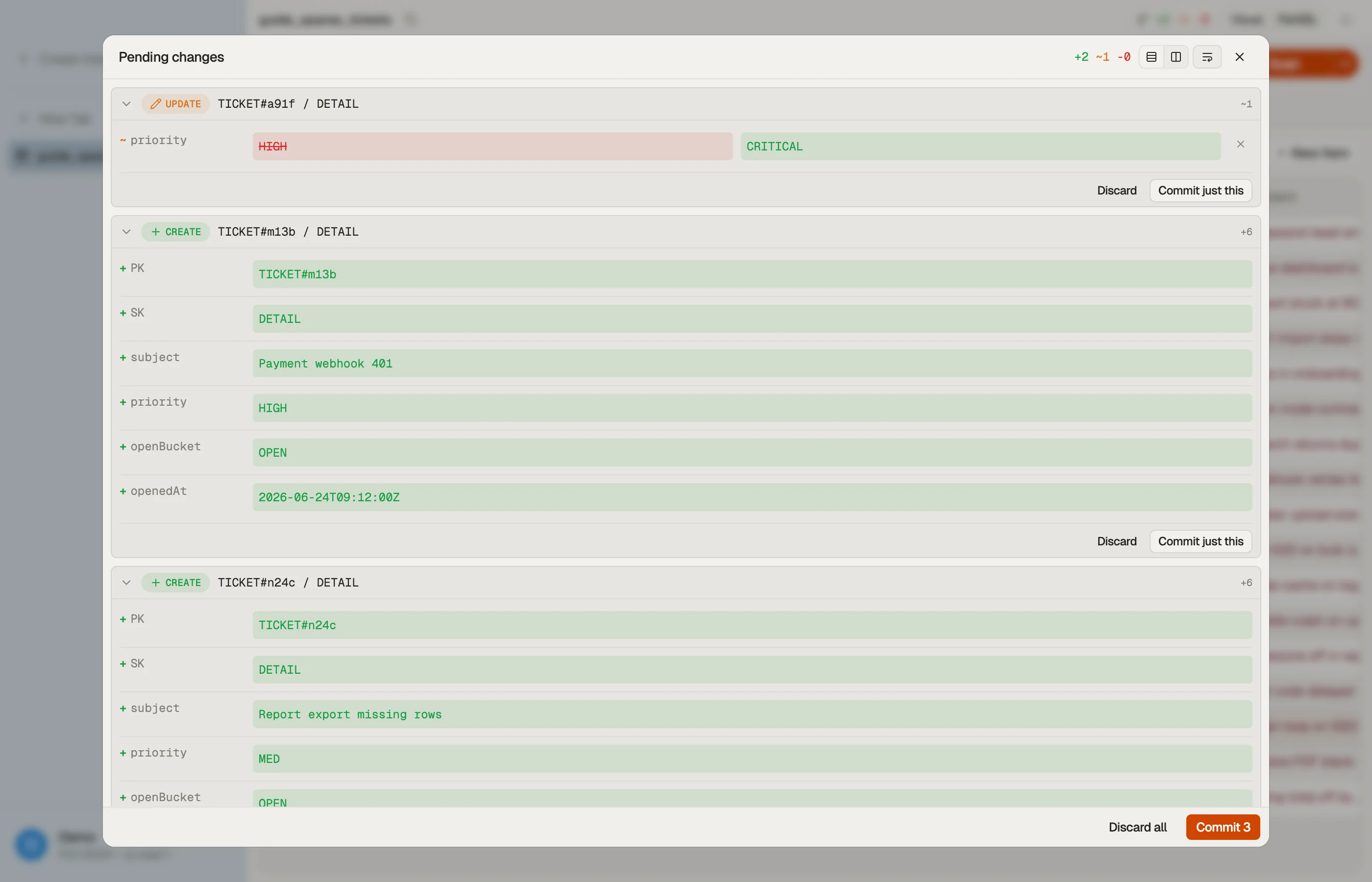
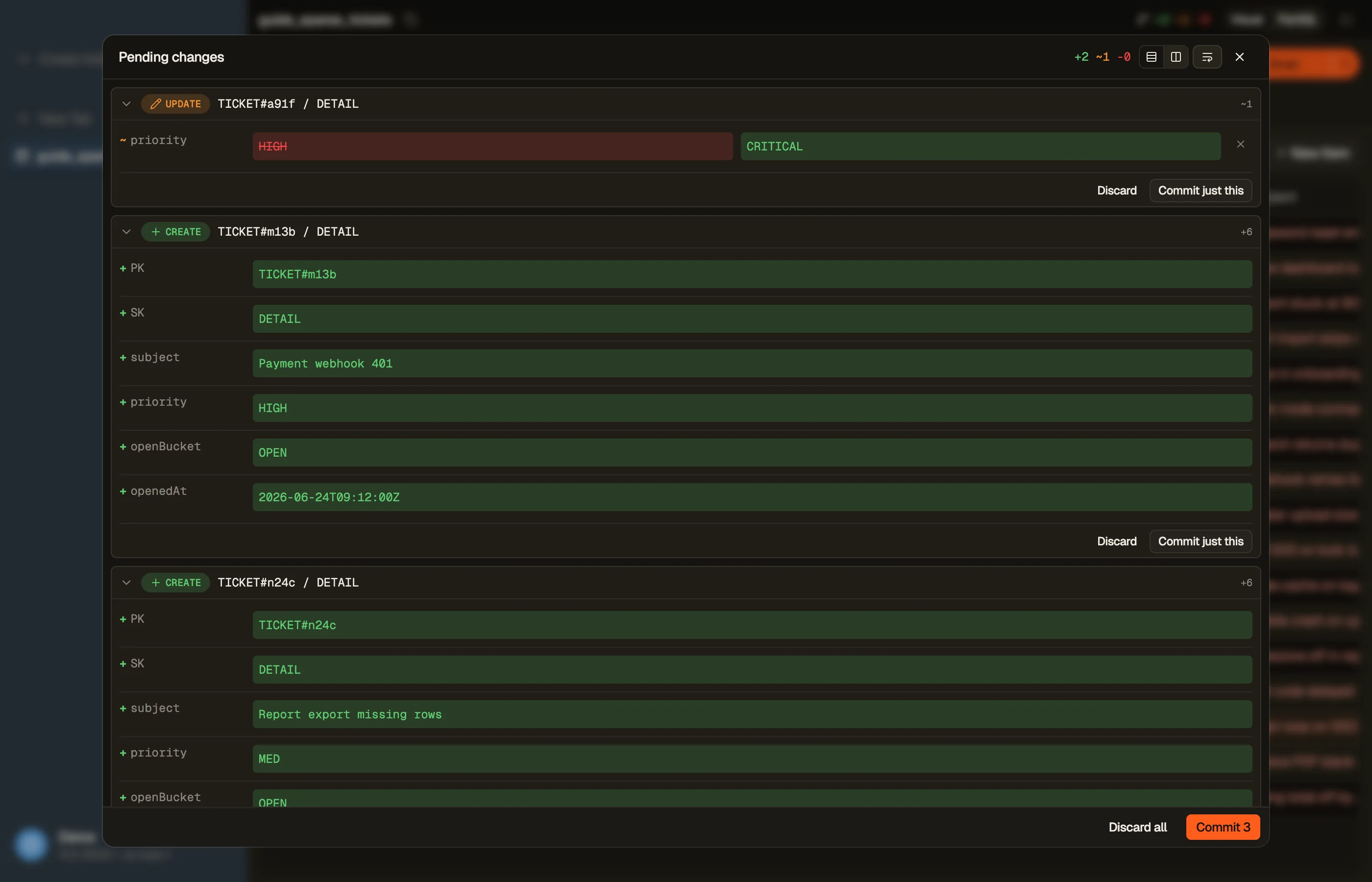
In DynoTable, you stage your edits locally and review them before committing them as efficient batched writes — bulk changes across many rows go out in grouped requests rather than one API call each, with the unprocessed-item retry handled for you.


Pitfalls + next steps
- Always retry
UnprocessedItems/UnprocessedKeyswith backoff — they're expected, not exceptional. - No partial-failure rollback. Need atomicity? Use transactions.
- No updates in a batch write —
BatchWriteItemis put/delete only; reach forUpdateItemto change attributes. - Mind the per-call caps — 25 writes / 100 reads / 16 MB. Page through larger jobs; see pagination.
Want to run bulk reads and writes without scripting the retry loop? Download DynoTable and edit your tables directly.