How to Model Data in DynamoDB
In SQL you model entities and relationships first, then trust the query planner to assemble whatever you ask for later. DynamoDB inverts that. You model the reads you already know you'll make, and the keys exist to serve them.
There is no join engine and no planner picking a strategy at runtime. A Query reads one partition along one key, and that is the entire performance contract. So you design keys for known access patterns, not for a tidy schema.
AWS says it plainly in its best-practices guide: "you shouldn't start designing your schema until you know the questions it will need to answer."
This guide walks the whole process on one domain: a multiplayer game leaderboard tracking players, the matches they play, and their per-season ranking. We go from a list of questions to a working key schema.
How do you model data in DynamoDB?
Model the reads first, not the tables. List every query the app makes, then design a and so each question resolves to a single Query or GetItem. Co-locate items that are read together, range over values in the sort key, and add a GSI for any access pattern the base table can't serve.
- List the reads first, not the tables. The questions are the spec; the nouns are a distraction.
- Each question must be one
QueryorGetItem. If a question needs aScan, the model is wrong. - Co-located items share a partition key; anything you range over goes in the sort key.
- A question the base table can't answer gets a GSI — never a
Scanwith a filter.
Step 1 — Frame the problem as questions, not tables
Resist the urge to draw players, matches, and scores tables. That instinct is the SQL habit, and here it's wrong. Instead write down every read the app actually performs. For our leaderboard:
- Fetch one player's profile by id.
- List a player's recent matches, newest first.
- Show the top N players for a given season, ranked by rating.
- Look up a player by their public handle (e.g. for a profile URL).
These four questions — not the nouns — are the spec. Each one must resolve to a single Query (or GetItem), because that's the only access shape DynamoDB serves cheaply at scale.
If a question can only be answered by scanning the table, the model is wrong, and you'll feel it in latency and cost — see Query vs Scan for why a Scan is the footgun to avoid.
The whole method is a short, ordered pipeline you run once per domain:
Each step below maps onto one box: list, enumerate, design keys, add indexes for the rest, then validate.
Step 2 — Understand the primitives you're modelling with
A table has a partition key (PK) that picks which physical partition an item lives on, and an optional sort key (SK) that orders items within that partition.
The AWS core-components docs call the pair the item's primary key. A Query always targets exactly one PK value and can range-scan or filter the SK — that's the whole toolkit.
This single-partition design is what lets DynamoDB deliver the predictable, low-latency, horizontally partitioned reads first described in the 2007 Amazon Dynamo paper.
Two consequences drive every decision below:
- Items that are read together should share a partition key so one
Queryreturns them in a single billed request. - Anything you want to range over (recent matches, top ratings) must live in the sort key, because that's the only attribute
Querycan order and bound.
When a question needs a different access shape than the base table provides, you add a Global Secondary Index — a re-projection of the table under a different PK/SK.
(For GSI versus Local Secondary Index, see GSI vs LSI.)
Step 3 — Design the keys, one question at a time
We use a single table with generic, overloaded key attributes — the single-table approach — because a player and their matches are read together.
Invent your own prefixes; here PLAYER#, MATCH#, and SEASON# tag the entity type inside otherwise-generic keys.
Questions 1 and 2 (profile + recent matches) share a partition, so both hang off the same PK:
| partitionId | rangeId | attributes |
|---|---|---|
| PLAYER#u8231 | PROFILE | handle, region, createdAt |
| PLAYER#u8231 | MATCH#2026-06-23T14 | result=win, ratingDelta=+18, mapId |
| PLAYER#u8231 | MATCH#2026-06-23T11 | result=loss, ratingDelta=-15, mapId |
Query partitionId = "PLAYER#u8231" returns the profile and every match in one read. For the profile alone, GetItem.
For recent matches, rangeId begins_with "MATCH#" with ScanIndexForward = false walks them newest-first — the timestamp in the sort key does the ordering for free.
Questions 3 and 4 can't be answered from that partition — they pivot on season rank and on handle, neither of which is the base PK. Each gets a GSI.
We add two generic index attributes, gsiPartition / gsiSort, and let each item populate them with whatever that index needs:
| partitionId | rangeId | gsiPartition | gsiSort |
|---|---|---|---|
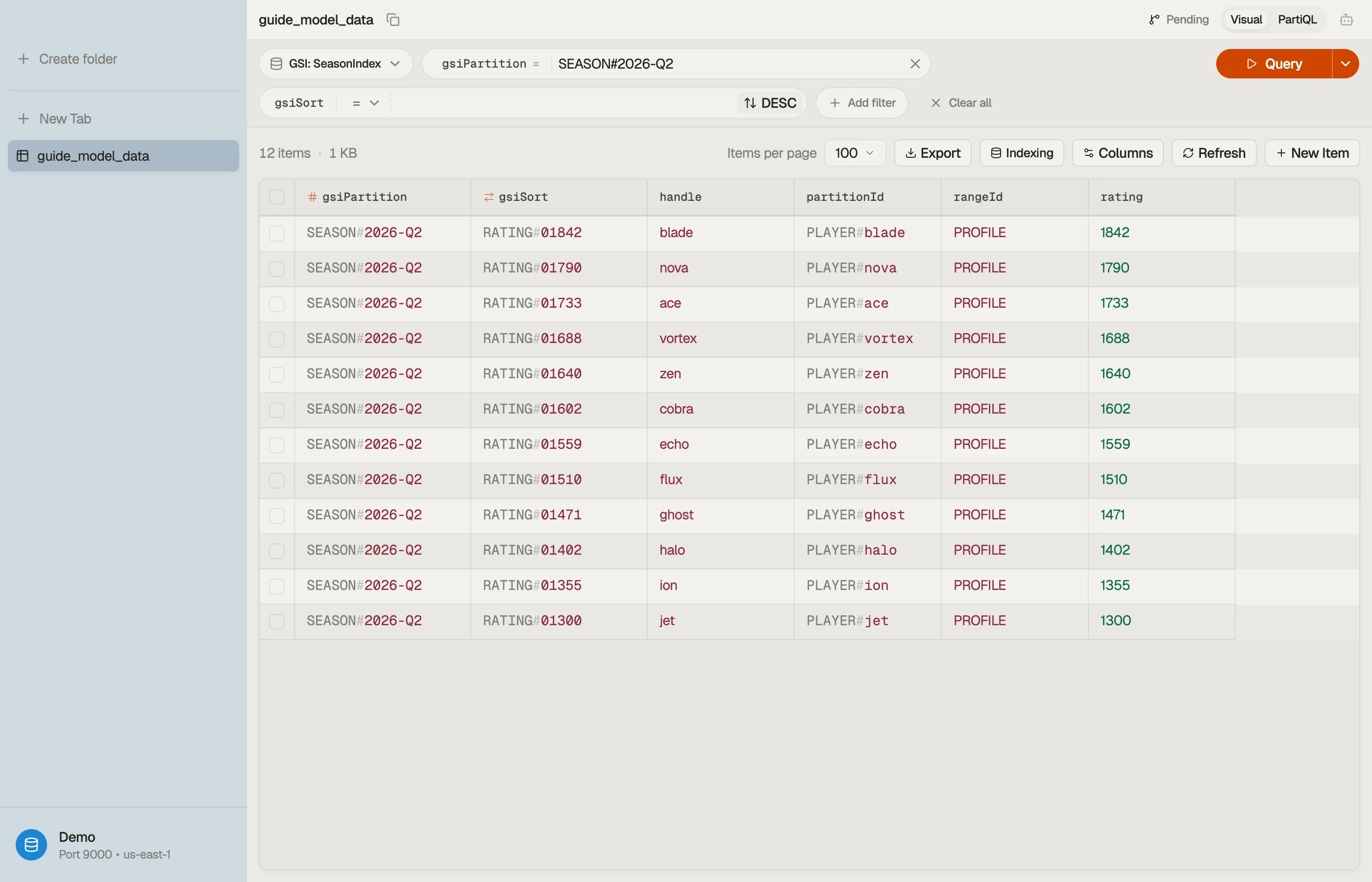
| PLAYER#u8231 | PROFILE | SEASON#2026-Q2 | RATING#1842 |
| PLAYER#u8231 | PROFILE | HANDLE#nighthawk | PLAYER#u8231 |
Now Query the season index WHERE gsiPartition = "SEASON#2026-Q2" with ScanIndexForward = false returns players ranked by rating — that's the leaderboard.
A second index keyed on HANDLE#… resolves a public handle to a player id in one read. One physical table, four single-Query access patterns.
A zero-padding note on
RATING#1842: DynamoDB sorts sort keys lexicographically, not numerically, so a rating must be zero-padded to a fixed width (RATING#01842) or9would sort after1000. This is a classic modelling gotcha worth getting right up front.
Step 4 — Validate the model in DynoTable
A key schema only earns trust when you watch a real Query return exactly the items you expected and nothing more.
Open the table in DynoTable, run the leaderboard query against the season index, and confirm the partition comes back ranked and bounded — no Scan, no client-side sorting.


When you build the condition expressions for these queries — the begins_with, the gsiPartition = :p, the placeholder :p binding — let the DynamoDB Expression Builder do it.
It generates the KeyConditionExpression, the ExpressionAttributeNames, and the ExpressionAttributeValues, so a reserved word like result or a typo'd placeholder never silently breaks a read.
Step 5 — Pitfalls and next steps
A few traps to check before you ship the model:
- Don't model relationships you never read together. A GSI per question is cheap; a wasted GSI is recurring cost. Add indexes from the question list, not speculatively.
- Watch partition heat. If one PK (a celebrity player, a single hot season) absorbs most traffic, that partition can throttle. Spread writes with a suffix shard when a key is provably hot — AWS covers this under partition-key design.
- Zero-pad and ISO-8601 everything numeric or temporal in a sort key, so lexicographic ordering matches the order you mean.
- A new question = a new key or index, never a
Scan. When a genuinely new access pattern appears later, extend the keys; don't paper over it with a filter.
Model the questions first, design keys so each is one Query, then prove it.
Try DynoTable to browse your table, run these queries against the base table and the GSIs side by side, and watch the access patterns you designed return exactly what you planned.