DynamoDB Migrations Without Downtime
Coming from SQL, a migration is an ALTER TABLE that locks the table while it
rewrites every row. DynamoDB has no schema to alter — items are schemaless, so
adding an attribute or a new entity type is free.
The hard part is the access pattern the new data has to serve, and reshaping live data to serve it without a stop-the-world rewrite.
How do you migrate a DynamoDB table without downtime?
DynamoDB has no ALTER TABLE, so migrations never lock the table. You add attributes, a new key shape, or a new online with UpdateTable, then reshape live data incrementally: backfill old items lazily on read or with a throttled sweep, and dual-write both formats during the transition. There is no flag-day cutover.
- There is no
ALTER TABLE. Items are schemaless. A "migration" means adding attributes, a new key shape, or a new index — never rewriting a fixed column set. - New writes are easy; old items are the problem. The existing rows don't carry the new attributes, so any new index or query silently misses them until you backfill.
- Add indexes online, backfill lazily.
UpdateTablebuilds a GSI on a live table; backfill old items on read (lazy) or with a controlled sweep — never a flag-day cutover. - Dual-write across the transition. While both shapes coexist, write the old and new format together so neither read path goes stale.
Frame it as an access pattern, not a column
Say you run a SaaS workspace product on one table. Items use PK = "WS#<id>"
and SK per entity:
| PK | SK | attributes |
|---|---|---|
| WS#a91 | META | name, tier |
| WS#a91 | DOC#2026-04-01#x7 | title, author, body |
| WS#a91 | DOC#2026-04-02#k2 | title, author, body |
Now product wants comments on documents, plus a new read: "list every comment a member wrote across the workspace, newest first." That last clause is the migration. A new entity type alone is trivial; serving a query the current keys can't answer is the work.
Add the new entity type first
Comments are just new items in the same partition — no migration ceremony, no new table:
| PK | SK | attributes |
|---|---|---|
| WS#a91 | DOC#2026-04-01#x7#CMT#01HZ... | author, text, createdAt |
A Query on PK = "WS#a91" with SK begins_with "DOC#2026-04-01#x7#CMT#"
already lists one document's comments. Existing documents are untouched. This
half ships on day one — see item collections and overloaded keys
for why the same partition holds both.
The new query needs a GSI
"All comments by a member, newest first" can't be served by the base table —
memberId is neither the PK nor a SK prefix. That's a new index, and
choosing it correctly is its own decision: see GSI vs LSI
(an LSI must exist at table creation, so for a migration on a live table a GSI
is your only option).
Add a generic GSI1 and write the new attributes on new comment items:
| GSI1PK | GSI1SK |
|---|---|
| MEMBER#u44 | 2026-04-02T09:15:00Z |
Query GSI1 WHERE GSI1PK = "MEMBER#u44" with ScanIndexForward = false gives
newest-first comments per member.
Build the index online
UpdateTable adds a GSI to a live table with no downtime. DynamoDB backfills
existing items into the index in the background; the index reports
CREATING/backfilling until done, then flips to ACTIVE
(Managing GSIs).
Two traps here. First, AWS warns that adding a can throttle base-table
writes if the new key distributes unevenly — add it in a low-traffic window
and watch CloudWatch. Second, the index is even after
it goes ACTIVE; a write may not be visible on the GSI for a moment. See
why GSIs are eventually consistent.
Backfill the old items
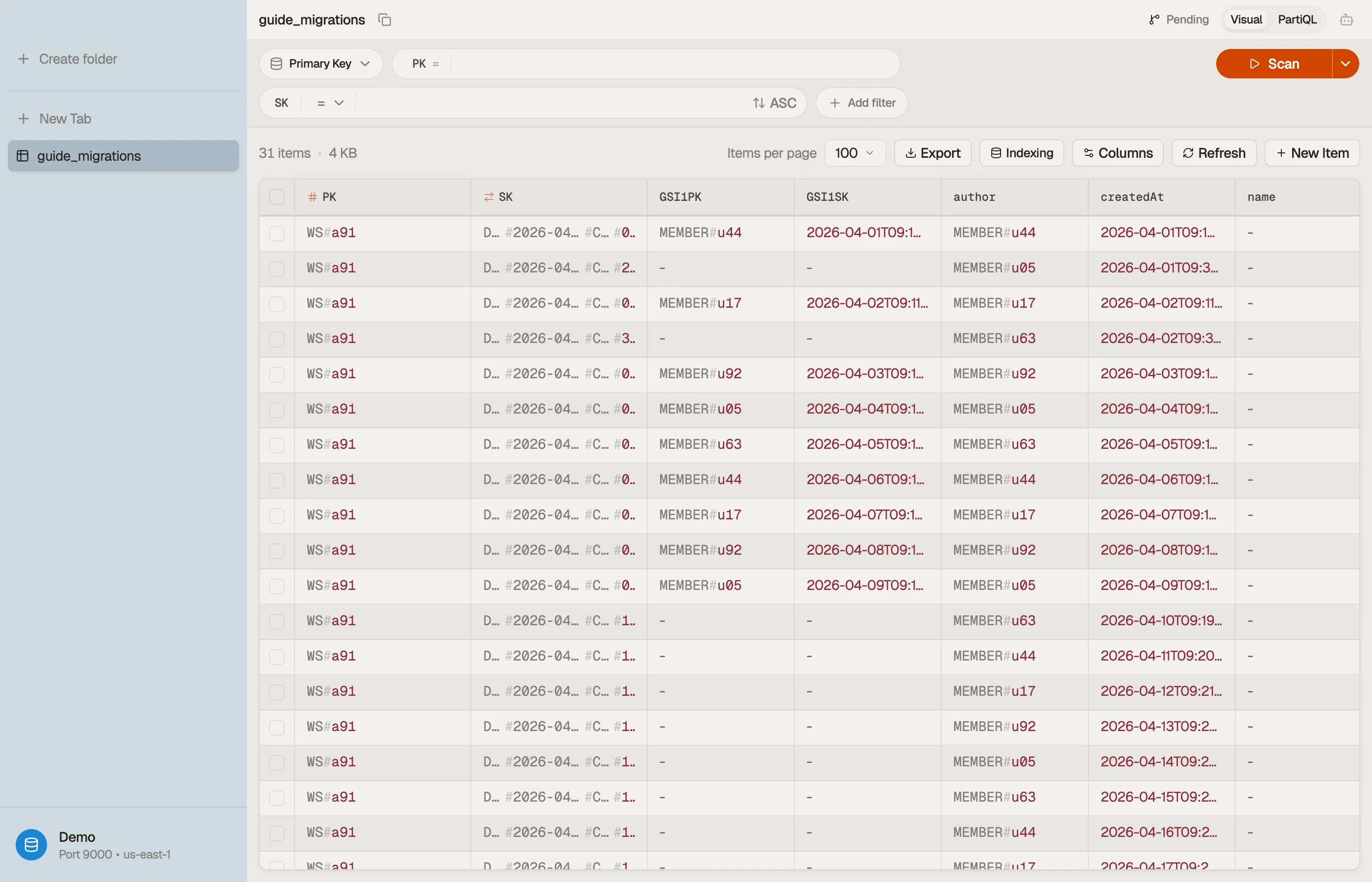
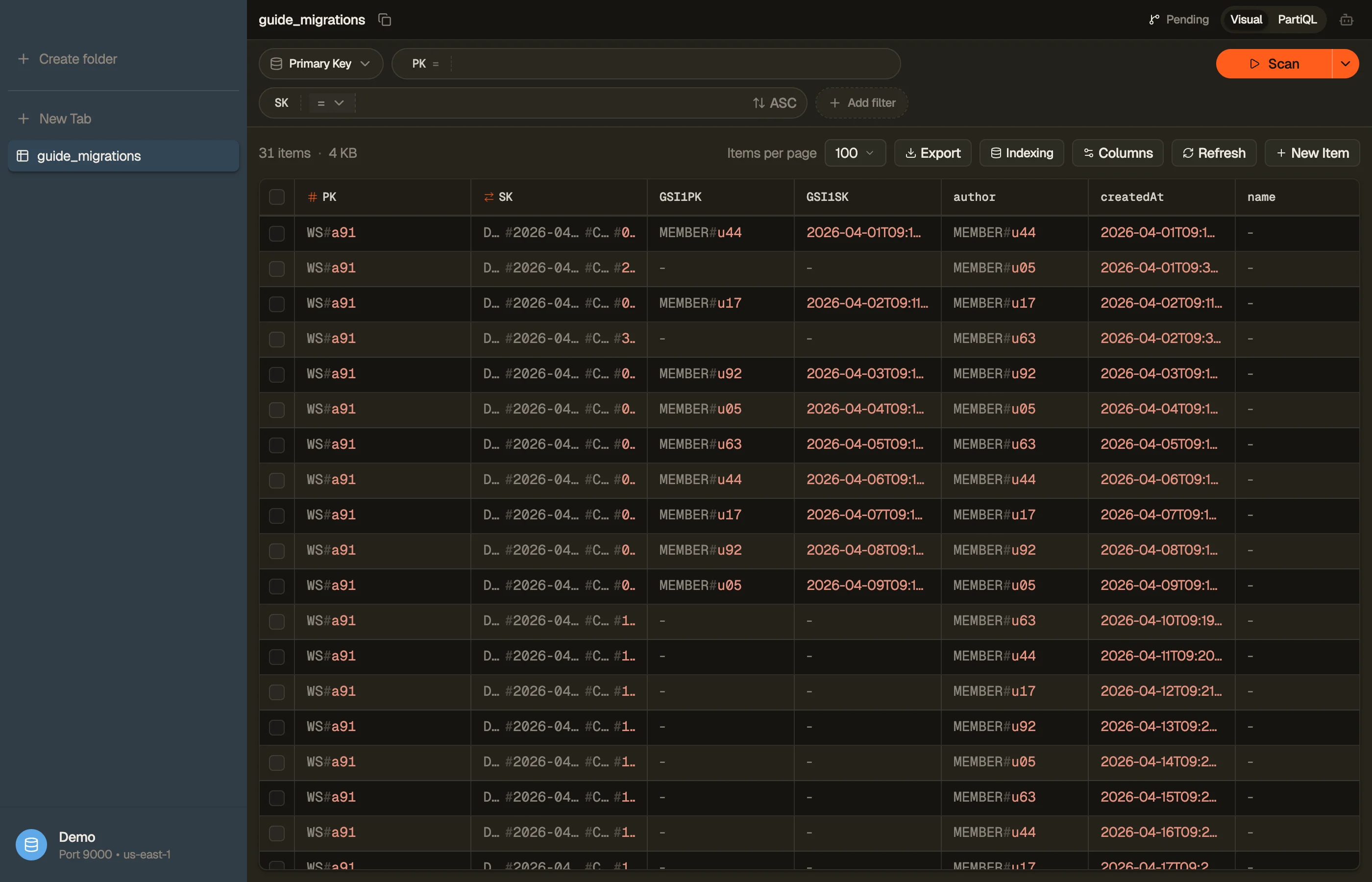
The GSI only indexes items that have GSI1PK/GSI1SK. Your pre-migration
comments — written before the attribute existed — never appear, even after
backfill completes. Online GSI backfill copies existing items, but it can't
invent attributes that aren't on them. You have to add the values.
Two strategies:
| Strategy | How it works | Use when |
|---|---|---|
| Lazy | On read of an old item, write back the new attributes | Old items are read often; trickle the cost |
| Sweep | A paginated Scan updates every old item once | You need the GSI complete by a deadline |
For the sweep, page through with Scan, and for each old comment add the index
attributes with a conditional UpdateItem so you never clobber a concurrent
write.
The condition guards on the attribute not already existing. Build and copy the
exact ConditionExpression and UpdateExpression with the
DynamoDB Expression Builder rather than
hand-typing attribute_not_exists(GSI1PK).
Dual-write through the transition
Until every old item carries the new attributes, two shapes coexist. The write path must populate the new format on every write — new comments and any update to an old one — so the gap only shrinks.
Pick a backfill end condition you can verify: the sweep paged the whole table, or the lazy path has run long enough that unconverted items are stale by design. Only then do you remove the old read path. Skipping this is how a migration "completes" while a fraction of queries silently return short results.


Pitfalls
- Adding the attribute ≠ backfilled. A new GSI starts empty for old items. Verify coverage before you trust the query.
- Changing a key in place is not a migration — it's a rewrite. You can't
mutate an item's
PK/SK; you write a new item under the new key and delete the old one. Plan it as copy-then-delete, dual-read in between. - No transactional cutover. There's no moment where the whole table flips. Design every step to be safe while both shapes are live.
Next steps
Sanity-check the new keys and overloaded collections in single-table design, and confirm the backfill is complete by paging the live table. Try DynoTable to browse your table, spot un-backfilled items, and run the conditional updates against your own data.