DynamoDB Item Collections
An item collection is the set of all items in a table (or index) that share the same value. It isn't a feature you turn on — it's an emergent property of your key schema.
The moment two items carry the same partition key, they form a collection, and that
collection becomes the unit DynamoDB lets you read together in a single Query.
Get this right and your reads come back in one round trip. Get it wrong and you're
stuck with a Scan.
What is a DynamoDB item collection?
A DynamoDB item collection is the set of all items that share the same value, stored together and sorted by sort key. It isn't a feature you enable — it emerges from your key schema. The collection is the unit a single Query reads efficiently, whereas a Scan walks every partition.
- A collection is just "same partition key." Two or more items with the same partition key value are stored together, sorted by .
- It's the unit of an efficient
Query.Queryreads one collection;Scanwalks every partition. That's the whole performance story. - No sort key, no collection. A partition-key-only table holds one item per key — nothing to collect.
- Two limits bite: the 10 GB per-collection ceiling when an exists, and hot partitions from low-cardinality keys.
The problem: reading related items together
Say you run a fleet of vehicles, each streaming telemetry — speed, coolant
temperature, fuel level — every few seconds. The dominant read is "give me the
recent readings for vehicle V-7741".
Coming from SQL, you'd index a vehicle_id column and let the planner do the work.
A plain key-value store has no such luxury.
It treats every reading as an isolated record, so that question means scanning the whole table and filtering. Slow, expensive, and worse as the fleet grows.
DynamoDB's answer is to make "all readings for one vehicle" a physically grouped, directly addressable thing. That grouping is the item collection.
What a collection actually is
DynamoDB stores items in partitions, and it routes each item to a partition by hashing its partition key. Every item with the same partition key value therefore lands in the same partition, sorted by sort key.
The AWS Developer Guide names this exactly: items that share a partition key value are an item collection, stored together and ordered by sort key.
This is the same idea the 2007 Amazon Dynamo paper introduced — consistent hashing to assign keys to nodes — extended with a sort dimension so related items sit adjacent on disk.
Because they're adjacent and ordered, DynamoDB returns a contiguous run of them with
one seek. That's why Query is cheap and Scan is not: Query reads a single
collection; Scan walks every partition.
To form a collection you need a — a partition key and a sort key. A table keyed on partition key alone has exactly one item per key value, so there's nothing to collect.
Our worked example: vehicle → telemetry readings
Model the telemetry stream with a composite key. The partition key identifies the vehicle; the sort key is the reading's timestamp, which keeps readings ordered newest-to-oldest within the collection.
| PK (vehicleId) | SK (recordedAt) | attributes |
|---|---|---|
| VEH#V-7741 | META | plate, model, depotCode |
| VEH#V-7741 | TS#2026-06-23T09:00:01Z | speedKph, coolantC, fuelPct |
| VEH#V-7741 | TS#2026-06-23T09:00:06Z | speedKph, coolantC, fuelPct |
| VEH#V-7741 | TS#2026-06-23T09:00:11Z | speedKph, coolantC, fuelPct |
| VEH#V-7742 | META | plate, model, depotCode |
| VEH#V-7742 | TS#2026-06-23T09:00:02Z | speedKph, coolantC, fuelPct |
Two collections live here — one per vehicle. The META item (vehicle metadata) and
all of V-7741's readings form one collection; V-7742's items form another.
Note the trick: give the metadata a sort key (META) that sorts before any TS#...
value, and a single Query on PK = "VEH#V-7741" returns the vehicle's profile
and its readings together.
That's the parent-and-children pattern at the heart of single-table design.
Each dashed box is one item collection: same partition key, items sorted by sort key.
A Query reads exactly one box.
Querying a collection
Because the collection is sorted by sort key, you get range reads for free. To pull the readings recorded in a ten-minute window for one vehicle, you bound the sort key:
# Query
KeyConditionExpression   vehicleId = :v AND recordedAt BETWEEN :from AND :to
ScanIndexForward         false        # newest first
The key condition restricts you to one collection (vehicleId = :v) and then to a
contiguous slice of it (recordedAt BETWEEN ...). DynamoDB reads only those items and
bills you only for them. Want just the metadata? recordedAt = "META" fetches the
single META item.
Building these key conditions and projection expressions by hand is fiddly. The
DynamoDB Expression Builder generates the
KeyConditionExpression, the ExpressionAttributeNames, and the
ExpressionAttributeValues for you, so the reserved-word and placeholder details
don't bite.
Collections on indexes
A secondary index has its own key schema, so it forms its own item collections.
Add a global secondary index keyed on depotCode (partition) and recordedAt (sort),
and "all readings from depot DEP-LON-3, newest first" becomes a single Query
against that index's collection — a read the base table can't serve.
That's why the index type matters: it governs what collections you can form and how they behave. See GSI vs LSI for the trade-off.
One sharp distinction: a local secondary index (LSI) shares the base table's partition key, so its collection is physically tied to the base item collection — and that bond creates a hard limit, below.
The limits that bite
Item collections are powerful, but two constraints decide how you shape keys:
- The 10 GB LSI limit. When a table has one or more local secondary indexes,
a single item collection — the base items plus their LSI projections for one
partition key — cannot exceed 10 GB. Exceed it and writes that grow the
collection start failing with
ItemCollectionSizeLimitExceeded. A table with no LSI has no such per-collection ceiling. This is exactly why an unbounded, ever-growing stream (telemetry that never stops) is a poor fit for an LSI: the collection only grows. A GSI gets its own partitions, so it sidesteps the limit. - . A collection lives in a partition, and a single partition has
finite throughput. If one vehicle (or one
depotCode) attracts a wildly disproportionate share of traffic, you can hot-spot that partition even while the table as a whole is under-provisioned. Adaptive capacity — covered in AWS's "Advanced Design Patterns for DynamoDB" re:Invent deep-dives — isolates and boosts hot keys automatically, but it can't rescue a key with no spread at all. Pick partition keys with high cardinality so traffic fans out across many collections.
See it in DynoTable
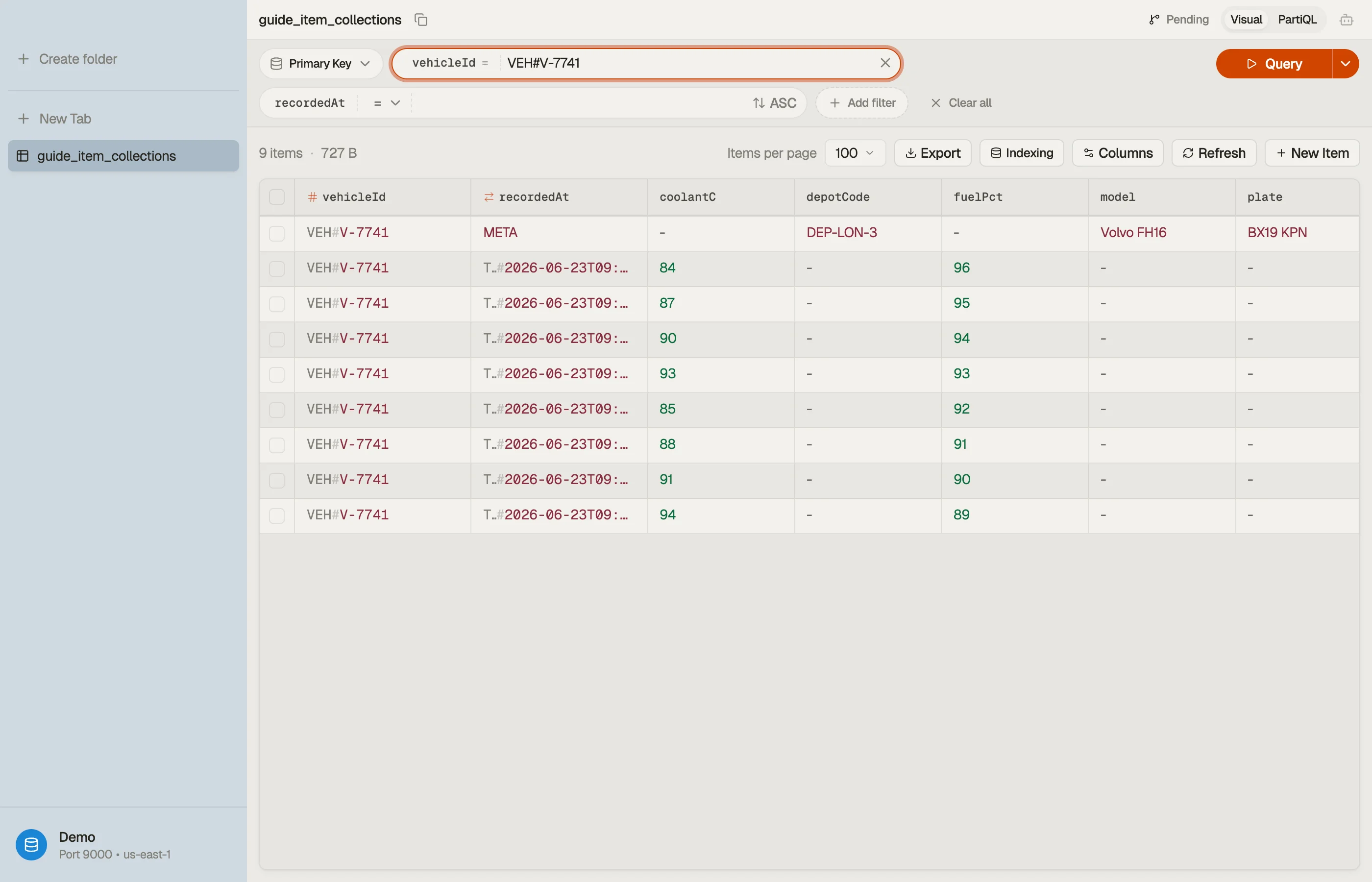
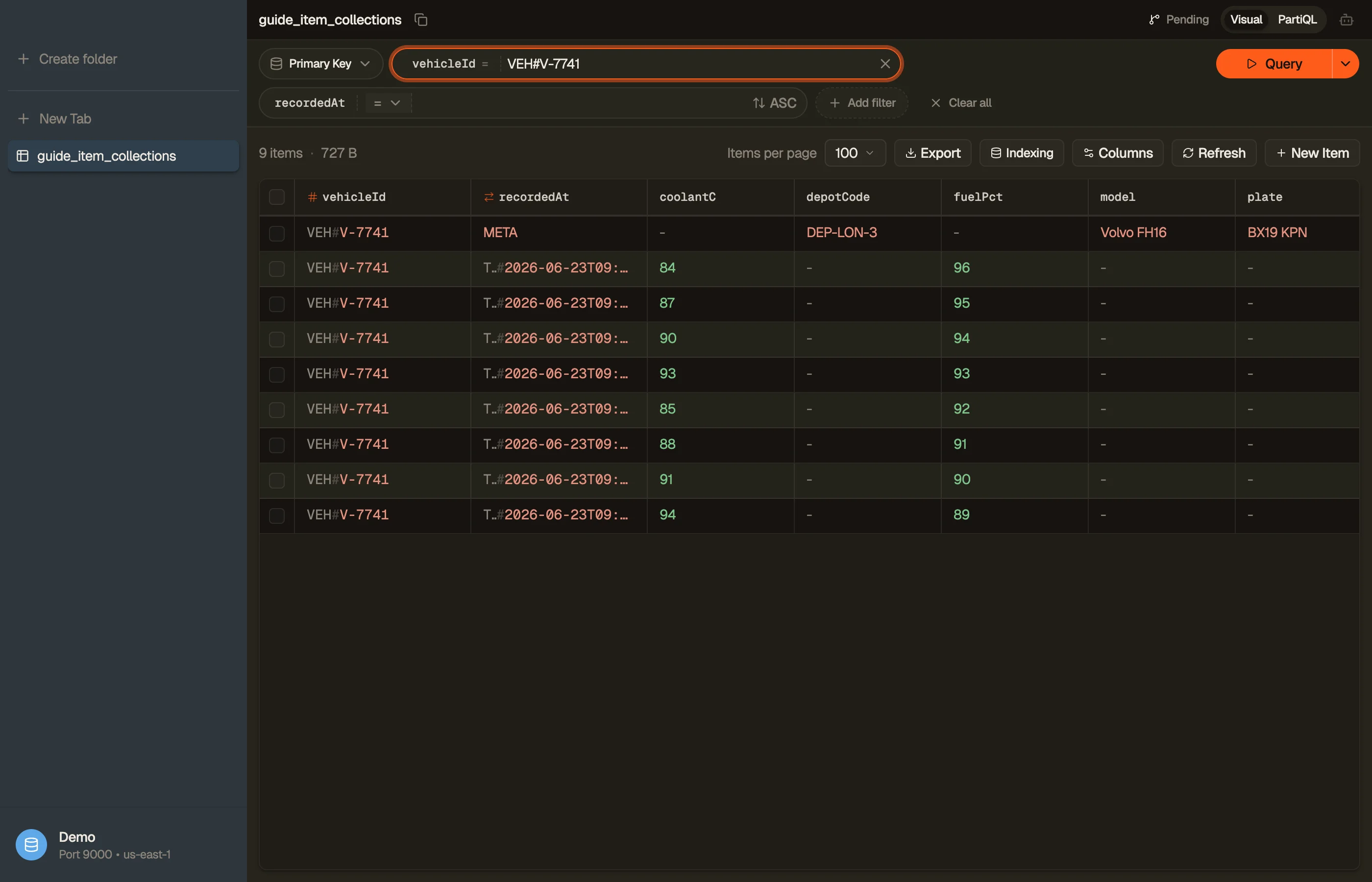
The fastest way to build intuition for collections is to look at one. In DynoTable,
querying a partition key renders the whole collection as a contiguous,
sort-key-ordered list — the META item sits right ahead of its timestamped readings,
on screen, no mental reconstruction required.


Pitfalls and next steps
- No sort key, no collection. A partition-key-only table can't group related items. If you need to read items together, you need a composite key.
- Don't let an LSI collection grow unbounded. Append-only streams belong on a GSI (or a time-bucketed partition key), not an LSI, because of the 10 GB ceiling.
- Spread your partition keys. A collection is only as scalable as the partition it lives in. Low-cardinality partition keys create hot spots.
- Reach for
Query, notScan. Collections exist so you can read related items with one targetedQuery; falling back to aScanthrows that advantage away — see Query vs Scan.
Sketch your own key schema, run a Query against a real partition key, and watch the
collection come back ordered. Download DynoTable and explore your tables'
collections directly.