What it took to build a safe DynamoDB MCP server
DynoTable's MCP server lets Claude Code, Cursor or Codex work on your DynamoDB tables. The agent never holds your AWS keys, and it cannot commit a write.
The simplest MCP server for a database is a process that holds your raw AWS credentials and passes the agent's calls straight to the API. If that process has a write tool, nothing stands between a model's mistake and your table.
We covered how to choose an MCP server safely from the user's side.
This post is the build side: what it took for DynoTable, a desktop DynamoDB client, to serve its AI tools to outside agents.
Three product pieces carry the design:
- Staging. Every change an agent makes lands in a staging area as a pending diff. Only you can commit it to DynamoDB.
- Scopes. Each connection gets one of three: Read only, Read & stage, or Full access. Full access adds opening views, setting filters, data transforms and exporting. Its DynamoDB writes still go through staging.
- License tiers. A paid license (trial or subscription) unlocks writes and AI. The free plan is read-only, and a signed-out app serves no data.
Building it meant an OAuth 2.1 authorization server inside a desktop app, and an identity type that cannot mix up credentials. It also meant rejecting the convenient default more than once.
We assume the agent is hostile, so it never holds keys or commits
Prompt injection makes an AI agent's intent untrustworthy. A row in your table can carry instructions that the model follows. So the design never relies on the agent behaving well.
Credentials stay in the app. The agent sends a tool call, and the app signs the DynamoDB request with the Profile's own credentials. The agent never sees them.
Writes land only in staging. Scopes limit what a call can do, whatever the model asks for. Every MCP call is written to the app's audit log, marked as coming from MCP.
The in-app assistant has one more layer. By default, it asks your permission for each tool call. That prompt does not exist over MCP. A later section covers what limits the damage without it.
Binding to 127.0.0.1 does not stop a web page
The server listens on 127.0.0.1 only. That keeps other machines out, but any
web page you open can still send requests to localhost through your browser.
A plain cross-site request carries the page's Origin header. The server
rejects every request whose Origin is a web page.
DNS rebinding is the harder case. The attacker's domain re-resolves to
127.0.0.1, so the browser treats the request as same-origin. The request still
carries the attacker's hostname in its Host header.
The server accepts only a loopback Host (localhost, 127.0.0.1 or [::1])
on its own port. A rebound request fails that check.
Requests with no Origin at all pass, because CLI clients such as Claude Code
send none. So this guard blocks one browser attack class and authenticates
nobody. Authentication is the bearer token's job.
The app had to become its own OAuth server
MCP's authorization spec for HTTP servers is OAuth 2.1. In OAuth terms, the MCP server is the resource server: it accepts a token and serves tools. The authorization server (AS) asks the user for consent and issues that token.
A hosted service can lean on an upstream identity provider. A local desktop server has none, so DynoTable is its own AS.
It implements PKCE with S256, authorization codes, rotating refresh tokens, and the RFC 8414 and RFC 9728 metadata documents that let a client discover the AS.
Clients register through dynamic client registration (RFC 7591). The 2025-11-25 MCP spec makes that path optional, keeps it for backward compatibility, and recommends Client ID Metadata Documents instead.
Dynamic registration is the path we support today. These are the rules we set early and kept:
- We did not hand-roll the protocol. The official MCP SDK ships the AS endpoints as a ready router. We implement only the storage and policy beneath it.
- The AS runs as a second loopback listener. Our MCP framework and that router use different HTTP stacks. The resource server points clients to the AS through its protected-resource metadata. We accepted a second listener over hand-writing PKCE and the token grammar.
- Redirects go to loopback only, per RFC 8252 for native apps. An invalid redirect gets a direct 400 and never an error redirect, so an attacker's URI is never a destination.
- An authorization code works once. A replayed code is an invalid grant, and an unused code expires after 60 seconds.
- Revocation is a Settings action, re-checked on every request. Click Revoke on a client, and its next call fails even with an unexpired token.
Every token pins one profile and one region at consent
Each agent connection reaches exactly one DynoTable profile. You turn on "Expose via MCP" for each profile an agent may use, and you bind the connection to one of them at consent.
The app stores each approved consent as a grant: the client, the scope and the bound profile. Turning off "Expose via MCP" revokes every grant bound to that profile.
Each AWS profile and region gets its own DynamoDB client. Two agents on different profiles cannot reach into each other's account.
The binding started as loose fields, re-declared on every record between consent and the request. It is now one identity value with two shapes: an AWS profile with its region, or a DynamoDB Local port.
The type cannot express an AWS identity without a profile and region, or a local one that carries either. Each parse yields one of the two shapes or fails.
The value travels intact from consent to the token, the stored grant and every request.
Two rules follow from it:
- Region is frozen at consent. You approve profile X in region Y, and the token carries that pair. A refresh re-issues the same identity, and it can narrow the scope but never widen it. Changing the profile's region needs a new consent.
- A malformed token gets a 401. If the identity on a token does not parse into one of the two shapes, the request is unauthorized. The server never fills the gap with a default profile, a default region or an empty string.
Resolving the region per request, or falling back to a default, is how an
agent ends up querying us-east-1.
Consent moved into an in-app modal with its own trust boundary
The first consent prompt was the operating system's native message box. While it was open, it blocked the app's main process. It also could not match our design system or be captured for the docs.
Consent is now an in-app modal. It shows the connecting client's name, a profile picker over the profiles you exposed, and the three scopes. Read only is selected by default, and nothing is granted until you press Approve.

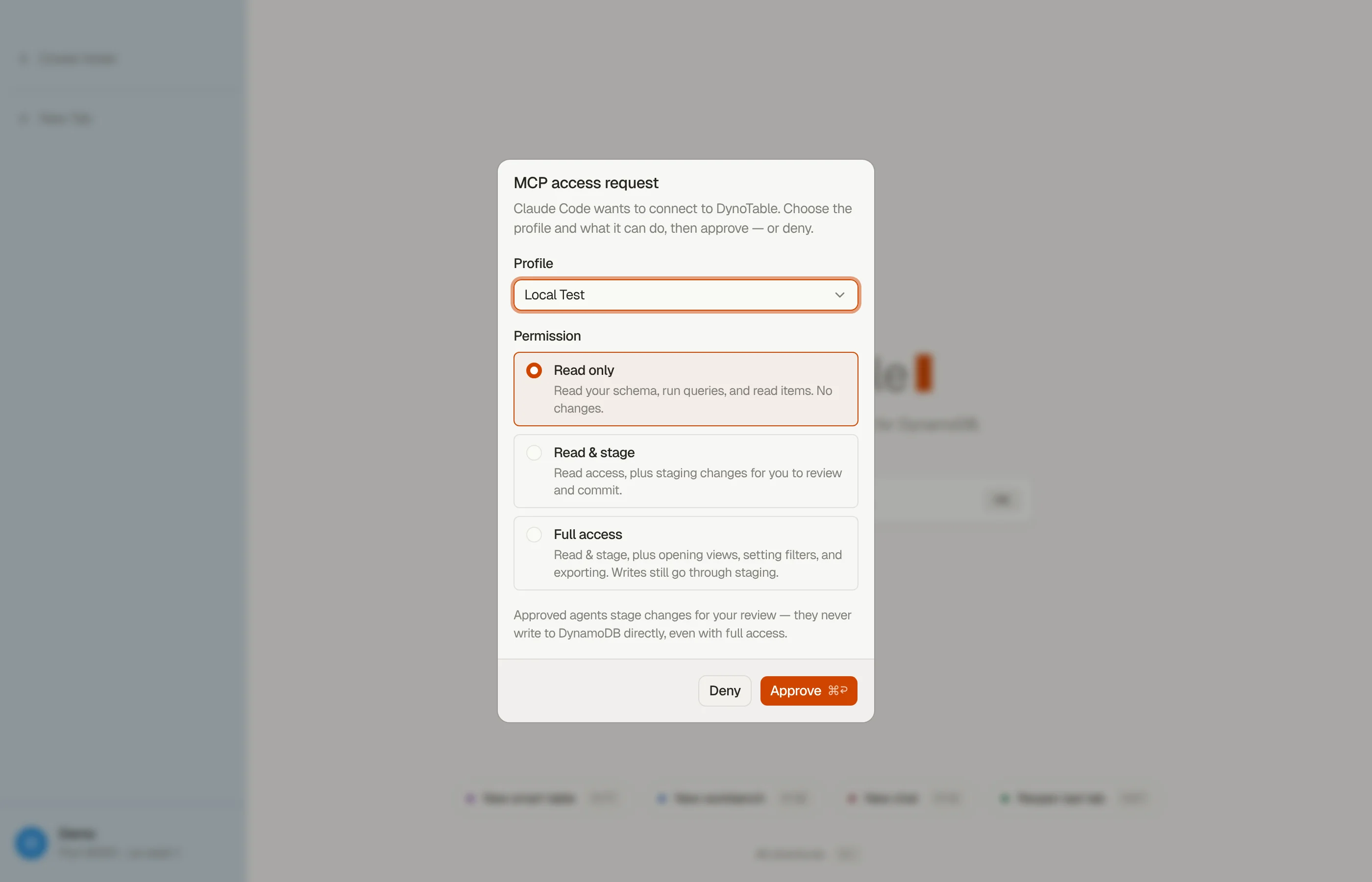

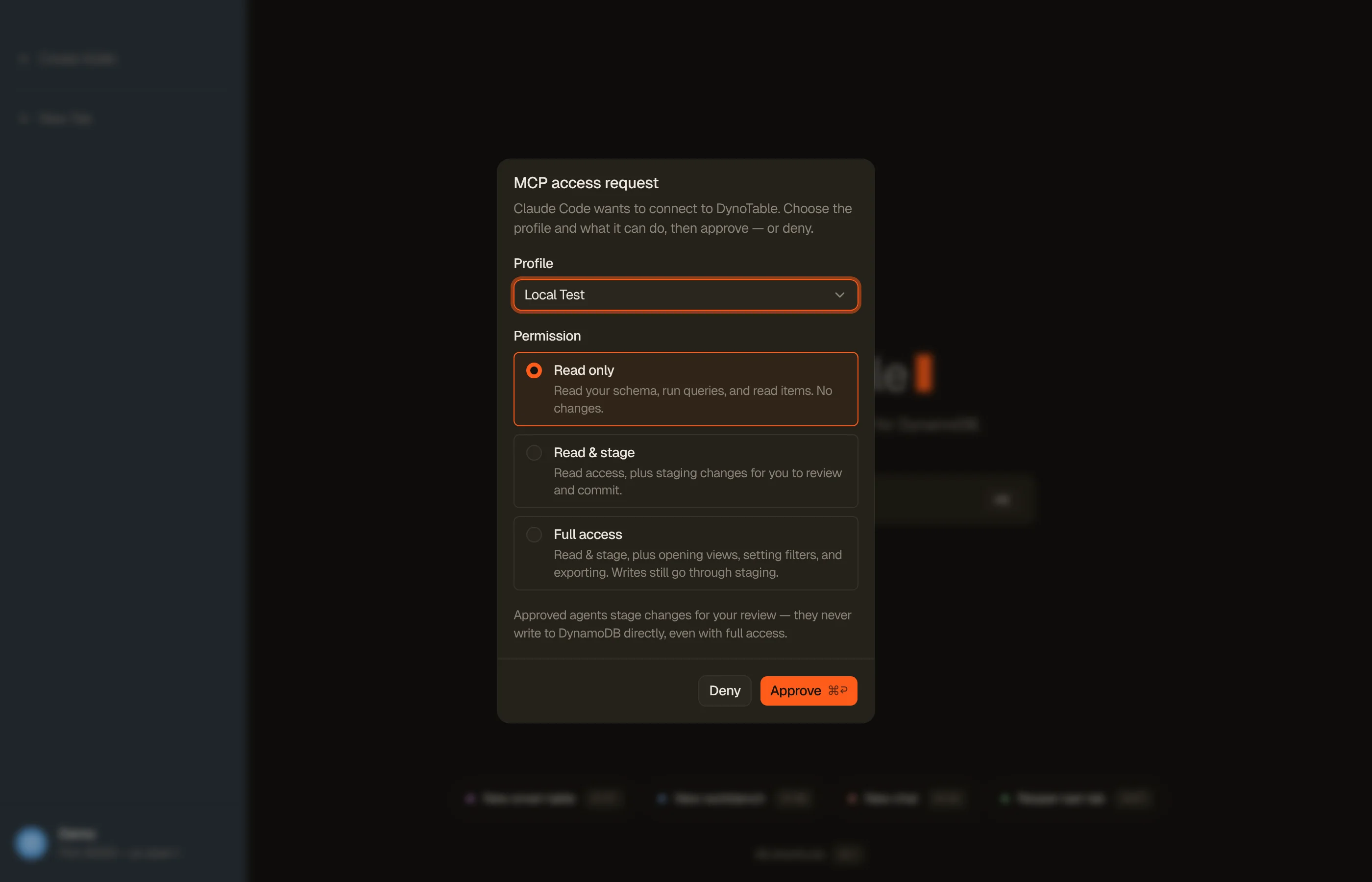
A consent request expires after five minutes and settles as denied. The client
gets access_denied instead of a hung request. A second answer to a request
that already settled is ignored.
The picker has its own trust boundary. A client may hint a profile in the authorize URL, but the grant comes from what you selected, checked against the list you were shown. A forged hint cannot bind a profile that never appeared on screen.
Consent is granted once per connection
Authorization over MCP is scope-only, approved once when the client connects. The in-app assistant's per-call prompts do not apply to MCP traffic.
So a leaked Read & stage token can stage changes with no human seeing each call, including a bulk delete of up to 10,000 items per call, by filter or key list, with no DynoTable window open.
It cannot commit them. Each staged change waits in the app until you commit it.
Several things limit the damage. Access tokens expire after one hour, and refresh tokens rotate on each use. You can revoke a single client in Settings, the audit log marks every MCP call, and the modal selects Read only by default.
We record the rest as an accepted risk in our own design docs.
The license is re-checked on every call
The stored grant keeps the scope you approved. The scope that applies is computed again on every tool call, from the app's license at that moment:
- Paid (trial or subscription): the granted scope applies.
- Free read-only plan: every connection is clamped to Read only, and the paid tools are hidden: SQL with joins and aggregates, and opening multi-table views.
- Signed out: every request gets a 401.
Because the grant itself is never overwritten, a mid-session reactivation widens the scope again without a new consent. The paid tools reappear in the client's tool list after it reconnects.
One asymmetry is deliberate. In the app, most exports stay available on the free plan, because your data is yours.
Over MCP, export is a Full access tool, so the read-only clamp blocks it. A person exporting their own data and an agent pulling data out in bulk are different trust cases.
Headless scans get budgets instead of popups
An external agent has no window, no popups and often no one watching. Each interactive guard in the app needed a headless replacement.
In the app, a full Scan of a table over 1 GiB or 5 million items asks you first. Over MCP there is no one to ask.
So a budget on items, bytes and duration bounds Workbench SQL queries and data transforms over a table. When a scan hits it, the scan stops with an error that says what to narrow.
PartiQL reads sit outside that budget. Each call reads one page, and its row limit can cap it lower.
SQL across tables streams page by page through the app's local engine, so no in-memory cap cuts the answer short.
If the client disconnects mid-scan, the server stops at the next page boundary, never mid-statement, and deletes the temporary data.
MFA codes go through the agent's own prompt
Some AWS profiles need an MFA code. When the client supports MCP elicitation, the server asks for the 6-digit code over the same connection.
Claude Code shows that prompt to you, and the call retries with your code. The code is single-use. Concurrent calls that need the same credentials share one prompt.
If the client lacks elicitation, an open DynoTable window on that AWS profile shows the app's own MFA prompt. With neither, the call fails and asks you to re-authenticate in DynoTable.
SSO stays off this path. It needs a browser sign-in flow, which a typed code cannot complete, so SSO profiles re-authenticate in the app.
Seven questions expose an unsafe MCP server
- Where do the credentials live: in the agent's process, or behind the server?
- Is there per-connection consent with real scopes, or does one config file grant everything?
- Can a write run without a human review step?
- Is the identity (profile and region) pinned at consent, or resolved from defaults at call time?
- Does a malformed or revoked token fail hard, or fall back to something?
- Does an audit trail mark which actions came from an agent?
- What bounds a runaway scan, and what happens when the client disconnects mid-operation?
The MCP server docs cover setup and each scope, and the staging docs cover review and commit. The connect-side guide walks through each client.
To size what an unbounded scan would cost, use the pricing calculator.
To try the server, download DynoTable, turn on the MCP server in Settings, turn on "Expose via MCP" for a profile, and connect a client at Read only.