Why a database GUI should never write directly
Every database GUI has a moment where a click turns into a write against production. We decided that moment shouldn't exist. In DynoTable, nothing you do — not an item edit, not a bulk delete, not an 's change — touches DynamoDB directly. Every write lands in a as a reviewable per-attribute diff, and ships only when a human commits it.
The mental model we built toward is git: a staging area for review, and a
commit that behaves like git push --force-with-lease — it succeeds only
if the remote still looks the way you last saw it. This post is the
engineering underneath: the cross-tab bug that reshaped the whole design,
the refactor whose main output was deleted code, and why the arrival of
AI agents turned a UX nicety into the load-bearing safety wall.
Writes are diffs
Edits accumulate in a local SQLite-backed stage and render as diff cards — old value, new value, per attribute — in a side panel. Rows tint in the grid so staged state is visible from the data, not just the panel. Commit ships the staged set as DynamoDB , chunked to the service's limits (100 items per transaction, with byte budgets per operation and per request), sequentially, with a 30-second timeout per chunk.

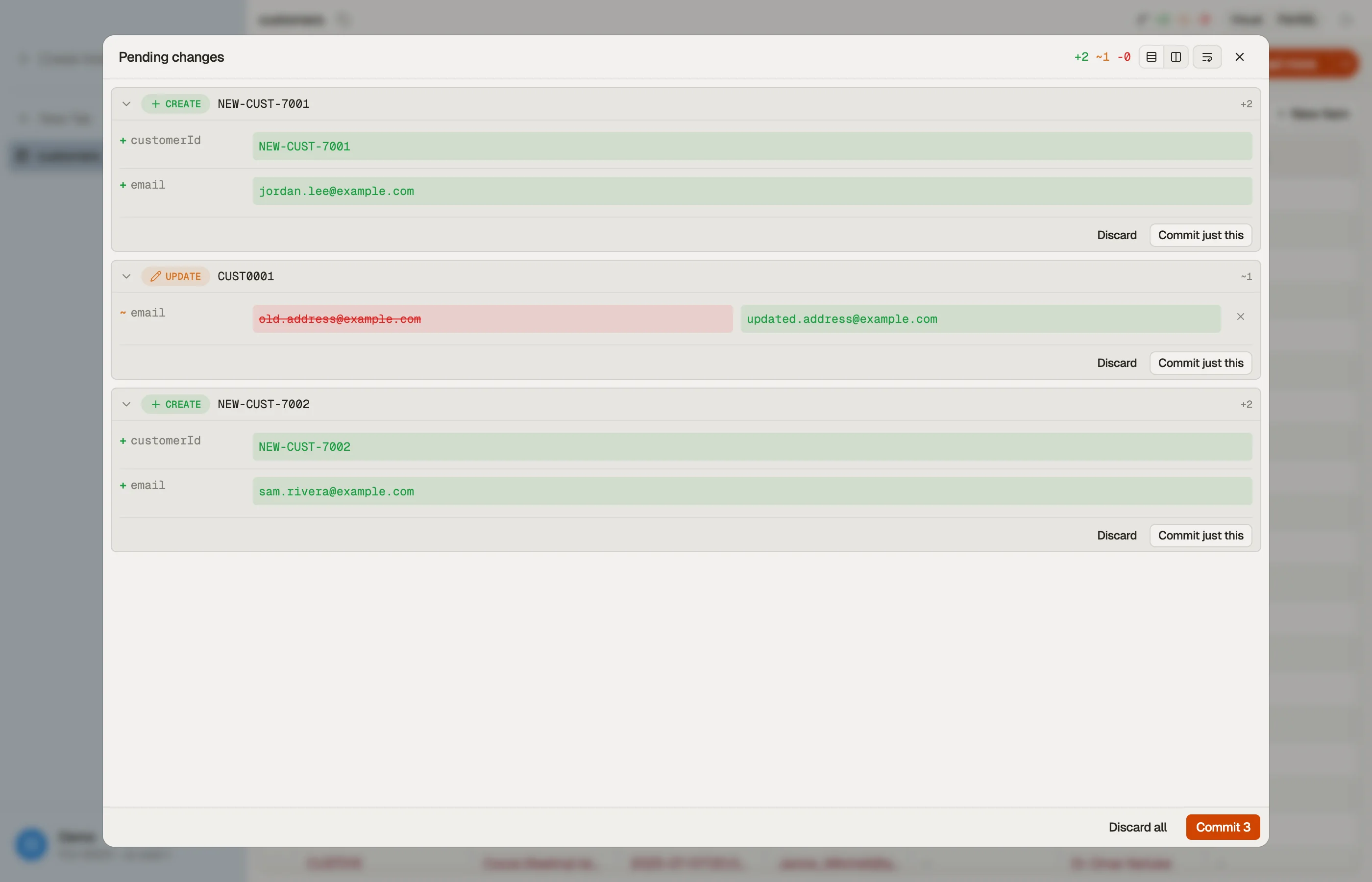

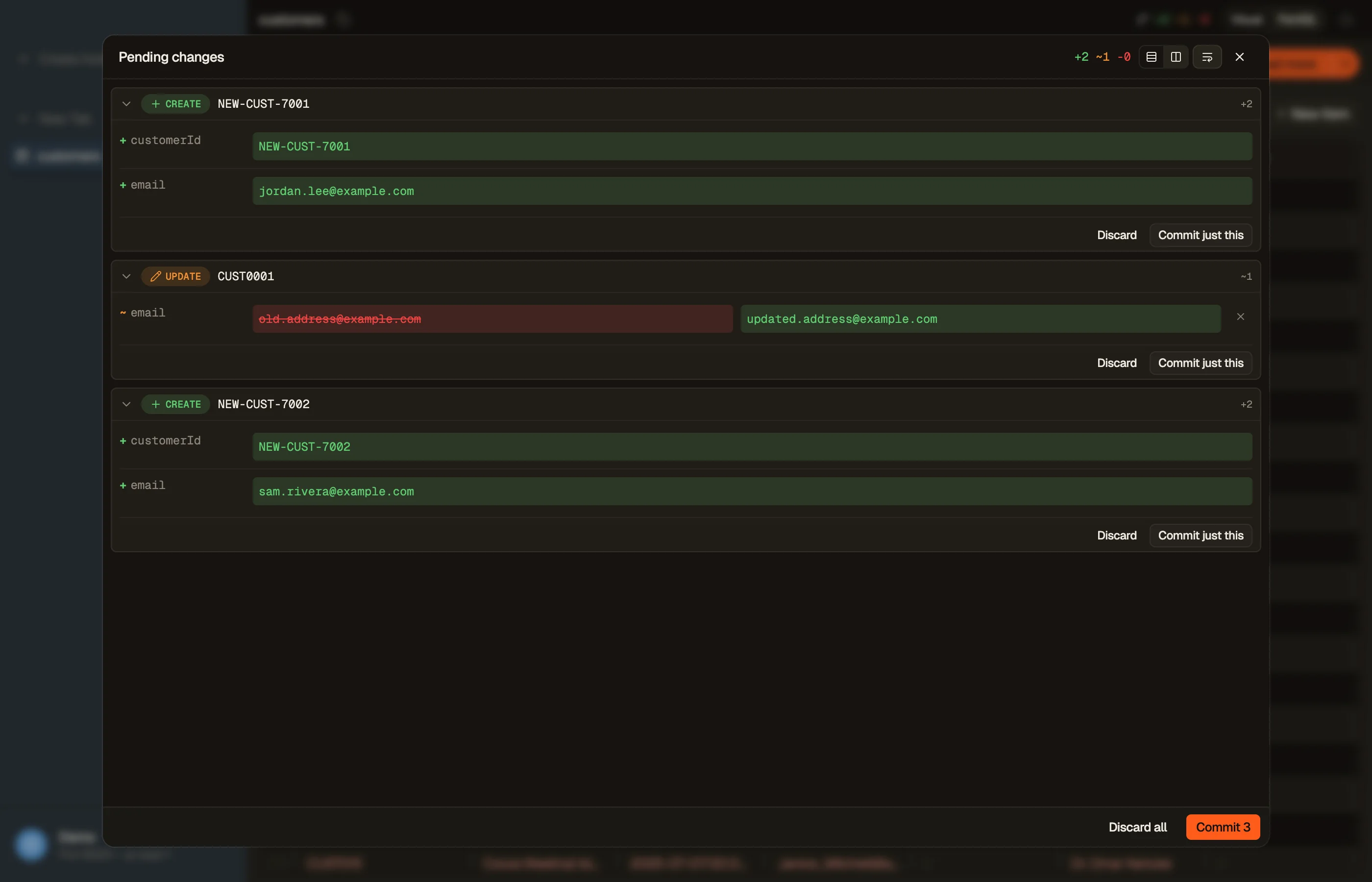
The staging docs cover the daily workflow. What they don't cover is what the stage is keyed by — which turned out to be the most consequential decision in the system.
Keyed to the table, not the tab
The first version scoped each stage to the tab that created it. That design produced a real bug: the AI's staging tool derived its target from the active tab, and its guard skipped tabs that aren't table views. So if you asked the assistant to fix a row while a SQL Workbench tab was focused, the edit was staged into the Workbench's stage — and the "reveal staged change" chip opened the wrong tab.
Worse, the commit lock was also per-tab. Two tabs viewing the same table held two independent locks — meaning both could commit the same staged rows to real DynamoDB concurrently. A double-commit race against production, built into the data model.
The fix was to re-key everything by table identity —
{profile, region, tableName} — instead of by tab:
- One stage per table, visible from every view of it, surviving tab close and reopen. The AI can stage with no table tab open at all.
- One commit lock per table. The double-commit race is not "handled" — it's unrepresentable.
- The wrong-tab bug class is gone by construction: there is no tab in the key.
And re-keying deleted more code than it added. The startup sweep that garbage-collected stages for closed tabs? A reviewer flagged it as feature-destroying under the new model — stages no longer die with tabs — so it was removed outright. Discard-on-tab-close and its confirmation dialog: removed. The only true orphan left is a deleted connection profile, which cascades explicitly.
The migration itself was the repo's first row-mutating one: a
hand-written SQLite table rebuild that de-duplicated legacy per-tab rows
with a ROW_NUMBER() OVER (PARTITION BY …) window (newest edit wins) and
backfilled the new key with char(0) separators, byte-identical to the
runtime's key builder. Row-mutating migrations got their own
seed-then-migrate test harness that day.
--force-with-lease, for DynamoDB
A review UI is worthless if the thing you reviewed isn't the thing that gets written. Between staging and committing, someone else may have changed the row. So every commit operation carries that pin the write to the exact snapshot you reviewed — , attribute by attribute:
- A create asserts the item doesn't already exist.
- An update asserts every attribute you're changing still holds the value you saw when you staged it.
- Even a removal asserts the attribute still equals its old value —
if a teammate changed
notefrom"old"to"new"while your removal ofnotesat staged, the commit must not silently delete their edit.
When a condition fails, DynamoDB cancels the whole transaction and tells us which item drifted. That row gets a conflict banner — rebase against the live value or abort — rather than a silent overwrite in either direction.
And on any chunk failure, the committer halts. Committed chunks stay committed, the failed chunk rolls back atomically, nothing further is attempted. We deliberately rejected best-effort continuation: a review tool that keeps writing past a conflict is applying a change set nobody reviewed.
The refactor that deleted a subsystem
Commits are long-running: the app registers each one in a replay registry
so a renderer reload — or a second window — can re-attach and watch it
finish. Over time, three different code paths each attached two
observers per commit, and an entire arbitration mechanism grew up around
one question: which observer is allowed to release the commit lock? It had
its own scary name (ownsLockOnBeforeRegistration), a comment block
explaining an IPC ordering race, and a 230-line toast tracker.
The fix was a single owner: a Commit Session that attaches exactly once per commit, owns the lock exclusively, projects progress into the store, and guarantees its start call settles on every exit path — never hangs, never rejects. The arbitration machinery and the tracker weren't relocated; they were deleted. The memory benchmark that thrashes the staging panel dropped about a third of its heap. The best code review comment we got that month: "this PR is mostly red."
Two behaviours fall out of that ownership model that we consider table-stakes for any tool that writes to production: an in-flight commit survives a renderer reload (the session re-attaches and completes), and it even survives your licence flipping to read-only mid-commit — new commits are blocked, but a write already in flight is observed to its end, never abandoned half-applied.
Why the wire format is deliberately ugly
Staged values are stored as raw DynamoDB typed envelopes —
{N: "42"}, {S: "42"} — not as friendly unmarshalled JSON. Two reasons.
The diff must be type-aware: {N: "1"} and {S: "1"} are different
values, and a primary-key hash built on unmarshalled values would collide
them. And the round-trip must be lossless: the SDK's unmarshalled number
wrappers don't survive JSON serialisation into SQLite and back, and
deep-equality against user input breaks. The commit path uses the raw
client for the same reason — what you reviewed is byte-for-byte what gets
conditioned on and written.
Then the agents arrived
Staging predates our AI features, but it's the reason they could ship at all. The assistant's write tool stages; its own description tells the model — verbatim:
The user reviews + commits from the staging panel —
this tool never writes to DynamoDB directly.
There is no commit tool. Not permission-gated, not audited — absent. The MCP server exposes the same boundary structurally: its middle consent scope is literally named "read + stage". A agent at that scope can propose garbage, and the blast radius is a diff card a human reads. And because commits carry per-attribute optimistic locks, even a stale agent edit can't silently clobber a concurrent human one — it surfaces as a conflict like everything else.
We wrote about making the agent's queries reliable; staging is the other half — making its writes boring.
What to demand from any tool that writes to your database
- A review step between intent and write — diffs, not confirmation dialogs.
- Optimistic concurrency on the reviewed snapshot, including deletes and removals — never last-writer-wins.
- Atomic batches with halt-on-failure, not best-effort continuation past a conflict.
- A write path that survives a crash or reload without leaving a half-applied set.
- For AI: staging as the only write primitive an agent has — a missing capability beats a guarded one.
The staging docs show the workflow, and editing DynamoDB data covers the basics it protects. Or download DynoTable, stage a few edits with ⌘S, and watch a bulk change become something you can actually read before it happens.